How Do You Know If Your Printer Is Inkjet?
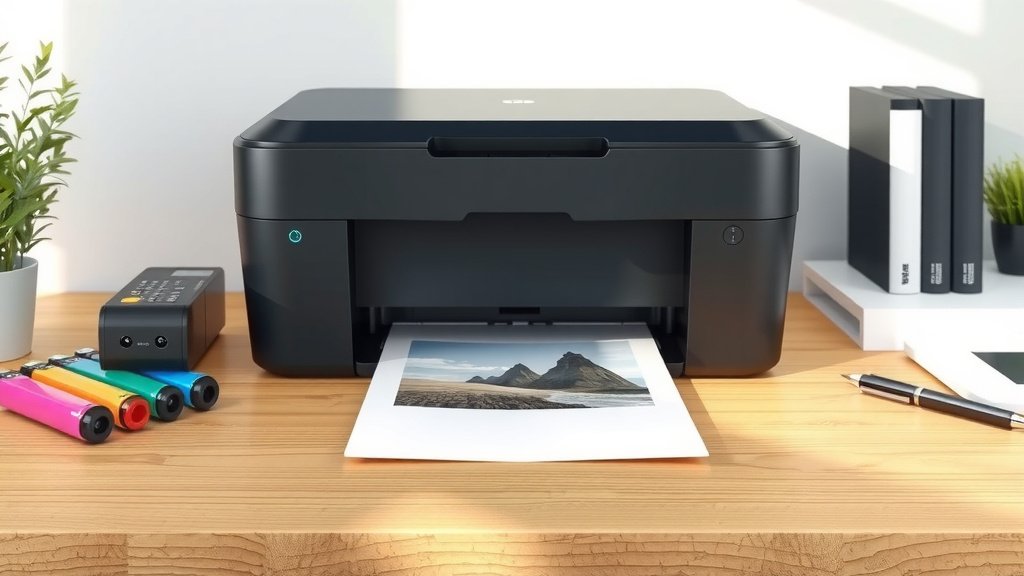
You can identify an inkjet printer by looking for ink cartridges instead of toner cartridges, checking for quiet operation during printing, and examining print quality that shows excellent color reproduction on photo paper.
Most home and office inkjet printers also have visible ink tanks or cartridge slots, produce slightly wet prints initially, and cost less upfront compared to laser printers.
Quick Ways to Tell If Your Printer Uses Inkjet Technology
Want to know right away? Look at what your printer uses for supplies. Inkjet printers use liquid ink stored in small cartridges or tanks. Laser printers use powdered toner in larger cartridges.
Open your printer’s front or top cover. You’ll see either small ink cartridges (inkjet) or a bigger toner cartridge (laser). The difference is pretty clear once you know what to look for.
Physical Differences You Can Spot
Inkjet printers are usually smaller and lighter. They fit nicely on home desks without taking up much space.
The paper comes out slightly damp from an inkjet printer. That’s because liquid ink needs a moment to dry completely on the paper.
Sound Clues During Printing
Listen to your printer work. Inkjet printers make gentle whirring sounds as the print head moves back and forth across the paper.
Laser printers sound different. They make more mechanical noises and often have a brief warm-up period before printing starts.
Check Your Printer’s Cartridge or Tank System
This is the most reliable way to identify your printer type. Open the main compartment where you replace supplies.
Inkjet Cartridge Characteristics
Inkjet cartridges are small and lightweight. Most home printers use two to six cartridges total.
You’ll typically see:
- Black ink cartridge
- Color cartridges (cyan, magenta, yellow)
- Sometimes separate photo cartridges
The cartridges snap or slide into place easily. You can often see the ink level through small windows on each cartridge.
Tank-Based Inkjet Systems
Some newer inkjet printers use refillable tanks instead of cartridges. These tanks are usually visible on the side or front of the printer.
You fill these tanks with bottled ink rather than replacing cartridges. The tanks are clear or translucent so you can see the ink levels.
Benefits of Tank Systems
Tank-based inkjets cost less per page to operate. You buy ink bottles instead of cartridges, which saves money over time.
Research shows that tank systems can reduce printing costs by up to 90% compared to traditional cartridges (Consumer Reports).
Print Quality Tells the Story
Look at something you recently printed. Inkjet prints have specific characteristics you can identify.
Photo and Color Quality
Inkjet printers excel at photos and colorful graphics. The colors blend smoothly together without visible dots or lines.
Print a color photo on glossy photo paper. If it looks nearly as good as a professional photo, you definitely have an inkjet printer.
Text Appearance
Black text from inkjet printers looks crisp but may show slight bleeding on regular paper. This is normal for liquid ink.
The text edges might look slightly fuzzy under close inspection. Laser printers produce sharper text edges because they use powder that gets fused to the paper.
Paper Type Makes a Difference
Try printing on different paper types. Inkjet printers work better with coated papers designed for inkjet printing.
Regular copy paper absorbs liquid ink more, which can cause slight bleeding. Laser printers work fine with any standard office paper.
Speed and Performance Patterns
Watch how your printer behaves during different tasks. Inkjet printers have distinct performance patterns.
Printing Speed Differences
Inkjet printers typically print slower than laser printers, especially for text documents. This happens because the print head moves across each line individually.
Photo printing takes even longer on inkjet printers. Quality photo prints can take several minutes per page.
Warm-Up Time
Inkjet printers start printing almost immediately. There’s no warm-up period needed.
Laser printers often need 30-60 seconds to warm up their internal heating elements before printing begins.
Power Consumption Clues
Inkjet printers use less electricity during normal operation. They don’t need heating elements like laser printers do.
You might notice your room temperature doesn’t change when using an inkjet printer. Laser printers generate noticeable heat during operation.
Look at Your Printer’s Brand and Model
Check the label on your printer for the brand name and model number. Some manufacturers focus mainly on specific printer types.
| Brand | Inkjet Models | Common Features |
|---|---|---|
| Canon | PIXMA series | Excellent photo quality |
| HP | DeskJet, OfficeJet, ENVY | Wide range of home/office options |
| Epson | Expression, WorkForce, EcoTank | Tank systems and photo printers |
| Brother | MFC-J series | Business-focused inkjet multifunction |
Model Number Patterns
Many inkjet model numbers include letters like “J” (for inkjet) or references to photos and colors. Laser models often include “L” or “Laser” in the name.
Cost Analysis Can Help Identify Your Printer
Think about what you paid for your printer and replacement supplies. This gives you clues about the technology inside.
Initial Purchase Price
Inkjet printers typically cost $50-300 for home models. Professional photo inkjets can cost more, but basic models stay affordable.
Laser printers usually start around $100-150 for basic models. Color laser printers often cost $200 or more.
Supply Replacement Costs
Look at your last supply purchase receipt. Inkjet cartridges typically cost $15-50 each, depending on your printer model.
Laser toner cartridges cost more upfront ($50-150) but last much longer than ink cartridges.
Page Yield Differences
Inkjet cartridges usually print 200-500 pages. High-yield inkjet cartridges might reach 800-1000 pages.
Laser toner cartridges often print 1500-5000 pages before needing replacement. This explains the higher upfront cost.
Maintenance Requirements Give You Clues
Different printer types need different kinds of care. Your maintenance experience can help identify your printer type.
Common Inkjet Maintenance Issues
Does your printer sometimes skip lines or print with missing colors? These are typical inkjet problems caused by dried ink in the print heads.
Inkjet printers often run automatic cleaning cycles. You might hear your printer working even when you’re not printing anything.
How Often You Replace Supplies
If you replace supplies every few weeks or months with moderate printing, you likely have an inkjet printer.
Laser printer supplies last much longer. Many people go 6-12 months between toner replacements.
Check Your Printer Software and Documentation
Look at the software that came with your printer or download the latest version from the manufacturer’s website.
Software Interface Clues
Inkjet printer software often includes photo editing tools and paper type selections for different photo papers.
You’ll see options for “photo paper,” “glossy,” and “matte” settings. Laser printer software focuses more on text quality and speed options.
Manual or Documentation
Find your printer manual or look it up online using your model number. The manual clearly states whether your printer uses inkjet or laser technology.
The supply replacement section shows pictures of either ink cartridges or toner cartridges, making identification easy.
Online Support Resources
Visit the manufacturer’s support website and search for your model number. The product page will clearly identify the printer technology type.
Support articles often mention “ink” or “toner” in the titles, which immediately tells you what type of printer you own.
Conclusion
Identifying whether your printer is inkjet comes down to a few key factors. Look for liquid ink cartridges or tanks, listen for quiet operation, and check the print quality on photos. Inkjet printers cost less upfront, use liquid ink supplies, and excel at color printing and photos.
The easiest method is opening your printer and looking at the supply system. Inkjet printers use small ink cartridges or visible ink tanks, while laser printers use larger toner cartridges. When you know what to look for, the difference becomes obvious within seconds.
Can I convert my laser printer to use ink instead of toner?
No, you cannot convert between printer types. Laser and inkjet printers use completely different printing mechanisms. Laser printers need heating elements and drums that inkjet printers don’t have, while inkjet printers need print heads that move across the paper.
Why does my inkjet printer sometimes print blank pages?
Blank pages usually mean dried ink is blocking the print heads or you’re out of ink. Run a print head cleaning cycle from your printer software, or check that all cartridges have ink and are properly installed. Sometimes removing and reinstalling cartridges fixes connection issues.
How long do inkjet printers typically last before breaking down?
Most inkjet printers last 3-5 years with regular home use. Heavy use or poor maintenance can shorten this lifespan. The print heads eventually wear out from constant movement, and electronic components can fail over time. Keeping your printer clean and using it regularly helps extend its life.
Is it normal for my inkjet printer to use ink even when I’m not printing?
Yes, inkjet printers automatically run maintenance cycles to prevent ink from drying in the print heads. These cleaning cycles use small amounts of ink to keep everything flowing smoothly. You might hear the printer working occasionally even when it’s just sitting idle.
Should I turn off my inkjet printer when not using it?
You can turn off inkjet printers daily, but don’t leave them off for weeks at a time. Long periods without use can cause ink to dry and clog the print heads. Many experts recommend leaving inkjet printers in sleep mode rather than completely powering them down, especially if you print several times per week.