What Printer Is Best for Printing on Sticker Paper?
On this page (8 sections)
The best printer for printing on sticker paper really depends on your needs, but generally, a laser printer offers sharper text and better ink durability on many sticker types. For vibrant colors and photos, an inkjet printer with pigment-based inks can also work wonderfully. We found that matching the printer type to the sticker paper is key for great results.
When choosing, think about the type of sticker paper you’ll use most often. Glossy papers might perform differently than matte or vinyl sheets. We also found that printer resolution plays a big role in how crisp your designs will look. Always check your printer’s specifications for paper compatibility.
TL;DR:
- Laser printers are great for sharp text and durability.
- Inkjet printers excel with vibrant colors and photos.
- Match your printer type to your sticker paper type.
- Printer resolution affects design clarity.
Let’s dive into the specifics of what makes a printer ideal for turning plain sticker sheets into professional-looking labels and decorations.
Choosing the Right Printer for Your Sticker Creations
Selecting the best printer for your sticker paper needs boils down to understanding a few key factors. It’s not just about picking any printer off the shelf. We’ve researched and found that the right choice significantly impacts the quality and longevity of your printed stickers. Let’s figure out what works best for you.
Inkjet vs. Laser: The Core Battle for Sticker Printing
The first big decision you’ll face is whether an inkjet or a laser printer is the better fit. Both have their strengths when it comes to printing on sticker paper. Your intended use for the stickers will often guide this choice. We found that many users gravitate towards one based on their existing printer or primary printing needs.
Inkjet Printers: For Vibrant Colors and Photos
Inkjet printers use liquid ink sprayed onto the paper. This method is fantastic for producing vibrant, full-color graphics. If you plan on printing photos, intricate designs, or stickers meant for artistic display, an inkjet is often the top contender. Many modern inkjets offer excellent color accuracy.
The Advantages of Inkjets for Stickers
We found that inkjet printers excel at creating smooth color gradients. This means your photos and artwork will look rich and detailed. They also tend to handle a wider variety of paper types, including some specialty sticker papers. If you’re printing for scrapbooking, custom party favors, or even detailed planner stickers, an inkjet shines.
Potential Drawbacks of Inkjets
One thing to watch out for with inkjets is ink type. Dye-based inks can fade over time, especially when exposed to sunlight. For better durability, we suggest looking for an inkjet printer that uses pigment-based inks. These are more resistant to fading and water damage. Also, inkjets can sometimes smudge if they get wet, depending on the sticker paper.
Laser Printers: For Sharp Text and Durability
Laser printers use toner, a powder that is fused onto the paper using heat. This process creates incredibly sharp text and images. Laser printers are often favored for business labels, shipping addresses, and functional stickers where crispness and smudge-resistance are paramount.
Why Lasers Are Great for Text-Heavy Stickers
The fused toner in laser printers makes for very durable prints. They are less likely to smudge than many inkjet prints, even when exposed to moisture. If your primary goal is to print labels with clear text, barcodes, or simple graphics, a laser printer can be an excellent choice. See whether a sticker business profitability. We found that the sharpness is truly impressive for text.
Considerations for Laser Printing on Stickers
While laser printers offer great text quality, they might not produce the same level of color vibrancy as an inkjet, especially on glossy sticker papers. The heat used in the fusing process can sometimes affect certain types of sticker paper, potentially causing bubbling or peeling if the paper isn’t heat-resistant. Always check your sticker paper’s specifications.
Understanding Sticker Paper Types and Printer Compatibility
The sticker paper itself plays a huge role in how well your printer performs. Not all sticker papers are created equal, and some work better with specific printer technologies. We found that matching your printer to your paper is just as important as choosing the printer itself.
Glossy vs. Matte Sticker Paper
Glossy sticker paper reflects light and often produces vibrant colors. Inkjet printers usually handle glossy paper very well, delivering sharp images. Some laser printers might struggle with the heat, potentially causing the toner to not adhere perfectly or the paper to warp. Always check if the glossy paper is rated for laser printers.
Matte sticker paper has a non-reflective surface. It’s excellent for writing on and can be a good choice for both inkjet and laser printers. Inkjets will produce rich colors on matte paper, and lasers will create sharp, durable text. Matte finishes often absorb ink or toner well.
Vinyl and Specialty Sticker Papers
Vinyl sticker paper is known for its durability and water resistance. It’s ideal for outdoor stickers or products that might get wet. Both inkjet and laser printers can print on vinyl, but you need to ensure the paper is compatible with the heat of a laser printer if you go that route. Special coatings on vinyl papers help the ink or toner adhere properly.
Other specialty papers, like kraft paper or textured options, might require specific printer settings. Always consult the sticker paper manufacturer’s guidelines for printer compatibility. We found that taking this extra step prevents a lot of potential frustration.
Key Printer Features to Look For
Beyond just inkjet versus laser, there are other printer features that can enhance your sticker printing experience. Thinking about these will help you narrow down your options to find the perfect fit.
Resolution Matters: DPI for Detail
Dots Per Inch (DPI) measures how many dots of ink or toner a printer can place within one square inch. A higher DPI means a sharper, more detailed image. For stickers with intricate designs or small text, we recommend a printer with a minimum resolution of 600 DPI for text and 1200 DPI for graphics if possible. This ensures your designs come out crisp and clear.
Paper Handling Capabilities
Can your printer handle thicker media? Sticker paper is often thicker than standard paper. Check the printer’s specifications for its maximum paper weight and thickness. Some printers have a straight-through paper path, which is gentler on sticker paper and reduces the chance of jams or damage. This is particularly important for thicker vinyl or specialty sticker sheets.
Color Accuracy and Management
If color is critical for your stickers, look for printers known for good color accuracy. Some printers offer advanced color management software or support for color profiles. This helps ensure that what you see on your screen is what you get on your sticker. We found that many photo-quality inkjet printers excel in this area.
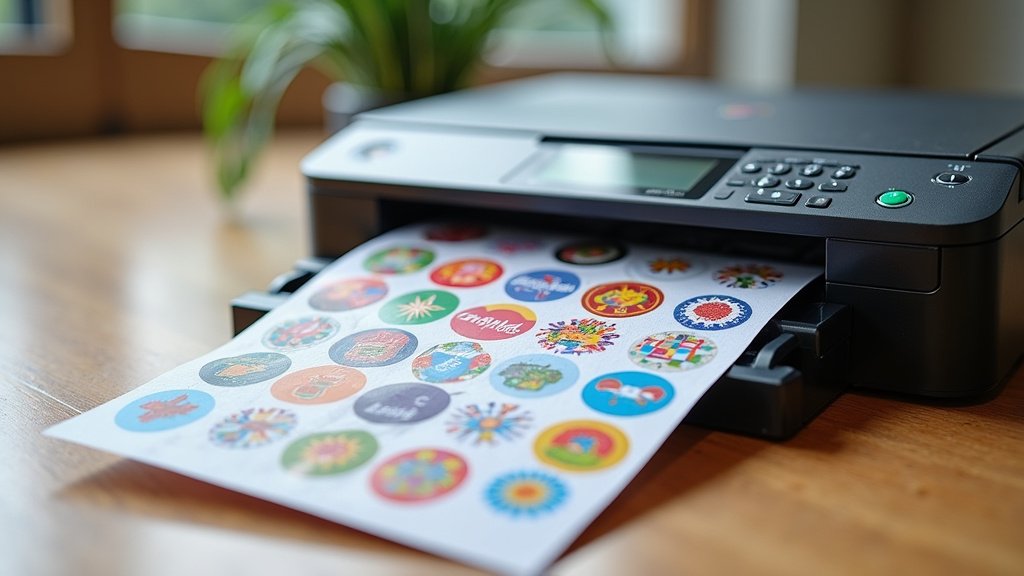
A Quick Comparison Table
To help you visualize the differences, here’s a quick breakdown. We’ve focused on the aspects most relevant to sticker printing.
| Feature | Inkjet Printers | Laser Printers |
|---|---|---|
| Best For | Vibrant colors, photos, detailed graphics | Sharp text, durable labels, high-volume printing |
| Color Quality | Excellent, smooth gradients | Good, can be less vibrant on glossy stock |
| Text Quality | Good, but can be less crisp than laser | Exceptional, very sharp |
| Durability | Varies; pigment inks are more durable | High; toner is smudge and water-resistant |
| Paper Handling | Generally more flexible, but check weight limits | Can be sensitive to heat; check paper compatibility |
| Cost Per Print | Can be higher, especially with frequent color use | Often lower for text, can vary for color |
Your Sticker Printing Checklist
Ready to make your final decision? Keep these points in mind as you shop:
- Confirm the printer is compatible with your preferred sticker paper type (glossy, matte, vinyl).
- Check the printer’s DPI resolution for crispness, especially for detailed designs.
- Look at paper handling specifications for weight and thickness limits.
- Decide if vibrant color (inkjet) or sharp text/durability (laser) is your priority.
- Consider pigment-based inks for inkjet printers if longevity is key.
- Read reviews specifically mentioning sticker paper printing if possible.
Conclusion
Choosing the best printer for your sticker paper projects comes down to balancing vibrant colors with sharp text and durability. If high-impact graphics and photos are your priority, an inkjet printer with pigment-based inks is likely your best bet. For crisp text, labels, and smudge-resistant applications, a laser printer often leads the pack. Remember to always match your printer type to your sticker paper, checking compatibility for heat and ink absorption. Now that you know the key factors, take a moment to review your sticker needs and pick the printer that will bring your creative visions to life.
Frequently Asked Questions
Can I use any printer to print on sticker paper?
Not all printers are ideal for every type of sticker paper. You need to consider if your printer is inkjet or laser and if your sticker paper is compatible with the heat from a laser or the ink absorption of an inkjet. Always check the sticker paper’s specifications for printer compatibility.
Will my inkjet printer’s ink smudge on sticker paper?
It depends on the ink type and sticker paper. Dye-based inks are more prone to smudging and fading. For better durability, look for inkjet printers that use pigment-based inks, which are more water and fade-resistant. Matte sticker papers also tend to absorb ink better than glossy ones.
Are laser printers good for printing colorful stickers?
Laser printers excel at sharp text and solid graphics but might not produce the same vibrant color depth as an inkjet, especially on glossy sticker paper. The heat-fusing process can also sometimes affect certain sticker papers. They are generally better suited for text-heavy or simpler graphic stickers.
What is DPI and why is it important for sticker printing?
DPI stands for Dots Per Inch, which measures your printer’s resolution. A higher DPI means more detail and crisper images. For detailed sticker designs or small text, a higher DPI (like 600 DPI for text or 1200 DPI for graphics) ensures your prints are sharp and not blurry.
How do I know if my printer can handle thick sticker paper?
You’ll need to check your printer’s specifications for its maximum paper weight and thickness limits. Sticker paper is often thicker than standard printer paper. Some printers also have a straight-through paper path, which is gentler on thicker media and can help prevent jams.