Craft Cutting Machines: The Complete Buying Guide
The best craft cutting machines match your materials and workspace, not just your budget. Pick a compact cutter for labels and small vinyl, a full-size smart cutter for mixed materials, or a case and mats that fit how you store and carry your tools.
On this page (10 sections)
- What are craft cutting machines and what do they cut?
- How do craft cutting machines differ by size and workspace?
- What is the best craft cutting machine for vinyl, stickers and labels?
- What is the best craft cutting machine for cardstock, cards and paper crafts?
- How do you compare Cricut Maker, Explore and Joy models?
- How do craft cutting machines compare with Silhouette, Brother and laser cutters?
- What features should you check in a cutting machine for crafts?
- What is the best craft cutting machine for a small workspace?
- How do you set up and care for craft cutting machines?
- Which craft cutting machine should you buy for your projects?
The best craft cutting machines match your materials and workspace, not just your price tier. For a non-Cricut alternative, read the Silhouette Cameo 5 Alpha review.
A compact cutter suits labels and small vinyl work, while a full-size smart cutter suits mixed materials and larger projects.
Craft cutting machines sit between a printer and a craft tool. They do not print a picture for you, but they cut, score, draw or foil shapes that you design in an app.
This guide compares cutting technologies, materials and workspace needs before you choose. It uses three examples that show the range: a compact Joy cutter, a full-size Maker cutter and a carrying case for Joy machines.
What are craft cutting machines and what do they cut?
Craft cutting machines are app-connected cutters that turn digital designs into physical shapes. For help pairing a Cricut Explore machine, see Cricut Explore Bluetooth setup.
You pick or draw a design, load the material, and let a blade follow the lines.
Most home models cut vinyl, cardstock, stickers, iron-on and paper. Some also draw with pens, score fold lines, foil details, engrave or deboss, depending on the tools that fit the machine.
The Cricut Maker 4 works with 300+ materials, including leather, wood, vinyl, iron-on HTV, cardstock and stickers. Cricut says it also draws, foils, scores, engraves, debosses and perforates.
The Cricut Joy cuts 50+ materials, including cardstock, vinyl decal and iron-on, with a StandardGrip mat. It also works with matless Smart Materials for longer cuts.
That gap is the main buying question. If your list is mostly vinyl and cardstock, a compact machine may cover it.
If your list includes leather, wood or engraving, a full-size machine has a wider tool range.
If you are new to the process, start with what is vinyl cutting so you know what weeding means before you buy vinyl. Weeding is removing the extra vinyl around a design, and it is part of almost every vinyl project.
Which materials matter most in your craft list?
Write down the materials you will use in the next year, not the ones you only like in theory. A short list of cardstock, vinyl and stickers points to one kind of machine, while a long list with fabric, leather or wood points to another.
Think about project types too. Labels and decals need fine cuts and weeding.
Cards need scoring for clean folds. T-shirts need iron-on in a size your machine can handle.
Check the best vinyl cutter supplies you will need alongside any machine, because blades, mats and transfer tape are ongoing costs. A low machine price does not help if mats wear out fast or blades are hard to replace.
How do craft cutting machines differ by size and workspace?
Size is the first practical limit. A compact cutter fits a cubby or a small desk, while a full-size cutter needs a clear run of table for the machine and the mat.
The Cricut Joy measures 8.5 in wide, 5.5 in deep and 4.25 in high, with a weight of 3.9 lb in the bundle description. That shape lets you store it in a cubby and move it between rooms.
The Cricut Maker 4 measures 22.1 in wide, 7.1 in deep and 6.2 in high. That wider body gives it room for larger mats and more tools, but it needs a dedicated spot.
Workspace means more than the machine footprint. You also need room to load a mat, weed a design, and lay out finished pieces without stacking them on the cutter.
A compact machine is easier to carry, but a full-size machine may cut larger shapes in one pass. Match the machine to the table you actually have, not the table you wish you had.
Storage matters as much as use. If you clear the table after each session, a case or tote should be part of your plan from the start.
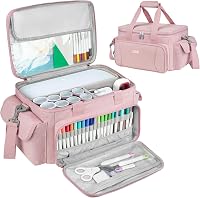
The VIGEGARI case measures 13.5 in long, 5.5 in wide and 10 in high, with nylon polyester fabric and thick padding. It has two compartments, a front zip pocket and a top pocket, plus removable straps and web handles.
How do you measure your craft table before you buy?
Measure width, depth and height clearance before you compare models. Leave room for the machine, the mat when it extends, and your hands during weeding.
Mark the spot with tape and set out the mats and tools you plan to use. If the outline crowds your other tools, choose a smaller machine or a different storage plan.
Check the wall behind the machine too. Some projects need headroom for a mat or a long material to feed through without bending.
Good light helps with weeding small vinyl and reading cut lines on cardstock. A machine that fits but forces you to work in poor light will slow every project.
What is the best craft cutting machine for vinyl, stickers and labels?
The best craft cutting machine for vinyl is the one that cuts your decals cleanly and fits your sticker workflow. Vinyl work needs a fine-point blade, a mat or smart material, and room to weed small letters.
The Joy bundle includes a blade and housing, a fine point black pen, a StandardGrip mat and 30 images in the Design Space app. The machine cuts individual shapes up to 4 ft long or repeated cuts up to 20 ft, according to Cricut.
The Maker 4 bundle includes a fine-point blade, a light grip mat, a fine point pen, a weeder and a materials sampler. The sampler includes smart vinyl, matless vinyl, smart iron-on, matless heat transfer vinyl, cardstock and transfer tape.
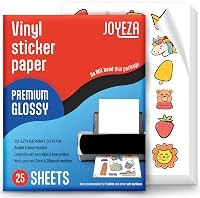
For stickers, both machines can work with a home inkjet printer through a print-then-cut workflow. The Maker 4 works with most inkjet printers for full-color stickers, and the Joy also supports print media such as cardstock and labels.
If vinyl is your main material, our list of the best craft vinyl cutting machine options helps you compare blade types and mat needs. It also helps you see which machines use smart materials that skip the mat.
For a wider view of electronic cutters, see the best electronic die cutting machine roundup. Die cutting and vinyl cutting overlap on cardstock, but the tools and mats differ.
How does print-then-cut change your sticker workflow?
Print-then-cut lets an inkjet printer print the color design, then the cutter follows the outline. You print first, check the colors on paper, and only then load the sheet for cutting.
That order matters for stickers because a misaligned cut ruins a printed sheet. Use the registration marks and keep the printed sheet flat when you place it on the mat.
If you print shrink film or other specialty sheets, check material rules first. Our guide to the best inkjet printer for printing shrink film crafts explains printer settings that affect the sheet before cutting.
What is the best craft cutting machine for cardstock, cards and paper crafts?
Cardstock work needs a machine that scores folds, cuts clean edges and handles thicker paper without tearing. A laminator for paper crafts can also protect finished paper projects.
Cards, banners and paper flowers all depend on those three skills.
The Joy makes custom cards and labels in a compact body, and it draws and writes in any style. That pen function helps with card greetings and planner labels, even when you do not cut a complex shape.
The Maker 4 cuts cardstock as part of its 300+ material range, and it scores and perforates as well. Scoring gives you a fold line, so cards sit straight instead of cracking at the bend.
Check mat grip before you buy supplies. A light grip mat holds cardstock without tearing it during removal, while a standard grip mat suits vinyl and iron-on.
Blade care also matters for paper. A dull blade leaves rough edges on cardstock and small letters, so keep spare blades in your supply plan.
If you use press-on die cuts for cards, compare manual tools too. The best manual die cutting machines for card making list suits crafters who want no app or power cord.
How do you choose between scoring, cutting and drawing for cards?
Scoring a card blank makes the fold, cutting makes the shape, and drawing adds words or details. Many card projects use all three in one design.
Plan the order in the app before you load the cardstock. A scored fold should happen before the card is cut out, so the piece stays stable on the mat.
Pens add the handwritten look without extra steps. The Joy draws any shape and writes in any style, which helps with names on cards and labels on storage jars.
For party banners, size matters more than detail. Check whether your machine cuts the banner in one piece or in segments that you tape together.
How do you compare Cricut Maker, Explore and Joy models?
Compare models by material range, project size and tool options, not by color or bundle extras. The Maker line sits at the top for materials, the Explore line sits in the middle, and Joy sits at the compact end.
The Maker 4 in this guide works with 300+ materials and more tools than Cricut's other cutting machines, according to Cricut. The Joy cuts 50+ materials in a body that fits a cubby.
If you are deciding between two full-size models, read cricut maker vs cricut explore air 2 for a side-by-side of tools and mats. That comparison helps if you want more materials without moving to the top tier.
For a broader family comparison, see cricut maker vs explore to place each model by project type. It helps you see which machine suits mixed materials and which suits vinyl and cardstock.
If space is your main limit, read cricut maker vs cricut joy to compare a full desk machine with a portable one. The Joy trade-off is fewer materials for easier storage and travel.
How do you decide between Maker 4 and Explore 5?
The maker vs explore 5 comparison comes down to material range and tool support. A top-tier machine usually supports more tools, such as rotary or knife blades, while a mid-tier machine focuses on vinyl, cardstock and iron-on.
Check the cricut maker vs explore 5 guide if you plan to cut fabric, leather or wood. Those materials change the value of the higher-priced machine.
Also check bundle contents. A bundle with a sampler, pens and mats can save a first shop, but only if you will use those exact items.
Look at the best cricut maker bundle options if you want mats, pens and blades in one box. Compare what is included against the machine-only price before you add extras.
If you want a mid-tier starter, look at best cricut explore bundle picks with the same care. A bundle is only a deal when the extras match your first projects.
How do craft cutting machines compare with Silhouette, Brother and laser cutters?
Craft cutting machines are not the only way to cut crafts. Silhouette, Brother ScanNCut and laser models each solve a different problem.
Silhouette machines use their own app and blades, so the choice often comes down to software and material range. Read silhouette cameo vs cricut if you already use one app or want a second opinion on tools.
For newer flagships, see silhouette cameo 5 vs cricut maker 4 to compare a top Silhouette with Cricut's top line. That pairing helps if you want the widest material range in either brand.
Brother ScanNCut machines scan paper designs and cut them, which suits crafters who work from paper patterns. See best brother scanncut machines if scanning matters more than app design.
Laser cutters cut and engrave hard materials such as wood and acrylic with a beam, not a blade. They suit different projects from blade cutters, so check best laser cutter for paper only if you plan laser work.
A vinyl printer cutter combo is another path if you print and cut signs in one workflow. Read what to look for in a vinyl printer cutter combo before you assume one machine can print and cut.
When should you choose a laser cutter instead of a blade cutter?
Choose a laser cutter when you need to cut or engrave wood, acrylic or thick materials that a blade cannot handle. A blade cutter is better for vinyl, paper, stickers and thin materials.
Laser work also needs ventilation and safety steps that blade cutting does not. Factor in eye protection, airflow and a clear work area before you compare prices.
If your projects are mostly paper and vinyl, a blade cutter stays simpler and quieter. It also fits on a desk without the extra safety gear that laser work requires.
What features should you check in a cutting machine for crafts?
Check blade type, mat system, pen options, app access and material list before you compare prices. Those five items decide what you can make and how much extra you must buy.
The Maker 4 uses Design Space, Cricut's app, with 3,000+ free images and 100+ fonts in the free library. Cricut says the full library grows to 1,500,000+ images with an optional paid subscription.
The Joy also uses Design Space on phones and laptops, with wireless Bluetooth connection. That app link matters because you design on a screen, then send the file to the machine.
Check smart materials too. Matless smart vinyl and iron-on save mat steps on long cuts, but they only fit machines that support them.
Blades wear out with use, so check replacement costs early. Our list of best cricut replacement blades helps you plan for fine-point and specialty blades.
Mats also wear out. A mat loses grip after many uses, so learn how to use cricut cutting mat steps for loading, cleaning and storage.
For Joy users, check what materials can cricut joy cut before you buy mats and vinyl. That list keeps you from buying materials the compact machine cannot handle.
How do bundles change the value of a craft cutting machine?
Bundles add mats, pens, blades, vinyl and digital images to the machine. They help if you want to start the same day without a second shop for basics.
The Joy bundle adds 30 images, a blade, a pen, a mat and ready-to-make projects. The Maker 4 bundle adds a sampler, a pen, a weeder, a mat and 30 bonus images.
Check the best cricut joy xtra bundle picks if you want a Joy Xtra starter kit. Compare the xtra size and mat needs against the standard Joy before you choose.
Joy owners should also check best cricut joy tool set options for weeders, spatulas and scrapers. Good tools make weeding small vinyl faster and cleaner.
A bundle is not a deal if the extras duplicate what you own. List the mats, blades and pens you need for your first three projects, then compare that list with the box contents.
What is the best craft cutting machine for a small workspace?
The best craft cutting machine for a small workspace is a compact model that stores in a cubby and still cuts your main materials. Size and storage matter more than top-tier tools in a tight room.
The Joy fits that role with an 8.5 in width and a 3.9 lb weight. Cricut describes it as a portable smart cutter for personalizing and organizing crafts on the go.
A case turns a compact cutter into a grab-and-go kit. The VIGEGARI case has thick padding, soft lining, a removable divider and pockets for tools and accessories.
For Silhouette fans with small desks, check the best silhouette cameo bundle options for compact storage ideas. Bundle size and mat length still decide whether it fits your table.
Small workspace crafters should also plan light and weeding space. A 12 in by 48 in active cutting area on the Joy means you need room to feed long smart material without bending it.
How do you store a craft cutting machine in a small room?
Store the machine in a case, tote or cubby with padding around the body. Keep blades, pens and mats separate so they do not scratch the machine or each other.
The VIGEGARI case uses a zip closure, two compartments and removable straps for carrying between rooms. Its nylon polyester shell wipes clean, and the soft lining helps protect against dust and scratches.
Label the pockets with a list of blades and mats. That list stops you from opening the case at a class and finding the wrong mat grip.
Keep the power adapter in a fixed pocket. A machine that is ready to plug in gets used more often than one buried under supplies.
How do you set up and care for craft cutting machines?
Set up a craft cutting machine by placing it on a flat table, plugging it in, and connecting it to the app. Most models pair by Bluetooth and guide you through a first cut.
Read the quick-start steps before you load expensive material. A test cut on cardstock shows whether the blade depth and mat grip are correct.
Clean mats with a gentle wipe and let them dry flat. Dust and fibers build up on mats and reduce grip, which makes small cuts shift.
Change blades when cuts look rough or letters tear. Fine-point blades wear faster on thick cardstock and glitter materials than on vinyl.
Keep pens and blades in their housings when not in use. That habit protects the tip and stops the blade from nicking other tools in storage.
For boards and pressed items, pair cutting with printing carefully. The best sublimation printer for cutting boards guide helps if you print designs before a cutter shapes them.
What should you do before your first cut?
Do a test cut with cardstock or scrap vinyl before you use a new material. Check the depth setting, mat grip and design size on a small shape first.
Make sure the mat is clean and the material is flat with no curl. A curled sticker sheet or vinyl piece can jam or cut at an angle.
Confirm the machine is on a stable table with room for the mat to extend. A wobbling table can shift the cut on long designs.
Save the test piece and note the settings. That note helps you repeat a clean cut when you load the real material.
Which craft cutting machine should you buy for your projects?
Choose the Joy if your projects are labels, decals, cards and small gifts in a small space. Choose the Maker 4 if your list includes leather, wood, fabric, engraving or larger mixed-material projects.
Choose a case if you move the machine, store it in a cubby or carry it to classes. The VIGEGARI case fits Joy and Joy Xtra machines with padding and pockets for tools.
For brand-specific picks, see best vinyl cutter cricut to compare Cricut models by material range. It helps you place the Joy and Maker 4 in the wider Cricut line.
Use this guide to match the machine to your materials, table and storage first. A craft cutting machine that fits those three things will get used for more projects than a larger model that stays in a box.
Frequently asked questions
What are craft cutting machines used for?
Craft cutting machines cut or score materials such as vinyl, cardstock, stickers, iron-on and paper for labels, cards, decals and gifts. You load a design in an app, the machine follows the cut lines, and you weed, layer or apply the result.
The right machine depends on the materials you use most.
What is the best craft cutting machine for beginners?
A compact machine is often best for beginners who make labels, small decals and cards. It sets up quickly, takes less desk space and uses app designs that guide each step.
If you want thicker materials or larger projects, a full-size cutter gives more room to grow.
Can a craft cutting machine cut vinyl and cardstock?
Many craft cutting machines cut both vinyl and cardstock, but the result depends on the blade, mat and material setting. Smart vinyl can cut without a mat on some models, while cardstock usually needs a mat.
Check the material list for your chosen machine before you buy extra supplies.
Do I need a carrying case for a craft cutting machine?
A case helps if you store the machine in a cubby, move it between rooms or carry it to a class. Look for padding, a secure fit, pockets for tools and a divider so the machine does not rub against accessories.
Measure your machine before you choose a case size.
What should I check before buying a cutting machine for crafts?
Check the materials it cuts, the largest project size, the workspace footprint and how designs are loaded. Also check whether mats, blades, pens and smart materials are part of the machine or bought separately.
A machine that fits your table and your main materials will get more use.