How to Print Custom Labels for Candles?
On this page (7 sections)
You absolutely can print custom labels for your candles! It’s a fantastic way to brand your creations and make them look professional. You’ll need a good printer and the right kind of label material to get started. Don’t worry, it’s easier than you might think.
Creating your own candle labels allows for so much creativity and personalization. You can design everything from scent names to warnings and even your logo. Many people find this process incredibly rewarding, adding a unique touch to their handmade goods.
- Design your labels on your computer.
- Choose the right paper or sticker material.
- Print them using your home printer.
- Cut and apply them to your candle jars.
Let’s walk through exactly how you can design and print your perfect custom candle labels step by step.
Crafting Your Own Custom Candle Labels
You absolutely can print your own custom labels for your candles! If you make handmade soap too, see our guide to printing soap product labels. It’s a fantastic way to brand your creations and make them look professional. You’ll need a good printer and the right kind of label material to get started. Don’t worry, it’s easier than you might think.
Creating your own candle labels allows for so much creativity and personalization. You can design everything from scent names to warnings and even your logo. Many people find this process incredibly rewarding, adding a unique touch to their handmade goods.
- Design your labels on your computer.
- Choose the right paper or sticker material.
- Print them using your home printer.
- Cut and apply them to your candle jars.
Let’s walk through exactly how you can design and print your perfect custom candle labels step by step.
Designing Your Candle Labels: Where Creativity Meets Practicality
The first step is to design what your label will look like. This is where you get to show off your brand’s personality! Think about the overall aesthetic of your candles. Are they rustic, modern, minimalist, or something else entirely?
Essential Information to Include
Beyond just looking good, your labels need to be informative. Federal regulations require certain information for candle safety. For example, you’ll want to include the net weight of the candle. You should also clearly state the type of wax used, if that’s part of your brand’s story.
Warning labels are also a must. These are critical for customer safety. You’ll want to mention things like keeping the candle away from drafts, children, and pets. Also, advise burning on a heat-resistant surface and never leaving a burning candle unattended. Many sources, like the National Candle Association, provide standard warning language you can adapt.
Tools for Designing Your Labels
You don’t need to be a graphic designer to create professional-looking labels. There are many user-friendly tools available. For simple designs, even Microsoft Word or Google Docs can work. You can set up a document with text boxes and images.
For more advanced features and a wider range of design options, consider using free online tools. Canva is a very popular choice. It offers tons of templates, fonts, and graphics that you can customize easily. Websites like Adobe Express (formerly Adobe Spark) are also excellent options.
If you’re already familiar with design software, programs like Adobe Photoshop or Illustrator offer the most flexibility. However, these have a steeper learning curve. Start with something simple if you’re new to design.
Sizing Your Labels Correctly
Getting the size right is super important. Measure the area of your candle jar where you plan to place the label. You don’t want it to be too big and wrinkle or too small and look lost.
Most label sheets come in standard sizes, like 8.5 x 11 inches. You’ll need to set up your design file to fit the printable area of the labels on your sheet. If you’re using pre-cut labels, measure those carefully. If you’re printing on full sheets and cutting yourself, decide on a consistent size for all your labels.
Font Choices and Readability
Choosing the right font makes a big difference. A fancy script might look lovely for your brand name. However, it might be hard to read for important safety information. Stick to clear, legible fonts for all the essential details.
Generally, it’s best to use no more than two or three different fonts on a single label. A good combination is a distinctive font for your brand name and a clean, simple font for the rest of the text. Ensure there’s enough contrast between your text color and the background color for easy reading.
Choosing the Right Printing Materials
The material you print on is just as important as the design itself. The wrong material can peel, smudge, or look unprofessional very quickly. You’ll want something that can withstand a bit of handling and potentially humidity.
Paper Labels vs. Sticker Labels
You have two main choices: regular paper labels or adhesive sticker labels. Paper labels are often less expensive. You’ll typically use a glue stick or spray adhesive to attach them to your jars. This method can be a bit messier and might not hold up as well over time.
Adhesive sticker labels, often called “full-sheet labels” or “label paper,” are much more convenient. They have a sticky back. You simply peel and stick them directly onto your candle jars. We found that these tend to offer a cleaner, more professional finish.
Types of Sticker Label Materials
Within sticker labels, there are a few common types you’ll encounter:
- Matte Labels: These have a non-glossy finish. They’re great for a natural or rustic look. Matte labels also tend to be easier to write on if you need to add any handwritten details.
- Glossy Labels: These have a shiny finish. They can make colors pop and give a very polished, high-end appearance. However, they can sometimes show fingerprints more easily.
- Waterproof/Water-Resistant Labels: For candles, especially those that might be used in bathrooms or kitchens, this is a smart choice. These labels are designed to resist moisture and prevent smudging or peeling. Look for materials specifically labeled as waterproof or water-resistant.
Many sources suggest that for candle labels, a water-resistant matte or satin finish offers a good balance of durability and aesthetic appeal. You can find these label sheets at office supply stores or online retailers.
Considerations for Ink and Durability
The type of ink your printer uses matters too. Standard inkjet printers use dye-based inks. These can fade over time, especially if exposed to sunlight. They are also more prone to smudging when wet.
Laser printers often use toner, which is more durable and water-resistant. If you plan to print a lot of labels and want them to last, a laser printer might be a better investment. Alternatively, if you use an inkjet printer, consider printing on water-resistant label material. This is often the easiest solution for most home users.
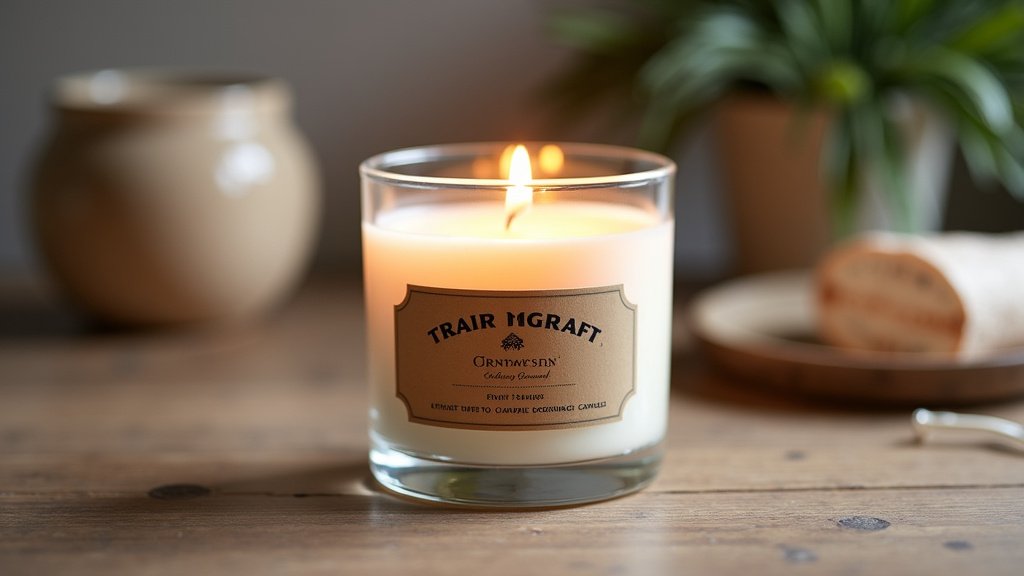
Printing Your Custom Candle Labels at Home
Now for the exciting part – putting your design onto paper! Printing at home is convenient and allows you to print exactly the number of labels you need, when you need them.
Printer Settings for Best Results
Before you hit print, check your printer settings. Most printers have a “label” or “heavy paper” setting. Using this setting tells the printer to feed the label material more slowly and carefully. This helps prevent jams and ensures the ink is applied correctly.
You’ll also want to select the highest print quality possible. This will make your colors vibrant and your text crisp. Double-check that the paper size in your settings matches the label sheets you are using (e.g., Letter or A4).
Test Prints are Your Friend!
We cannot stress this enough: always do a test print! Print your design on a regular piece of paper first. Then, carefully lay it over your actual label sheet. This lets you check the alignment and size without wasting expensive label material. Adjust your design file as needed until it lines up perfectly.
Once you’re confident with the alignment on a plain sheet, load your label material into the printer. Make sure you load it correctly according to your printer’s manual. Some printers prefer the label sheet to be face up, while others need it face down. A small mistake here can lead to wasted labels and frustration.
Troubleshooting Common Printing Issues
What if the ink smudges? This could be due to the wrong printer setting or using non-water-resistant paper. If your printer jams, carefully remove the label sheet. Check for any small pieces of torn label paper inside the printer. Sometimes, adjusting the paper guides can help prevent future jams.
If colors aren’t vibrant, ensure your ink cartridges are not low. You might also need to adjust color settings in your design software or printer preferences. Many experts suggest calibrating your monitor and printer for the most accurate color reproduction, though this is more advanced.
Cutting and Applying Your Finished Labels
You’ve designed, you’ve printed, and now it’s time for the final touches. Cutting and applying your labels can be done with simple tools.
Methods for Cutting Your Labels
If you used full sheets of label paper, you’ll need to cut them out. A paper trimmer or a craft knife with a ruler works very well. These tools provide straight, clean edges, which look much more professional than scissors for most people.
If your labels have pre-scored lines or are pre-cut on the sheet, simply peel them off carefully. Be gentle to avoid tearing or stretching the label.
Tips for Perfect Application
Make sure your candle jar is clean and dry before applying the label. Any dust or moisture can cause the label to bubble or peel later. Start by peeling a small portion of the backing off the label.
Carefully align the edge of the label with the edge of your jar. Once you’re happy with the position, slowly peel the rest of the backing off while smoothing the label onto the jar. Work from the center outwards to push out any air bubbles. If you get a small bubble, you might be able to gently lift and reapply that section.
Here’s a quick checklist to keep you on track:
- Measure your candle jar’s label area.
- Include all necessary safety information.
- Choose durable, water-resistant label material.
- Do a test print for alignment.
- Use the correct printer settings.
- Apply labels to clean, dry jars.
Conclusion
You now have all the knowledge you need to create and print your own custom candle labels. From design to the final stick, you can transform plain jars into beautiful branded products. We found that choosing the right label material, like a water-resistant matte sticker, makes a huge difference in the final look and durability. Don’t be afraid to experiment with different designs and fonts until you find what perfectly represents your candle creations. Your next step is to gather your supplies and start designing—your candles will thank you for it!
Frequently Asked Questions
What’s the best way to ensure my custom candle labels are waterproof?
We recommend printing on label material specifically advertised as waterproof or water-resistant. Many sources also suggest that using a laser printer with toner ink offers better water resistance than traditional inkjet printers with dye-based inks.
Can I use my home inkjet printer for candle labels?
Yes, you absolutely can use your home inkjet printer! For the best results and to prevent smudging, make sure to use water-resistant label paper and check your printer’s settings for a “label” or “heavy paper” option.
How do I make sure my label design fits my candle jar perfectly?
It’s essential to measure your candle jar’s label area before designing. Then, create your design file to match those dimensions, taking into account the printable area on your chosen label sheets. Always do a test print on regular paper first to check alignment.
What kind of software is best for designing candle labels if I’m not a designer?
For user-friendly design, we’ve found that Canva and Adobe Express are excellent choices. They offer many templates, fonts, and graphics that you can easily customize without needing professional design skills.
How can I avoid air bubbles when applying labels to my candle jars?
To avoid air bubbles, ensure your candle jar is clean and dry. Peel back only a small portion of the label backing at first, carefully align it, and then slowly peel the rest while smoothing the label from the center outwards.