8 Best Replacement Blades for Cricut Explore (November 2026)
The best Cricut Explore replacement blades include the Cricut Premium Fine-Point Replacement Blade for everyday Explore cutting, the Likart 6-Pack Paper Cutter Replacement Blade kit for trimmer and scoring work, and the AUNKZL Deep Cut Housing +5 Pcs Deep-Point for thicker craft materials.
On this page (7 sections)
- How to choose the best Cricut Explore replacement blades
- The best Cricut Explore replacement blades for different jobs
- How do fine-point and deep-point Explore blades differ?
- What should cricut explore air 2 blades replacement buyers check?
- How do replacement blades for cricut explore air 2 compare on thick materials?
- How should you install, store and care for Explore blades?
- Which of these best Cricut Explore replacement blades should you buy?
The best Cricut Explore replacement blades for most owners are fine-point blades for daily cutting, because Explore Air 2 work usually means cardstock, vinyl and iron-on. Deep-point blades earn a place when you cut chipboard, foam or thick cardstock.
Fabric blades belong in a separate slot for bonded fabric.
Our score weighs specs, features and buyer feedback against what you are shopping for. We compared counts, blade angles, housings and machine fit across these 8 options.
Start with the job you do most, then check compatibility for your exact Explore model.
Our picks at a glance
-
1
 Best for everyday Explore cutting
Cricut Premium Fine-Point Replacement Blade
9.6/10 our score
See it on Amazon -
2
 Best for trimmer and scoring work
Likart 6-Pack Paper Cutter Replacement Blade kit
9.3/10 our score
See it on Amazon -
3
 Best for thicker craft materials
AUNKZL Deep Cut Housing +5 Pcs Deep-Point
9.2/10 our score
See it on Amazon
- 4
 Check it
UTNVBTR Deep Point Blade + Housing
Best deep-cut value with housing - 5
 Check it
HOOFULL 55 PCS Replacement Plotter Blades Compatible
Best all-angle variety kit - 6
 Check it
Cricut Premium Fine-Point Replacement Blade
Best smaller fine-point refill pack - 7
 Check it
Moalaok 30 Packs Rubber Roller Replacement
Best roller and blade maintenance set - 8
 Check it
HQMaster Bonded-Fabric Blade and Holder Compatible
Best for bonded fabric cuts
How to choose the best Cricut Explore replacement blades
Choose by material first, because blade angle and blade type decide how cleanly a cut forms. Fine-point blades handle detail, deep-point blades handle thickness and fabric blades handle bonded fabric.
Our wider craft cutting machines guide helps if you are comparing machines as well as blades. For a general overview across models, see best cricut replacement blades.
Blade angle changes how the point enters the material. A 45 degree point is the usual middle ground for paper and vinyl, while a 60 degree point has a steeper entry for thicker stock.
A 30 degree point is aimed at finer or more delicate work, where a steeper blade can be too blunt for small shapes.
Counts and housings decide what fits your routine once you have chosen the right type. A 10 count pack suits weekly cutting because you can replace a worn point without reordering, while a 5 count pack suits occasional projects.
A housing in the box matters if your current housing is worn, since some fine point refills are sold without one.
Think about your mat and machine load as well as the blade itself. Heavy repeated cutting on glitter cardstock or layered vinyl wears a point faster than plain cardstock, so frequent crafters should plan for more spares.
If you share a machine between Explore and Maker models, check that every set you buy lists both families, because shared compatibility is common but not universal.
Quick checks before you order
Confirm the exact model name on your machine, not just the Explore family name. Check whether a housing is included, and check the stated material range against the stock you actually use.
Count the blades and angles in the box, since a large piece count can include tools and holders as well as blades. If a set mixes angles, plan a small test cut for each angle and material pair before you start a larger project.
The best Cricut Explore replacement blades for different jobs
The Cricut 10-count fine-point set leads for everyday Explore Air 2 use. Deep-cut sets from AUNKZL and UTNVBTR cover thicker work, HOOFULL covers mixed angles, Likart covers trimmer work and HQMaster covers fabric.
Cricut Premium Fine-Point Replacement Blade: Best for everyday Explore cutting
- 10 fine-point blades
- Cuts light to mid-weight materials
- Fits Maker and Explore machines
- German carbide steel design
A 10-count fine-point set for routine Explore and Explore Air 2 cuts in cardstock, vinyl and iron-on.
Pros
- Large 10-count supply
- Fits Explore Air 2
- Made for light to mid-weight materials
Cons
- Housing sold separately
- Not for thicker deep-cut materials
This 10-count set suits Explore owners who cut vinyl, cardstock and iron-on most weeks. 10 blades give a long supply for routine projects, so you can swap in a fresh point before detail starts to drag.
Cricut describes the design as durable carbide steel, made to resist wear and breakage for longer life. That targets light to mid-weight materials in daily use, including cardstock, vinyl, iron-on, poster board and lightweight fabrics.
It fits Explore, Explore One, Explore Air and Explore Air 2, plus Maker machines. The housing is sold separately, so keep your current Premium Fine-Point Blade Housing in mind when you order.
The trade-off is that this is the everyday choice, not a thick-material blade. It will not match a 60 degree deep point on chipboard or foam, so pick a deep-cut set with housing if thicker stock is your main work.
Likart 6-Pack Paper Cutter Replacement Blade kit: Best for trimmer and scoring work
- 4 cutting blades and 2 scoring blades
- Light green holder included
- Fits Cricut portable trimmer
- Manual paper cutting use
A trimmer kit with cutting and scoring blades for straight paper cuts outside the Explore machine.
Pros
- Includes scoring blades
- Holder included
- Good for card making
Cons
- Not for Explore machine cutting
- Does not fit older green cutter
Likart suits paper crafters who use a Cricut portable trimmer beside their Explore machine for straight edges. 4 cutting blades and 2 scoring blades cover straight cuts and fold lines for cards, coupons, photos and matted paper.
The light green holder holds the blades for manual trimmer use. Scoring blades create clean folds without cutting through paper, so one kit covers both trimming and folding in a card workflow.
It fits Cricut Trimmer 12 inch and 13 inch models, a Cricut roll holder and other listed paper cutters. It does not fit the older green Cricut cutter, so check your trimmer model first.
The trade-off is that these are trimmer blades, not Explore machine blades. They cannot cut vinyl designs the way a machine blade can, so keep a fine-point Explore blade for machine work.
AUNKZL Deep Cut Housing +5 Pcs Deep-Point: Best for thicker craft materials
- 5 deep-point blades plus housing
- Cuts materials up to 1.5mm
- Fits Explore Air and Maker
- 60 degree deep point angle
A deep-cut set with housing for chipboard, thick cardstock, foam sheets and other thicker craft materials.
Pros
- Housing included
- Deep point for thick materials
- Fits Explore Air 2
Cons
- Less suited to fine detail
- Sharp blade needs care when uncapping
AUNKZL suits Explore Air owners who need thicker cuts without buying a separate housing first. 5 deep-point blades plus a housing arrive ready to install for chipboard, thick cardstock, foam sheets, cardboard and magnet sheets.
The 60 degree deep point angle bites deeper than a standard 45 degree blade. That helps with materials up to 1.5mm thick, where a fine point would drag, and imported bearings aim for smoother motion.
It fits Explore Air One, Air, Air 2, Air 3, Maker and Maker 3. AUNKZL states the blade can usually handle 1000 to 2000 uses, which helps you estimate spares.
The trade-off is focus. Deep point blades are less ideal for tiny detail, and the blade needs care when removing the black rubber cap.
Keep a fine-point blade for intricate designs.
UTNVBTR Deep Point Blade + Housing: Best deep-cut value with housing
- 6 deep point blades plus housing
- 60 degree deep cut angle
- Fits Maker and Explore models
- German alloy construction
Six deep-point blades with a housing for thicker materials on Explore and Maker machines.
Pros
- Six blades included
- Housing included
- Deep point angle for thick stock
Cons
- Overkill for everyday vinyl
- Third-party housing fit should be checked
UTNVBTR suits crafters who want deep cuts and a housing in one box for Explore and Maker machines. 6 deep point blades plus a housing give spares for chipboard, rubber sheets, thick cardstock, stiffened felt, foam and cardboard.
The 60 degree angle suits complex cutting on thicker materials, where a steeper point can hold a cleaner line through dense stock. German alloy construction and an electroplated casing aim at durability and clean edges.
It fits Maker 3, Maker 4, Maker, Explore 3, Explore 4, Explore Air 2, Air, One and Venture. That broad list suits households with newer and older machines, with housing included for easy replacement.
The trade-off is specialisation. Like other deep-point sets, this is more than you need for daily vinyl and cardstock, where a fine-point blade is simpler for detail.
HOOFULL 55 PCS Replacement Plotter Blades Compatible: Best all-angle variety kit
- 55 pieces total
- 30, 45 and 60 degree blades
- 2 housings and 2 tweezers
- Fits Explore Air and Maker
A large mixed kit with fine, standard and deep blades for crafters who switch materials often.
Pros
- Many angles in one kit
- Housings and tweezers included
- Good for material variety
Cons
- Complex for beginners
- Depth must be set manually
HOOFULL suits crafters who switch materials often and want several angles at hand in one purchase. 55 pieces include fine point, 45 degree standard, 30 degree thin-cut and 60 degree deep-cut blades, plus 2 housings and 2 tweezers.
Tungsten carbide heads aim at longer life than standard steel, with anti-corrosion plating and precision shanks for a secure fit. That mix lets you match angle to material, from tissue paper and vinyl to leather up to 2mm.
It fits Cricut Explore Air, Maker and Expression models without an adapter. Silicone caps protect fingers during changes, and tweezers help you handle blades without touching the sharp edge.
The trade-off is complexity. Depth must be adjusted manually, so test cuts matter more with this set than with a single-purpose refill.
Beginners may prefer one clear blade type first.
Cricut Premium Fine-Point Replacement Blade: Best smaller fine-point refill pack
- 5 fine-point blades
- Cuts light to mid-weight materials
- Fits Maker and Explore machines
- Alloy steel construction
A smaller 5-count fine-point refill for Explore owners who want fewer spares at one time.
Pros
- Cricut brand fine-point blade
- Fits Explore Air 2
- Smaller pack for light use
Cons
- Housing sold separately
- Fewer blades than the 10-count option
This 5-count Cricut set suits lighter Explore users who do not need 10 spares at once. 5 blades still cover many projects in cardstock, vinyl, iron-on, poster board and lightweight fabrics.
The improved German carbide steel design targets light to mid-weight materials with lasting sharpness. In daily terms that suits decals, cards, labels and iron-on designs, where a fresh point keeps small shapes tidy.
It fits Explore, Explore One, Explore Air and Explore Air 2, plus Maker machines. Housing is sold separately, which keeps the pack smaller, and if you already own a sound housing this refill is a direct swap.
The trade-off against the 10-count Cricut set is quantity. The larger pack suits frequent cutters better, while this smaller pack suits light use and limited storage.
Moalaok 30 Packs Rubber Roller Replacement: Best roller and blade maintenance set
- 30-piece roller and blade set
- 10 blades in 30, 45 and 60 degrees
- Rollers for Maker 3 and Explore Air 2
- Tools and clips included
A maintenance set that pairs rubber rollers with blades for Explore Air 2 and Maker 3 users.
Pros
- Rollers and blades together
- Three blade angles
- Installation tools included
Cons
- Not for Cricut Joy or Maker 2
- More complex than a blade-only refill
Moalaok suits Explore Air 2 owners whose maintenance needs go beyond blades alone. 30 pieces combine rubber rollers, clips, tools and 10 blades in 30, 45 and 60 degree angles.
The set includes rollers for Maker 3 and Explore Air 2, plus screwdrivers, Allen wrenches and a plastic dismantling tool. That mix helps when a worn roller affects cut quality, since a fresh blade alone cannot fix uneven grip.
Blades suit paper, vinyl, fabric, PVC, adhesive paper, glitter paper, poster board, adhesive foil, vellum and lightweight wood. Individual blade protector sleeves help with storage, and electronic installation instructions are listed.
The trade-off is scope. This is a maintenance kit, not a simple refill, and it is not compatible with Cricut Joy or Maker 2, so confirm your machine first.
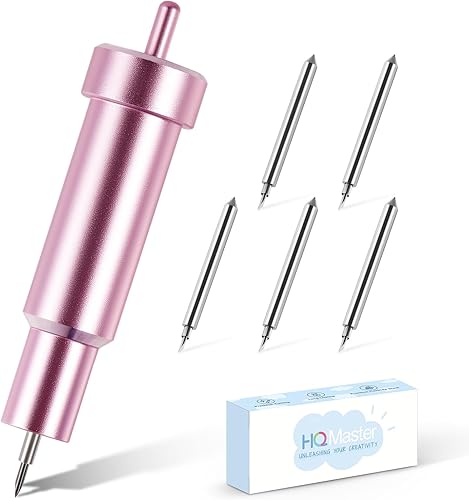
HQMaster Bonded-Fabric Blade and Holder Compatible: Best for bonded fabric cuts
- 5 bonded-fabric blades plus holder
- German carbide steel
- Fits Explore Air 2 and Maker
- Made for polyester, cotton and linen
A fabric-focused blade and holder set for bonded fabrics on Explore Air 2 and Maker machines.
Pros
- Holder included
- Made for bonded fabric
- Five fabric blades
Cons
- Not for paper or vinyl
- Fabric-only choice
HQMaster suits Explore Air 2 owners who cut bonded fabric more than paper or vinyl. 5 bonded-fabric blades plus a holder are made for polyester, silk, cotton, denim, felt, linen and fabrics with an iron-on backer.
German carbide steel aims at clean, precise fabric cuts and crisp edges. In daily use that means the blade is reserved for fabric only, since HQMaster advises not to use it for paper or vinyl.
It fits Explore 3, Air 2, Air, One, Maker 3 and Maker machines, with a pink holder included. Easy installation and removal make swapping jobs simpler, and the pack lists 6 items in total.
The trade-off is fabric-only use. That specialisation suits fabric crafters, but it cannot cover routine paper and vinyl, so keep a fine-point blade for those jobs.
How do fine-point and deep-point Explore blades differ?
Fine-point blades are the default for daily Explore cutting. They suit cardstock, vinyl, iron-on and poster board, with detail that deep blades may not match.
Deep-point blades use a steeper 60 degree angle for thicker stock. That angle helps with chipboard, foam, thick cardstock and stiffened felt.
If you own a Maker as well, compare best cricut maker replacement blades before you buy shared spares. Maker owners often ask what is cricut maker deep cut blade used for, and the answer overlaps with Explore deep-cut use.
The practical difference shows in how a design starts and finishes. A fine point can enter a thin sheet and turn through small curves without forcing the material, which suits lettering and layered vinyl.
A deep point enters with a steeper bite, which helps it push through dense stock, but it can struggle on very small shapes.
Material thickness is therefore a better guide than brand loyalty. If your main stock sits within the range of a fine point, a deep set adds cost without improving the result.
If you regularly cut stock that a fine point tears or skips, a deep point is the correct tool rather than a sign you need more pressure.
Many crafters end up owning both types. The fine point stays in the machine for most days, and the deep point moves in only for thick projects, with the housing swapped to match.
That routine is simpler than forcing one blade to cover every material.
Which blade should you keep as your spare?
Keep a fine-point blade as your main spare if you cut paper and vinyl most. Add a deep-point set only when thick materials appear in your projects.
Fabric users should add a bonded-fabric blade rather than forcing a fine-point blade through fabric.
For a first purchase, a fine-point refill is the safest spare because it covers the widest range of everyday work. A deep-point set is the best second purchase for chipboard, foam and thick cardstock users.
A bonded-fabric set is a third purchase for a specific fabric routine.
Housing decides how that spare routine works in practice. If you buy a fine-point refill without a housing, you plan to reuse your current housing, so check that it is still straight and clean.
If you buy a deep or fabric set with a housing included, you can keep that housing fitted for the specialised blade and swap the whole unit when the job changes.
What should cricut explore air 2 blades replacement buyers check?
Check that Air 2 is named in the compatibility list. Some sets list Explore Air 3 or Maker models only, so read the full list before you order.
Housing included or sold separately?
Cricut fine-point refills often need a housing sold separately. AUNKZL, UTNVBTR, HOOFULL and HQMaster include a housing, which can save a separate purchase.
A housing holds the blade at the correct angle and depth in the machine. A worn or dirty housing can cause uneven cuts and small skips on curves that look like a dull blade.
If your housing is old, a set with a housing included can solve two problems at once.
Check the housing type before you order, since deep and fabric blades use their own housings. A fine-point housing should not be assumed to work for a deep point blade.
Swapping the complete housing and blade together is the cleanest way to change jobs.
Count and angle match your projects?
A 5-count pack suits light use, while 10-count and 55-piece kits suit frequent cutting. Angle matters too: 45 degrees for standard work, 60 degrees for thick stock and 30 degrees for finer detail.
Count should reflect how often you cut, not just how much you like a large box. Weekly cutters who work with glitter cardstock or layered vinyl will use spares faster than occasional card makers, so a 10-count pack can be more practical.
Light users can start with 5 blades and reorder later.
Angle should reflect your main material, because the wrong angle shows up as dragging, tearing or blunt detail. Standard 45 degree work covers most daily cutting, 60 degree work covers thick stock, and 30 degree work is for finer detail.
Mixed kits help you learn which angle suits your projects, but they ask more in setup and testing.
How do replacement blades for cricut explore air 2 compare on thick materials?
Thick materials need a deep point, not more pressure on a fine-point blade. AUNKZL and UTNVBTR both use a 60 degree deep point with a housing included.
HOOFULL gives 60 degree blades inside a larger mixed kit. Moalaok also includes 60 degree blades, but its value is the roller maintenance set rather than blades alone.
For Joy owners, best cricut joy replacement blade covers a different machine family. Joy blades should not be assumed to fit Explore Air 2.
Thick material work also depends on rollers and mat, since a deep point still needs a stable surface to cut cleanly. A worn mat that no longer holds material firmly can cause shifting on chipboard and foam, even with a sharp blade.
Check grip and roller condition before you blame the blade for a poor thick cut.
Depth setting matters more on thick stock, and a small error can leave a design half cut or push too far into the mat. Test cuts on an offcut of the same material are worth the time, especially when you change from a fine point to a deep point.
Small adjustments on a test piece are far cheaper than a ruined sheet of chipboard.
When is deep cut worth it?
Deep cut is worth it for chipboard, foam sheets, thick cardstock, cardboard and stiffened felt. It is less useful for routine vinyl, where a fine-point blade gives cleaner detail.
Deep cut is also worth considering for leather, magnet sheets, stamp material and other dense stocks listed in the product data. Those materials expose the limits of a fine point, because the blade must enter and travel through a thicker layer without bending or tearing.
It is less worth it for poster board and lightweight fabrics, which sit within the light to mid-weight range of a fine point. Using a deep point there can cost you detail and add wear without a matching benefit.
Match the blade to the stock you cut most, and add deep cut only when thick materials become regular.
How should you install, store and care for Explore blades?
Install a blade into the correct housing, seat it fully and run a small test cut before a full project. Test cuts reveal depth issues early, especially with mixed kits that need manual depth setting.
Store spare blades in their caps or sleeves. Keep them dry and separate from tools that could bend the point.
Clean the housing area with care and avoid touching the blade edge. A dull or nicked point often shows up first as torn details, so swap in a spare and compare the cut.
Good habits start before the first cut and continue after it. Seat the blade fully in the housing, click or lock it in place, and confirm that the point moves freely without wobble.
A loose blade can shift during a cut and ruin detail, so a quick check at installation saves a larger project later.
Storage is the second habit that protects cut quality. Keep spare blades in their caps, sleeves or protective covers, and store them away from tools that could bend the point.
Humidity and knocks in a crowded drawer are common causes of damage, so a separate small container for blades is a simple safeguard.
Care during use is the third habit, and it is mostly about restraint. Avoid touching the edge with your fingers, and use tweezers where a kit provides them, because skin oils and accidental pressure can damage a fine point.
Clean the housing area gently, keep the mat grip in good order, and change the blade when test cuts show tearing rather than forcing a worn point through another project.
Our printer guides are separate from cutting guides, including Best All-In-One Printer For Photos and Best All-In-One Printer For Home Use. Those links help if your craft room pairs printing with cutting.
Which of these best Cricut Explore replacement blades should you buy?
Pick the Cricut 10-count fine-point set for everyday Explore Air 2 cutting. Pick AUNKZL or UTNVBTR for thicker materials with a housing included.
Pick HOOFULL if you want many angles in one kit and do not mind manual depth checks. Pick Likart for trimmer scoring, Moalaok for roller maintenance and HQMaster for bonded fabric.
The best Cricut Explore replacement blades are the ones that match your main material. Fine-point for daily work, deep-point for thick stock and fabric blades for fabric will keep your Explore Air 2 cutting cleanly.
Our top 3 picks at a glance
-
1
Best for everyday Explore cutting
Cricut Premium Fine-Point Replacement Blade
9.6/10 our score
See it on Amazon -
2
Best for trimmer and scoring work
Likart 6-Pack Paper Cutter Replacement Blade kit
9.3/10 our score
See it on Amazon -
3
Best for thicker craft materials
AUNKZL Deep Cut Housing +5 Pcs Deep-Point
9.2/10 our score
See it on Amazon
Frequently asked questions
Are Cricut Explore replacement blades the same as Maker blades?
Many fine-point and deep-point blades fit both Explore and Maker machines. Check the exact models listed for each set before you buy.
Explore Air 2 blades replacement shoppers should confirm Air 2 is named, since some sets list only newer models.
When should I replace a Cricut Explore blade?
Replace a blade when cuts tear, drag, skip details or leave rough edges that a new blade fixes. Dull blades often struggle first on fine detail and thick cardstock.
Keep a spare ready so a worn blade does not ruin a project.
Can deep-cut blades replace fine-point blades?
Deep-cut blades help with thicker materials, but they are not a like-for-like swap for every fine design. A 60 degree blade suits thicker stock, while a 45 degree fine-point blade suits daily paper and vinyl work.
Many crafters keep both types.
Do I need a housing with replacement blades?
Some Cricut fine-point refills need a housing sold separately. Other sets include a housing in the box.
Check what is included before you order, especially if you are replacing a worn housing as well as the blade.