Cricut Joy vs Joy Xtra: Which Fits Your Projects? (November 2026)
Choose the Cricut Joy Xtra if you want wider cuts and full-color Print Then Cut stickers. In the Cricut Joy vs Cricut Joy Xtra choice, project size and sticker printing matter more than small size alone.
On this page (11 sections)
- Quick verdict: cricut joy vs cricut joy xtra for most crafters
- Joy vs Joy Xtra side by side
- Cutting width: the first point that decides the choice
- Sticker capabilities: Print Then Cut changes the answer
- Materials and tools: what each bundle puts in the box
- Design Space and digital content: free does not mean unlimited
- Size, weight and desk space: measure the spot first
- Bundles: which Joy Xtra box fits your first month
- Setup, care and daily use: keep mats and tools ready
- Who should buy the Joy and who should buy the Joy Xtra
- Final verdict on cricut joy vs cricut joy extra
Choose the Cricut Joy Xtra if you want wider cuts and full-color Print Then Cut stickers. In the Cricut Joy vs Cricut Joy Xtra choice, the projects you plan to make should come before the machine you buy.
The Joy Xtra works with 50+ materials, including vinyl, iron-on HTV, cardstock and stickers. It cuts, draws, foils and more, and it works with most inkjet printers for full-color sticker designs.
The smaller Cricut Joy suits a tighter desk and simpler vinyl projects. The Xtra suits crafters who want more room to cut and who want to print a design before the machine cuts it.
 Best for travel and storage
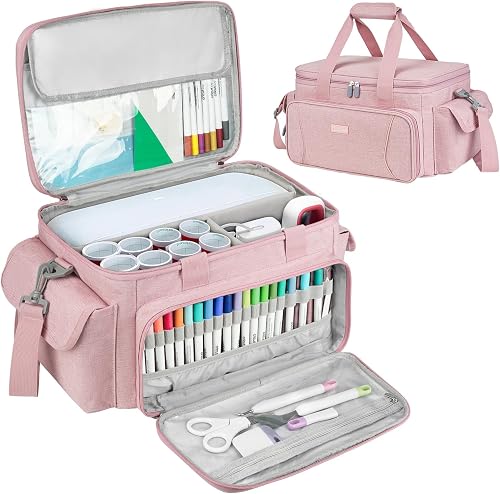
LEFOR·Z Carrying Case Compatible with Cricut Joy

Quick verdict: cricut joy vs cricut joy xtra for most crafters
Buy the Joy Xtra for sticker printing and larger layouts; keep the Joy for small vinyl and card projects. Your first three projects will tell you more than brand names will.
We compared the machines around cutting width, sticker capability, bundle contents and ease of use. We checked the specs for the Joy Xtra bundles and the accessories, and we looked at what each bundle includes in the box.
The Joy Xtra digital content bundle includes the machine, a fine-point blade, a fine-point pen, a mini weeder, a welcome card, a USB cable, a power adapter, materials for a practice cut and 30 bonus images in the Design Space app.
The Joy Xtra vinyl starter kit includes the machine, a StandardGrip Machine Mat, a Smart Vinyl Sampler Pack, 1 roll of transfer tape and a 5-piece tool set. It also includes a 9.5 in x 20 ft vinyl transfer tape roll.
Our score weighs specs, features and buyer feedback against what you are shopping for. A score does not replace your project list, since a small machine can still be the right fit for small work.
Joy vs Joy Xtra side by side
The Xtra gives you more cutting room and Print Then Cut; the Joy gives you a smaller footprint. Use the table to match each point to a project you already plan to make.
| Point | Cricut Joy | Cricut Joy Xtra |
|---|---|---|
| Best for | Small vinyl, cards and decals | Stickers, wider layouts and mixed materials |
| Sticker printing | Cut-only sticker shapes | Print Then Cut with an inkjet printer |
| Materials | Compact craft materials | 50+ materials, including vinyl, HTV and cardstock |
| Other tools | Cutting focused | Cuts, draws and foils |
| Design software | Design Space | Design Space |
| Space on a desk | Smaller | Larger, so measure first |
The Joy Xtra digital content bundle weighs 250 g as a listed item weight and works with inkjet printers, computers, tablets and smartphones. Cricut backs it with a 1-year Manufacturer Warranty.
The vinyl starter kit model is 8002286, while the digital content bundle model is 8002490. Both kits use the same Joy Xtra machine idea, but the box contents differ.
Cutting width: the first point that decides the choice
Choose the Xtra when your designs need more width than a small decal. A wider cut area lets you lay out words, cards and sticker sheets with less rework.
The LOPASA starter kit sizes its materials at 8.5 x 12 in to match the Xtra cutting area. That size helps you see the practical point: sheets and mats must fit the machine you own.
If you cut names, simple shapes and short phrases, the smaller Joy can still do the job. If you cut card layers, sticker sheets or longer vinyl phrases, plan for the Xtra instead.
Measure your most common sheet size before you order materials. A design that fits on paper at home may not fit the cutting area of a compact machine.
Our guide to craft cutting machines helps you compare machine classes before you narrow the choice to Joy or Joy Xtra. Start there if you are new to this type of cutter.
Sticker capabilities: Print Then Cut changes the answer
Choose the Xtra for full-color stickers; choose cut-only shapes if you do not print designs. This is the clearest practical gap between the two machines.
Cricut says the Joy Xtra works with most inkjet printers for Print Then Cut. You print the full-color design first, then the machine cuts around the printed shape.
That step matters for labels, planner stickers and artwork with color inside the border. A cut-only sticker is a solid shape with no printed image inside it.
If you want printed stickers, also check What Printer Works Best with Cricut Projects? before you buy paper. The printer and the paper shape the result as much as the cutter does.
The LOPASA kit includes 5 printable sticker papers in its sampler. That lets you test printed stickers without buying a full pack first.
Materials and tools: what each bundle puts in the box
Pick the bundle by the materials of your first projects, not by the longest list. A mat and vinyl sampler help a vinyl beginner more than bonus images will.
The vinyl starter kit includes a StandardGrip Machine Mat, a Smart Vinyl Sampler Pack, transfer tape and a 5-piece tool set. Cricut describes the mat as a reusable interface that holds material in place for clean cuts.
The digital content bundle includes a fine-point blade, fine-point pen, mini weeder, USB cable, power adapter and materials for a practice cut. It also includes a free trial subscription to Cricut Access for new subscribers.
The LOPASA Full Craft Starter Kit includes a weeding tool set, replacement blades, a roller and a trimmer. It also includes 12 permanent vinyl sheets, 12 transfer tape sheets, 12 HTV vinyl sheets, insert card sets and sticker paper.
Use the best Cricut Joy vinyl guide when you shop for vinyl after the machine arrives. Vinyl type, size and backing affect weeding and transfer, so match the sheet to the project.
Design Space and digital content: free does not mean unlimited
Both machines use Design Space, and the free library is a starting point rather than the full library. Read the digital content terms before you plan a project around a premium image.
Cricut says Design Space is free, easy to learn and works on desktop and mobile. The free library includes 3,000+ images, 100+ fonts and 1,000+ projects in one bundle description.
The full library includes 1,500,000+ images, 1,000+ fonts and 100,000+ projects with an optional paid Cricut Access subscription. The digital content bundle adds 30 bonus images in the app.
New subscribers get a free trial subscription to Cricut Access with the digital content bundle. Check whether the trial is active on your account before you rely on premium images for a deadline.
If you want step-by-step help, read how to use Cricut Joy Xtra for the Xtra, or how to use Cricut Joy 2 to compare the smaller machine workflow. The setup steps differ, so use the guide for the machine you own.
Size, weight and desk space: measure the spot first
Measure the desk, shelf and storage space before you choose the Xtra. A machine that cuts more is no help if it has no clear space to run.
The Joy Xtra digital content bundle lists an item weight of 250 g. Machine weight alone does not tell you the full footprint, so measure the machine, mat, cable and work space together.
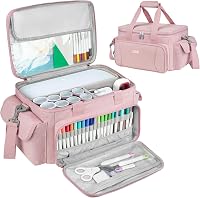
The LEFOR·Z carrying case measures 15 in L x 10 in W x 8.2 in H. Use that case size as a quick check for the room the machine and its storage need on a shelf.
The case has removable dividers that split the main compartment into 3 parts. The top transparent pocket fits Cricut cutting mats at 8.5 in x 12 in, smart vinyl sheets and insert cards.
Bundles: which Joy Xtra box fits your first month
Choose the vinyl starter kit for vinyl-first crafters and the digital content bundle for sticker and drawing projects. The machine is shared; the box contents set the path.
The vinyl starter kit suits decals, mugs, signs and home decor projects that need transfer tape. Its Smart Vinyl sampler and 5-piece tool set help you weed, lift and place a first design.
The digital content bundle suits cards, stickers and drawn designs. Its fine-point pen supports drawing tasks, and its practice materials help you learn the cut flow.
The LOPASA kit suits a crafter who wants to test many materials at once. It includes HTV for T-shirts, tote bags and pillows, plus permanent vinyl for mugs, signs and tumblers.
Our Cricut Joy Xtra reviews page collects the details on the Xtra from the buyer side. Read it next if you want more on the machine before you compare bundles.
For bundle shopping, see the best Cricut Joy Xtra bundle guide and match the box to your first project list. Do not buy extra vinyl until you know the sheet size your machine takes.
Setup, care and daily use: keep mats and tools ready
Keep the mat clean, the blade seated and the tools in their pockets, and most small cutters will stay reliable. Daily habits matter more than a monthly deep clean.
Design Space connects to the machine through a computer, tablet or smartphone. Set up the machine near your work surface so you can load a mat, smooth the material and watch the first pass.
Cricut describes the mat as the interface between the material and the machine. A dirty mat holds material less well, so wipe it as directed and keep dust and small vinyl scraps off the grip.
Store pens, a weeder, a scraper and a trimmer in elastic loops when you travel. The LEFOR·Z case has 20 elastic loops for spatula, weeder, scraper, trimmer, pens and foil transfer tools.
The case is made of tear-resistant polyester and is water resistant, scratch resistant and wear resistant. Cricut backs the Joy Xtra bundles with a 1-year Manufacturer Warranty.
Who should buy the Joy and who should buy the Joy Xtra
Buy the Joy for small, simple projects in a small space; buy the Xtra for stickers, wider layouts and mixed materials. This rule keeps the choice tied to real projects.
Buy the smaller Joy if you cut short vinyl phrases, small decals and simple cards, and if your desk has little spare room. Buy it when cut-only shapes match the work you actually do.
Buy the Joy Xtra if you print stickers, cut cardstock layers or use iron-on HTV. The Xtra also draws and foils, so it fits crafters who want more than cutting in one machine.
A wireless printer is a separate choice from the cutter. Read Is a Wireless Printer Worth the Extra Cost? if you plan to print sticker sheets often and want the printer near your craft desk.
Final verdict on cricut joy vs cricut joy extra
Pick the Joy Xtra for Print Then Cut stickers and wider projects; pick the Joy for compact cut-only craft. In this Cricut Joy vs Cricut Joy Xtra comparison, your project list should make the call.
Choose the Joy Xtra vinyl starter kit if vinyl decals are your first projects. Choose the Joy Xtra digital content bundle if stickers, drawing and bonus images matter more.
Add a padded case if the machine will travel to class, work or a friend's house. Add a sampler kit if you want to test HTV, permanent vinyl and sticker paper without buying each pack alone.
Next, check the Cricut Joy Xtra reviews and the best Cricut Joy Xtra bundle guide, then buy the bundle that matches your first three projects.
Frequently asked questions
Is the Cricut Joy Xtra better than the Cricut Joy for stickers?
For printed stickers, the Joy Xtra is the stronger pick because it supports Print Then Cut with most inkjet printers. You print a full-color design first, then the machine cuts around it.
The smaller Joy suits simple cut files and vinyl decals when full-color printing is not part of the project.
What materials can the Cricut Joy Xtra cut?
Cricut says the Joy Xtra works with 50+ materials, including vinyl, iron-on HTV, cardstock and stickers. It also draws and foils in addition to cutting.
Check the exact material size for your project before you buy sheets, since cutting area and mat size set the practical limit.
Which Joy Xtra bundle should a beginner choose?
Choose the digital content bundle if you want the blade, pen, weeder, practice materials and 30 bonus images. Choose the vinyl starter kit if you want a mat, Smart Vinyl sampler, transfer tape and a 5-piece tool set.
Your first projects decide which bundle saves you the most extra shopping.
Do I need a printer for Cricut Joy Xtra stickers?
You need a compatible inkjet printer for full-color Print Then Cut stickers. The machine cuts the printed design after printing.
If you only cut solid vinyl or cardstock, you can skip printing and use the cut files directly in Design Space.
How should I store a Cricut Joy Xtra?
Store the machine in a padded case when it travels, and keep tools, mats and vinyl in separate pockets. A case with dividers helps stop tools from rubbing the machine.
Set up the case where you craft so you can reach the machine, mat and tools without stacking them on top of each other.