Canon PIXMA G6020 Review: Worth It? (October 2026)
The Canon PIXMA G6020 suits home users who want a refillable inkjet for regular document printing. Its GI-20 bottles are designed for this MegaTank model, while compatible refills need extra care because their black ink is dye-based.
On this page (6 sections)
- Is the Canon PIXMA G6020 a good fit for document printing?
- What does the G6020's refill system mean for everyday use?
- Which GI-20 bottles match the Canon PIXMA G6020?
- How should you choose between genuine and compatible GI-20 ink?
- What should you consider before buying the G6020?
- Is the Canon PIXMA G6020 the right printer for your home?
The Canon PIXMA G6020 is a refillable inkjet for home users who print documents regularly and want bottle-based ink. Its GI-20 system has genuine Canon refills, while compatible bottles offer another option with a dye-based black ink that differs from Canon's pigment black.
The Canon GI-20 Genuine PGBK Ink Bottle is compatible with the G6020 and yields up to 6,000 pages, according to Canon. QIOCKTO's compatible four-color set also fits the G6020, but its black ink is dye-based.
Is the Canon PIXMA G6020 a good fit for document printing?
The G6020 uses refillable GI-20 bottles, including genuine pigment black ink. See Canon pigment ink printers.
Canon says the black bottle yields up to 6,000 pages.
Actual yield varies with print coverage and use. For a broader comparison of tank-style options, see our Best Refillable Ink Tank Printer guide.
If you're choosing between Canon and Epson, our Is Canon Pixma Better Than Epson Ecotank? comparison can help.
What does the G6020's refill system mean for everyday use?
The G6020 is compatible with GI-20 ink bottles, and Canon's genuine bottles have specialized nozzles designed to pour without spills or messes. The black bottle is pigment-based, and the magenta bottle is genuine Canon ink.
Match each bottle to the correct color when refilling. See refill Canon PIXMA G6020 ink.
If you print mostly text, you may use black ink more often, while color bottles are needed for documents with color.
Which GI-20 bottles match the Canon PIXMA G6020?
All three options below are compatible with the G6020. The Canon bottles are genuine, while the QIOCKTO set contains compatible black, cyan, magenta, and yellow ink.
| Ink option | G6020 fit | Stated yield or contents |
|---|---|---|
| Canon GI-20 Genuine PGBK Ink Bottle | Genuine pigment black | Up to 6,000 pages |
| Canon GI-20 Genuine Magenta Ink Bottle | Genuine magenta | Up to 7,700 pages |
| QIOCKTO G6020 G7020 GI-20 Ink Refill Bottles | Compatible four-color set | Black, cyan, magenta, and yellow |
Yields depend on the ink and printing conditions, so the figures don't show whole-printer running costs. Your documents and printing habits affect how often you refill.
Canon GI-20 Genuine PGBK Ink Bottle: Best for pigment black refills
Canon GI-20 Genuine PGBK Ink Bottle: Best for pigment black refills

- Genuine Canon GI-20 pigment black ink
- Compatible with G6020
- Canon says it yields up to 6,000 pages
A direct match for the G6020's GI-20 system when you want genuine pigment black ink. Canon says one bottle yields up to 6,000 pages.
Pros
- Designed for select MegaTank printers
- Purpose-made nozzle for refilling
- Stated yield of up to 6,000 pages
Cons
- Black ink only
- Yield varies with print coverage and use
Canon's genuine pigment black GI-20 bottle is compatible with the G6020 and yields up to 6,000 pages. Its specialized nozzle is designed to help pour ink without spills or messes.
Choose this bottle if you want genuine pigment black ink. It contains black ink only, so color printing requires separate bottles.
Canon GI-20 Genuine Magenta Ink Bottle: Best for genuine magenta refills
Canon GI-20 Genuine Magenta Ink Bottle: Best for genuine magenta refills
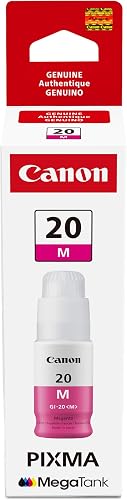
- Genuine Canon GI-20 magenta ink
- Compatible with G6020
- Canon says it yields up to 7,700 pages
This genuine magenta bottle matches the G6020's GI-20 ink system. Canon gives it a yield of up to 7,700 pages.
Pros
- Designed for select MegaTank printers
- Purpose-made nozzle for refilling
- Stated yield of up to 7,700 pages
Cons
- Magenta ink only
- Yield varies with print coverage and use
This genuine magenta bottle is compatible with the G6020 and yields up to 7,700 pages. Its specialized nozzle is designed to help pour ink without spills or messes.
It contains magenta ink only, rather than a complete set. Check which color you need before ordering.
QIOCKTO G6020 G7020 GI-20 Ink Refill Bottles: Best for a four-color compatible set
QIOCKTO G6020 G7020 GI-20 Ink Refill Bottles: Best for a four-color compatible set

- Four bottles: black, cyan, magenta, and yellow
- Compatible with G6020
- Black ink is dye-based
A compatible four-color refill set for G6020 owners considering non-Canon ink. Its black ink is dye-based, unlike the pigment-based OEM black, and QIOCKTO advises against mixing them.
Pros
- Includes all four ink colors
- Compatible with G6020
- QIOCKTO states yields for black and color bottles
Cons
- Black ink differs from OEM pigment ink
- QIOCKTO advises cleaning the printhead before use
QIOCKTO's compatible set includes black, cyan, magenta, and yellow bottles for the G6020. QIOCKTO says its black ink is dye-based, while OEM black ink is pigment-based, and advises against mixing them because it may affect printer performance and print quality.
QIOCKTO also recommends cleaning the printhead before using its ink. Follow that guidance as you prepare to refill.
How should you choose between genuine and compatible GI-20 ink?
Choose genuine Canon bottles if you want genuine Canon ink, including pigment black. The Canon magenta bottle is also a genuine GI-20 refill.
QIOCKTO's compatible set may suit you if you want all four colors together. Its black ink is dye-based, so follow QIOCKTO's advice about not mixing it with OEM pigment black and cleaning the printhead before use.
For a different refillable printer brand, compare the G6020 with Best Brother INKvestment Printers and Best HP Smart Tank Printers.
What should you consider before buying the G6020?
The product data here supports the G6020's compatibility with GI-20 bottles, but doesn't guarantee its document quality, print speed, paper capacity, or wireless features. Check Canon's specifications for those printer details before deciding.
If photos matter as much as documents, compare it with our Best Canon Pixma Printer For Photos guide. For a broader home-use comparison, see Best Canon Pixma Printer For Home Use.
Is the Canon PIXMA G6020 the right printer for your home?
The G6020 is compatible with genuine Canon GI-20 bottles and QIOCKTO's four-color compatible set. Choose the Canon black bottle if you want pigment black ink; consider QIOCKTO if its dye-based black and preparation instructions fit your refill plan.
See Canon PIXMA TS7720 review.
Frequently asked questions
Is the Canon PIXMA G6020 a refillable printer?
Yes. The PIXMA G6020 uses refillable GI-20 ink bottles, including pigment black and color inks.
Canon's genuine GI-20 bottles are designed for select MegaTank printers, including the G6020.
Check the bottle and printer compatibility before refilling, especially if you are considering third-party ink.
What ink does the Canon PIXMA G6020 use?
The G6020 uses Canon GI-20 ink bottles. Canon's genuine pigment black and magenta bottles are compatible with the G6020; the black bottle has a stated yield of up to 6,000 pages and the magenta bottle up to 7,700 pages.
Actual yield depends on coverage and use.
Can I use compatible GI-20 ink in a G6020?
A compatible refill set is available for the G6020, but check the ink type and instructions before using it. QIOCKTO says its black ink is dye-based while OEM black ink is pigment-based, and advises against mixing them.
It also recommends cleaning the printhead before using its ink.
Is the Canon PIXMA G6020 a good choice for documents?
The G6020 is worth considering if you print documents regularly and want a refillable ink system. Its genuine GI-20 pigment black bottle is made for select MegaTank printers and has a stated yield of up to 6,000 pages.
Compare it with other tank printers if your print volume or color needs differ.