Epson EcoTank vs HP Smart Tank: Which Should You Choose? (November 2026)
Choose Epson EcoTank when you want a broad range of refillable printers, including wide-format and photo models. Choose HP Smart Tank when its workflow and features match your home or office needs.
On this page (8 sections)
- Epson EcoTank vs HP Smart Tank: which is better?
- How do Epson EcoTank and HP Smart Tank ink systems compare?
- Which printer is best for a basic home office?
- Which option suits a busy home office?
- Is HP Smart Tank or Epson EcoTank better for photos?
- Should you consider Canon instead of both brands?
- What should you check before choosing a refillable printer?
- Which Epson EcoTank or HP Smart Tank should you choose?
Choose Epson EcoTank for the wider range of refillable printer choices, including basic home, wide-format and photo models. HP Smart Tank can be a good fit when a specific HP model offers the size, controls and functions you need.
Epson EcoTank and HP Smart Tank printers use refillable ink tanks instead of the traditional cartridge approach. That can reduce how often you replace ink, but the best choice still depends on your print volume, paper sizes and need for scanning or copying.
This comparison focuses on the platform decision first, then shows how the available Epson and Canon models fit different buyers.
 Best for basic home printing
Epson EcoTank ET-2800 Wireless Color All-in-One Supertank
 Best for wide-format home offices
Epson EcoTank ET-15000 Wireless All-in-One Wide-Format Supertank
Epson EcoTank vs HP Smart Tank: which is better?
Epson EcoTank is the stronger choice when you want more model variety across home, office and photo printing. HP Smart Tank deserves a closer look when a particular HP model matches your space and daily workflow better.
The phrase “Epson EcoTank vs HP Smart Tank” compares printer families, not 2 identical machines. Each brand sells models with different speeds, paper handling, controls and extra functions.
Start with the job you do most. A home printer for school pages has different needs from a printer for wide-format documents or borderless photo projects.
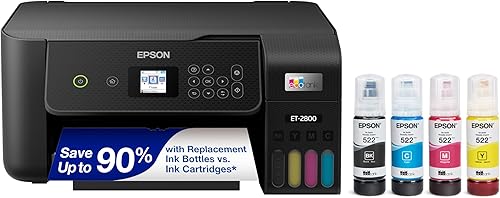
The Epson EcoTank ET-2800 is the simplest fit in this group. It combines wireless color printing, flatbed scanning and copying, with a maximum media size of 8.5 x 14 in.
The Epson EcoTank ET-15000 moves into office use. It adds faxing, automatic duplex printing, Ethernet and support for media up to 11 x 17 in.
The Epson EcoTank Photo ET-8550 targets photos and creative work. Its 6-color Claria ET Premium ink system and 13 x 19 in maximum media size make it a different type of choice from a basic Smart Tank or EcoTank document printer.
How do Epson EcoTank and HP Smart Tank ink systems compare?
Both platforms are designed around refillable ink tanks, so you should compare bottle access, ink colors and your expected print mix. The tank design matters most when you print often enough to use the ink before long storage becomes an issue.
The ET-2800 includes black, cyan, magenta and yellow ink bottles. Epson says its included ink can support up to 4,500 black pages and 7,500 color pages, based on the stated conditions.
The ET-15000 uses Epson Genuine Ink and EcoFit ink bottles. Its included media lists 1 bottle of black ink and 1 bottle each of cyan, magenta and yellow.
The ET-8550 uses 6-color Claria ET Premium inks. Its included bottles cover photo black, black, cyan, magenta, yellow and gray.
That difference matters for photos. A standard 4-color tank system can be a sensible choice for documents and everyday color, while a 6-color photo system is built around a different print goal.
Epson strongly recommends genuine ink for its EcoTank models. Follow the exact printer instructions when filling tanks, and avoid choosing replacement ink only by bottle shape or color name.
For another refillable platform comparison, read our guide to Epson EcoTank vs Canon MegaTank.
Which printer is best for a basic home office?
The Epson EcoTank ET-2800 is the best fit here for basic home printing, scanning and copying. It has wireless connectivity, a compact all-in-one design and refillable tanks for households that print color documents regularly.
Its stated dimensions are 22.8 x 10 x 14.8 in, and it weighs 11.4 lb. It prints black pages at up to 10 pages per minute and color pages at up to 5 pages per minute.
The ET-2800 uses simplex printing, so it is not the choice for automatic two-sided pages. It does include USB hardware, Wi-Fi, an app control method and an LCD display.
Its flatbed scanner and copier make it more useful than a print-only machine for school forms, household documents and occasional image copying. The main trade-off is that it does not offer the wider paper handling or automatic duplexing found in the ET-15000.
If your needs are limited to home documents, use our guide to How Much Should I Budget for a Home Office Printer? before paying for office or photo features you will not use.
Which option suits a busy home office?
The Epson EcoTank ET-15000 is the better match for a busy home office that needs wide-format output and automatic duplex printing. Its larger size makes sense only when those features solve a real weekly task.
The ET-15000 measures 29.6 x 19.6 x 14.3 in and weighs 26.5 lb. It prints black pages at up to 17 pages per minute and color pages at up to 9 pages per minute.
It supports printing, faxing, copying and scanning. Its maximum media size is 11 x 17 in, and its connection choices include USB 2.0, LAN and Wi-Fi.
The ET-15000 is a poor fit for a small desk if you only print a few pages each week. Measure the cabinet, the paper-loading area and the route through your home before choosing a larger all-in-one.
Wide-format printing also requires the right paper and a place to store it flat. Its larger feature set does not automatically make it better for simple black-and-white forms.
Is HP Smart Tank or Epson EcoTank better for photos?
A photo-focused Epson EcoTank is the clearest choice in this group for refillable photo printing. The ET-8550 supports up to 13 x 19 in media and uses 6-color Claria ET Premium inks for photos, graphics and creative work.
The ET-8550 measures 29.8 x 20.6 x 16.9 in and weighs 24.5 lb. It prints black pages at up to 16 pages per minute and color pages at up to 12 pages per minute.
It supports wireless control through an app and touch interface, plus USB. Automatic duplex printing, scanning and copying make it more flexible than a photo-only printer.
The ET-8550 is not the sensible choice for every home. Its 13 x 19 in capability and photo ink system add value only if you print photos, artwork or larger creative pieces often enough to justify the space.
For a closer photo-focused comparison, see Best Epson Ecotank Printer For Photos. If your main need is everyday family printing, Best Epson Ecotank Printer For Home Use is a better next step.
Should you consider Canon instead of both brands?
The Canon MegaTank G3270 is worth considering if you want a refillable alternative outside the Epson EcoTank and HP Smart Tank families. It provides wireless printing, copying and scanning in an all-in-one design.
The G3270 measures 21.9 x 16.4 x 10.6 in and weighs 13.2 lb. Its stated speeds are up to 11 black pages per minute and 6 color pages per minute.
Canon states that one ink set can print up to 6,000 black and white pages or 7,700 color pages under its stated conditions. The printer includes a 1.35 in square LCD display and uses single-sided printing.
That makes the G3270 a useful middle option for home users who want refillable color printing without moving to the wider paper handling of the ET-15000 or the photo focus of the ET-8550.
What should you check before choosing a refillable printer?
Choose by paper size, automatic duplexing, connection type and print purpose before comparing brand names. These details affect daily use more than the EcoTank or Smart Tank label.
Check whether you need:
- Automatic two-sided printing for longer documents.
- A flatbed scanner, copier or fax function.
- Wi-Fi only, USB, Ethernet or LAN access.
- Standard pages or media larger than 8.5 x 11 in.
- Everyday color or a photo-focused ink system.
- A compact cabinet or a larger office printer.
A wireless printer is useful when several devices need access, but Wi-Fi does not remove the need for a suitable setup. Keep the printer within reach of its controls, paper and ink bottles.
Ink tanks also change the refill routine. Keep bottles upright, use the correct color in each tank and follow the model's setup instructions.
Do not refill from an unmarked container.
The What Is the Cheapest Printer to Own Long Term? guide can help you compare refillable ink use with the wider ownership picture.
Which Epson EcoTank or HP Smart Tank should you choose?
Pick Epson EcoTank if you want the broadest choice in this comparison. Choose the ET-2800 for basic wireless home printing, the ET-15000 for wide-format office work and the ET-8550 for refillable photo output.
Choose HP Smart Tank when a specific HP model fits your desk, connection needs and print routine better than the Epson models you are considering. Compare the exact specifications, not only the brand family.
The Canon MegaTank G3270 is the alternative when you want a refillable all-in-one outside both brands. For current options, our guide to Best Inkjet Printer Deals can help you compare models before you decide.
The simplest rule is clear: choose by the work you print most often, then confirm the tank system, paper size and maintenance steps for that exact model.
Frequently asked questions
Is Epson EcoTank better than HP Smart Tank?
Epson EcoTank is the better fit when you want more choice across basic home, wide-format and photo printing. HP Smart Tank may suit you if its model has the features, size and connection options you need.
Compare the exact printer rather than choosing only by brand.
What is the difference between Epson EcoTank and HP Smart Tank?
Both are refillable ink tank printer families designed to reduce reliance on traditional cartridges. The meaningful differences depend on the exact model, including print speed, automatic duplexing, maximum paper size, scanning functions, wireless controls and the ink system used.
Is an Epson EcoTank good for home use?
An Epson EcoTank can suit home use when you print often enough to benefit from refillable tanks and also need color printing, scanning or copying. The ET-2800 is aimed at basic home tasks, while the ET-15000 and ET-8550 fit wider paper or photo needs.
Should you buy an ink tank printer for occasional printing?
Buy an ink tank printer for occasional printing only if its refillable design and all-in-one features still match your needs. If you print very rarely, compare setup, maintenance and purchase cost with a simpler printer before choosing a tank platform.