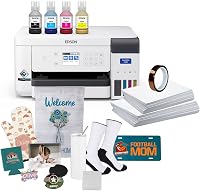
How to Use Sawgrass SG500 with an HTVRONT Phone Maker
Use the Sawgrass SG500 to print a mirrored sublimation transfer on coated paper, then align and press it on an HTVRONT phone case. Correct paper, ink, temperature, pressure, and cooling steps help protect the design.
On this page (9 sections)
- What do you need for HTVRONT phone maker printing with Sawgrass SG500?
- How do you prepare the Sawgrass SG500 design?
- How do you prepare an HTVRONT phone case for pressing?
- What heat and pressure should you use?
- How do you avoid blurred or ghosted phone case prints?
- Do respirators help during phone case pressing?
- Can you print phone case designs without a computer?
- What should you check after pressing?
- What is the best workflow for HTVRONT phone maker printing with Sawgrass SG500?
Use the Sawgrass SG500 to print a mirrored sublimation transfer, then place the transfer against a compatible coated phone case in the HTVRONT phone maker. Apply the correct heat, pressure, and time from the case and press instructions, then let the case cool before removing the paper.
The basic workflow is simple: prepare the artwork, print it with sublimation ink, trim the transfer, align it carefully, press it, and inspect the result. The case surface matters as much as the printer because sublimation needs a suitable coating to accept the dye.
If you're still choosing a machine, our guide to What Can You Make with a Sublimation Printer? covers phone cases and other common projects.
What do you need for HTVRONT phone maker printing with Sawgrass SG500?
You need a Sawgrass SG500, sublimation ink, sublimation paper, a compatible HTVRONT phone case blank, heat-resistant tape, and the HTVRONT phone maker. Keep a lint-free cloth nearby so dust and loose fibers don't get trapped under the transfer.
The phone case should be white or light colored and have a suitable sublimation coating. A dark or uncoated case will not produce the same result because sublimation ink needs a light surface and a receptive coating.
Choose artwork that fits the printable area. Leave enough room to trim the paper without cutting into important parts of the design.
For more project ideas, see Best Sublimation Printer For Phone Cases, Best Sublimation Printer For Coasters, and Best Sublimation Printer For Crafting.
How do you prepare the Sawgrass SG500 design?
Prepare the design at the size of the phone case insert or pressing area, then mirror the artwork before printing. Mirroring is essential for words, numbers, logos, and any image with a clear left and right direction.
Use the color settings recommended for your Sawgrass workflow and select sublimation paper as the print media when that option is available. Avoid resizing the design after printing because even a small change can affect alignment.
Print one test transfer on inexpensive sublimation paper if the design contains small text or narrow borders. A test helps you check orientation and scale before using the case blank.
Do not use regular ink with sublimation paper. The A-SUB paper is intended for sublimation ink and is not designed for ordinary ink.
Which sublimation paper suits phone case transfers?
The A-SUB Sublimation Paper 8.5x11 Inch 110 Sheets gives you 8.5 x 11 in sheets for common phone case artwork. It is a coated paper with a 125g title weight and is described for phone cases, metal plates, coated mugs, tumblers, ceramic, tile, and white or light colored high-quality polyester.
The paper is useful when your design fits within a letter-size sheet. Place it correctly in the Sawgrass SG500 so the printable side receives the ink, and confirm the printer's paper path before making a full batch.
Trim close to the artwork while leaving a small paper margin for handling. Keep the printed surface clean and avoid folding the transfer because creases can affect contact during pressing.
How do you prepare an HTVRONT phone case for pressing?
Prepare the phone case by removing dust, checking the coating, and confirming that the printed design fits the case shape. If the case has a separate insert or pressing surface, use the phone maker's instructions for how it sits in the equipment.
Place the printed side of the transfer against the case's coated surface. Secure the paper with heat-resistant tape so it cannot shift while the press closes.
Do not place tape over important parts of the artwork. Tape should hold the edges while leaving the design area flat against the case.
Check the case edges before pressing. A transfer that extends too far can leave unwanted color outside the intended area.
If you plan to make several cases, label each transfer before trimming. This prevents the wrong design from being paired with the wrong phone case.
What heat and pressure should you use?
Use the temperature, time, and pressure recommended for the specific HTVRONT phone maker and case blank. These settings can vary by case coating, blank construction, and equipment, so one universal setting is not reliable.
Place the case and transfer in the correct position, close the press evenly, and keep the case still during the cycle. Uneven pressure or movement can cause pale areas, ghosting, or blurred edges.
Avoid guessing if the result looks weak after the first press. Check the case instructions, confirm the transfer was mirrored, and verify that the printed side touched the coated surface.
Never touch the case immediately after pressing. Use appropriate heat protection and allow the case to cool according to the equipment instructions.
How do you avoid blurred or ghosted phone case prints?
Prevent ghosting by taping the transfer securely and keeping the case flat during pressing. Ghosting often happens when the paper moves as the press opens or when the case is handled too soon.
Prevent pale areas by checking that the printed design covers the full pressing surface. Wrinkles, dust, trapped air, and uneven contact can all leave gaps in the image.
Keep the transfer dry and flat before use. Store unused paper in its package and avoid handling the coated side more than necessary.
If colors look wrong, check the Sawgrass SG500 color workflow and confirm that sublimation ink is installed. Do not judge the final color from the paper alone because sublimation ink changes as it transfers into the coating.
Do respirators help during phone case pressing?
Respiratory protection should not replace ventilation, safe heat-press operation, or the instructions for the case and ink. If your workspace involves industrial contaminants, use only protection selected for those specific hazards.
The 3M Half Facepiece Reusable Respirator is a large, gray 3M 6300 half facepiece made from thermoplastic elastomers. It is NIOSH-approved for use with approved 3M cartridges, filters, or supplied air systems, and it can be disassembled, cleaned, and reused.
The 6300 uses bayonet connection cartridges and filters, including 3M 6000 Series Gas/Vapor Cartridges and 3M Particle Filters 2000, 2200, 7000, or 5000 Series. It is intended for industrial or occupational use only, not consumer sale or use.
The 3M P100 Respirator Cartridge/Filter is a 60923 1-pair set with a bayonet connection. It is NIOSH approved against certain organic vapors, acid gases, and non-oil and oil particulates.
This cartridge and filter works with 3M Half and Full Face Pieces 6000, 7000, and FF-400 Series with a bayonet-style connection. It is also listed for certain 3M Scott facepieces with the specified adapter.
Neither product should be treated as general protection for every sublimation workspace. Follow the relevant safety instructions, maintain ventilation, and use respiratory equipment only for hazards covered by its approval and fit requirements.
Can you print phone case designs without a computer?
A computer is usually the simplest way to prepare, mirror, size, and send artwork to the Sawgrass SG500. If you want a mobile workflow, read Can You Print without a Computer Using a Phone? before choosing your setup.
A phone may help you create or store artwork, but the exact transfer process depends on the printer software and connection method. Confirm that the file reaches the printer at the intended size and orientation.
A small test print is useful when moving between phone and computer workflows. It can reveal a mirrored-image or scaling error before you press the phone case.
What should you check after pressing?
Check the design for complete coverage, readable text, clean edges, and unwanted marks. Let the case cool before removing the transfer, then peel the paper slowly from one corner.
If the image is pale, inspect the paper type, ink choice, case coating, temperature, time, and pressure. If the image is blurred, focus on transfer movement and alignment.
Record the settings that work for a particular case blank and phone maker. Use that record as a starting point for the next batch, but confirm the blank's instructions before repeating the cycle.
For related craft workflows, Can You Print Labels without a Label Maker? explains how printer-based projects differ from sublimation case pressing.
What is the best workflow for HTVRONT phone maker printing with Sawgrass SG500?
The best workflow is to use sublimation ink, mirror and size the design, print on suitable coated paper, secure the transfer, follow the HTVRONT settings, and cool the case before peeling.
Choose A-SUB paper when you need letter-size coated sheets for phone case transfers. Choose the 3M respirator products only when your work setting and the equipment approvals call for that type of industrial respiratory protection.
Measure the case area before printing, keep the transfer still during pressing, and check the finished design after cooling. Those steps address the most common problems without guessing at settings that belong to a specific phone maker or blank.
Frequently asked questions
Can a Sawgrass SG500 print transfers for an HTVRONT phone maker?
Yes, a Sawgrass SG500 can prepare sublimation transfers for phone case pressing when you use sublimation ink, suitable sublimation paper, and a compatible coated case. Check the phone maker's case size, pressing temperature, pressure, and timing instructions before starting.
Should you mirror a phone case design before printing?
Yes, mirror the design before printing the transfer. The printed side faces the coated phone case during pressing, so mirroring keeps text, logos, and directional artwork readable after the image moves onto the case.
What paper works with a Sawgrass SG500 for phone cases?
Use paper made for sublimation ink, not standard printer paper. A-SUB Sublimation Paper 8.5x11 Inch 110 Sheets is designed for sublimation printing and lists phone cases and metal plates among its uses when the surface is suitable.
Do you need ventilation for sublimation phone case pressing?
Use good ventilation and follow the instructions for your heat press, phone maker, inks, and case materials. A respirator is not a replacement for ventilation.
If you use respiratory protection for an industrial setting, choose equipment and cartridges approved for the specific contaminants and follow its instructions.