5 Best Laser Printers with Two Paper Trays (November 2026)
The best laser printers with two paper trays include the Brother HL-L5210DWT Business Monochrome Laser Printer for most two-tray offices, the Brother HL-L6210DWT Business Monochrome Laser Printer for high-volume paper handling, and the Brother HL-L2405W Wireless Compact Monochrome Laser Printer (best compact option for one main stock).
On this page (6 sections)
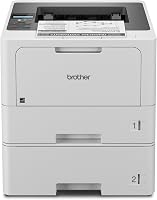
The best laser printer with two trays is the Brother HL-L5210DWT. Its 250-sheet and 520-sheet trays let you keep two regular paper stocks loaded, while automatic duplex printing, wireless networking, Gigabit Ethernet, and output up to 48 pages per minute fit busy office work.
A two-tray laser printer is useful when your document jobs change often. Keep plain paper in one tray and legal paper, letterhead, or another regular stock in the second so you can switch jobs without unloading the printer.
The highest-capacity pick is the Brother HL-L6210DWT, with two 520-sheet trays and output up to 50 pages per minute. The Brother HL-L2405W is smaller, but it has one 250-sheet tray and a manual feed slot rather than two permanently loaded trays.
If you're still weighing the workflow, read Is It Worth Buying a Printer with Two Paper Trays? before choosing a larger office model.
Our picks at a glance
-
1
 Best for most two-tray offices
Brother HL-L5210DWT Business Monochrome Laser Printer
9.7/10 our score
See it on Amazon -
2
 Best for high-volume paper handling
Brother HL-L6210DWT Business Monochrome Laser Printer
9.6/10 our score
See it on Amazon -
3
 Best compact option for one main stock
Brother HL-L2405W Wireless Compact Monochrome Laser Printer
9.5/10 our score
See it on Amazon
The best laser printer with two trays for each workflow
The Brother HL-L5210DWT is the best overall fit for most two-tray buyers because its paper capacity, speed, automatic duplexing, and network options cover common office needs. The other picks make more sense when you need higher capacity, a smaller body, or scanning and copying.
Brother HL-L5210DWT Business Monochrome Laser Printer: Best for most two-tray offices
- 48 pages per minute
- 250-sheet and 520-sheet trays
- 100-sheet multipurpose tray
- Automatic duplex printing
- Wireless and Gigabit Ethernet networking
The HL-L5210DWT gives busy offices two main paper trays plus a multipurpose tray for custom media or envelopes. Its 48-page-per-minute speed, wireless networking, Gigabit Ethernet, and mobile printing suit shared workgroups.
Pros
- Two different paper stocks can stay loaded
- Fast 48-page-per-minute output
- Automatic duplex printing
- Wired and wireless networking
Cons
- Print-only design
- Larger and heavier than the compact pick
The Brother HL-L5210DWT is the best laser printer with two trays for a shared office that uses different paper stocks throughout the day. The 250-sheet tray and 520-sheet tray can hold separate regular stocks, while the 100-sheet multipurpose tray handles custom media or envelopes.
Its output reaches 48 pages per minute, and automatic duplex printing helps reduce paper use for two-sided documents. The printer supports dual-band wireless networking, Gigabit Ethernet, USB 2.0, and mobile printing, so it can fit either a wired office network or a wireless workgroup.
The printer is 15.3 in deep, 14.7 in wide, and 15.3 in high, with a listed weight of 32.7 lb. Plan a stable location with enough room to open trays and load paper without blocking nearby equipment.
Brother includes a 3,000-page toner cartridge. The printer is compatible with TN920, TN920XL, TN920LX2PK, TN920XXL, and TN920UXLL toner cartridges, plus the DR920 drum unit.
Choose this model when you want two regular trays and a strong balance of speed and capacity. For a higher-volume office, compare it with the best dual tray laser printer for notary work.
Brother HL-L6210DWT Business Monochrome Laser Printer: Best for high-volume paper handling
- 50 pages per minute
- Two 520-sheet paper trays
- 100-sheet multipurpose tray
- Automatic duplex printing
- Expandable capacity up to 1,660 sheets
The HL-L6210DWT is the strongest choice when two large paper trays matter more than a smaller footprint. It adds 50-page-per-minute output and expandable capacity for demanding offices.
Pros
- Largest standard tray capacity here
- Fastest print speed here
- Automatic duplex printing
- Gigabit Ethernet and dual-band wireless
Cons
- Print-only design
- Heavier and taller than the HL-L5210DWT
The Brother HL-L6210DWT is the best laser printer with two trays for higher-volume work because both standard trays hold 520 sheets. Its 100-sheet multipurpose tray adds room for custom media or envelopes, and total capacity can expand up to 1,660 sheets with an optional tray.
It prints at up to 50 pages per minute, the fastest rate among these picks. Automatic duplex printing supports two-sided office documents, while dual-band wireless networking, Gigabit Ethernet, and USB 2.0 give you several connection choices.
The printer measures 15.3 in deep, 14.7 in wide, and 16.6 in high, and weighs 35.4 lb. Its maximum media size is 8.5 x 14 in, which makes it a practical match for offices that switch between letter and legal documents.
Brother includes a 3,000-page toner cartridge. The printer uses the TN920UXXL ultra high-yield replacement toner cartridge for 18,000 pages.
Pick this model when avoiding refills matters more than keeping the printer compact. Its larger trays are especially useful for offices with repeated document batches and several users.
Brother HL-L2405W Wireless Compact Monochrome Laser Printer: Best compact option for one main stock
- 30 pages per minute
- 250-sheet paper tray
- Manual feed slot
- Dual-band wireless
- Mobile printing
The HL-L2405W is a compact monochrome printer with one main tray and a manual feed slot for envelopes or specialty paper. It belongs in this comparison as a space-saving alternative when two permanently loaded trays are not essential.
Pros
- Compact 14.2 x 14 x 7.2 in size
- 30-page-per-minute output
- Dual-band wireless
- Mobile printing
Cons
- Not a true dual-tray printer
- Manual rather than automatic duplex printing
The Brother HL-L2405W is the best compact alternative when you need simple monochrome printing but do not need two full trays. Its 250-sheet paper tray handles everyday jobs, while the manual feed slot supports envelopes and specialty paper one job at a time.
This model reaches 30 pages per minute for one-sided documents. Its compact body measures 14.2 in deep, 14 in wide, and 7.2 in high, with a weight of 15.1 lb, so it is easier to place on a smaller desk than the business models.
Dual-band wireless lets you connect multiple devices, and USB provides a local connection to one computer. Mobile printing works through the Brother Mobile Connect app, which can also track toner use and order Brother Genuine supplies.
Duplex printing is manual rather than automatic. That difference matters if you regularly create long two-sided reports, but it may be acceptable for occasional home-office printing.
Choose it when desk space and a simple setup matter more than keeping two paper stocks loaded. It is not the right choice if your main reason for shopping is automatic switching between two regular trays.
HP LaserJet Pro 3101fdw: Best for small-team multifunction work

- Print, scan, copy, and fax
- 35 black-and-white pages per minute
- Automatic duplex printing
- Automatic document feeder
- Wi-Fi, Ethernet, and Bluetooth
The HP LaserJet Pro 3101fdw is a multifunction choice for small teams that need scanning, copying, and faxing with monochrome printing. Its automatic document feeder and automatic duplex printing support document workflows, although the data does not describe two paper trays.
Pros
- Print, scan, copy, and fax in one unit
- Automatic document feeder
- Automatic duplex printing
- Wi-Fi, Ethernet, and Bluetooth
Cons
- Two-tray capacity is not specified
- Letter is the stated maximum media size
The HP LaserJet Pro 3101fdw is the best fit when your small team needs more than printing. It prints, scans, copies, and faxes, and its automatic document feeder helps with multi-page scan and copy jobs.
Black-and-white output reaches 35 pages per minute for single-sided printing. Automatic duplex printing supports two-sided documents, while intelligent Wi-Fi, Ethernet, and Bluetooth provide several connection options.
HP lists support for wireless printing from mobile devices, PCs, and tablets. The printer also works with Microsoft, Mac, AirPrint, Android, and Chromebook devices.
Its dimensions are 16.5 in deep, 12.3 in wide, and 15.7 in high, with a listed weight of 10.5 kg. The maximum media size is letter, so check your paper needs carefully if your office uses legal documents.
The data does not specify two permanently loaded paper trays. Choose this model for its multifunction workflow, not as a direct replacement for a dual-tray office printer.
Canon imageCLASS MF273dw: Best for compact scanning and copying
- Print, copy, and scan
- 30 pages per minute
- Automatic document feeder
- Automatic duplex printing
- Wireless monochrome printing
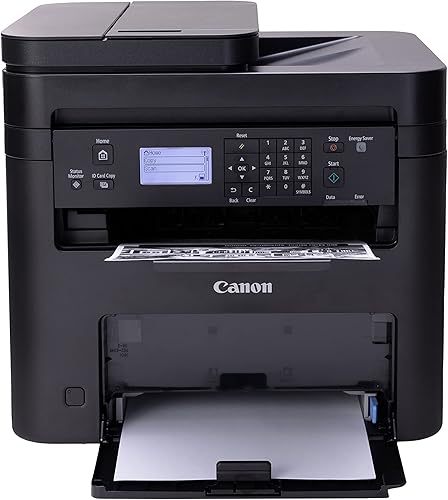
The Canon imageCLASS MF273dw combines monochrome printing with scanning and copying in a compact multifunction design. It supports automatic duplex printing and legal-size media, but its data does not specify two permanently loaded paper trays.
Pros
- Print, copy, and scan
- Automatic document feeder
- Automatic duplex printing
- 8.5 x 14 in maximum media size
Cons
- Two-tray capacity is not specified
- 30-page-per-minute output
The Canon imageCLASS MF273dw is the best compact option when scanning and copying belong in the same machine as monochrome printing. If you need color from a compact laser, compare compact color laser printers.
It is a wireless 3-in-1 printer with print, copy, and scan functions, plus an automatic document feeder.
Output reaches 30 pages per minute, and the first print takes about 5.3 seconds for a letter page. Automatic two-sided printing helps with routine reports, forms, and other double-sided documents.
The Canon measures 14.6 in deep, 15.4 in wide, and 14.4 in high, and weighs 24.7 lb. Its maximum media size is 8.5 x 14 in, giving it more flexibility for legal-size paper than the HP model.
It uses Toner 071 or 071 High-Capacity Toner. The included media is a black Cartridge 071 starter cartridge with a 700-page yield, along with documentation and a power cord.
The data does not specify two regular paper trays. Choose the MF273dw when multifunction features and legal-size support are more important than permanently loading two paper stocks.
How we compared two tray laser printers
We compared tray layout, paper capacity, print speed, duplex printing, connectivity, media size, and whether each model adds scanning or copying. Our score weighs specs, features, and buyer feedback against the needs of someone shopping for a laser printer with two trays.
Tray layout came first because the whole point of this category is keeping more than one regular stock ready. A printer with two loaded trays can switch between jobs in the print dialog, while a single tray plus a manual slot needs someone at the machine for specialty media.
Paper capacity mattered next, since larger trays mean fewer interruptions during a busy day. We looked at standard capacity, multipurpose capacity, and whether the total can expand with an optional tray.
The Brother HL-L5210DWT and HL-L6210DWT are the only two models here with clearly described dual regular trays. The HL-L5210DWT uses one 250-sheet tray and one 520-sheet tray, while the HL-L6210DWT uses two 520-sheet trays.
The Brother HL-L2405W has a 250-sheet tray and a manual feed slot. That layout works for occasional specialty paper, but it does not provide the same fast switching as two loaded regular trays.
The HP LaserJet Pro 3101fdw and Canon imageCLASS MF273dw are included for buyers who may need a multifunction printer. Neither product's data specifies two regular paper trays, so treat them as workflow alternatives rather than direct dual-tray matches.
Speed, duplexing, and connectivity shaped the rest of the comparison. Automatic duplex printing saves paper on two-sided reports, while wired and wireless options determine how easily several people can share the printer.
What should you keep in each paper tray?
Keep the paper you use most in the larger tray and reserve the second tray for a regular alternate stock. For many offices, that means plain letter paper in one tray and legal paper or letterhead in the other.
Use the multipurpose tray for envelopes or custom media when the printer provides one. The Brother HL-L5210DWT and HL-L6210DWT each include a 100-sheet multipurpose tray for that purpose.
Check the paper size and media type in the print dialog before sending a job. A correctly loaded tray still needs the document settings to match the paper you want the printer to select.
Paper handling also depends on the stock itself. Read Can I Use Inkjet Paper In A Laser Printer? and Can You Use Inkjet Paper In A Laser Printer? before placing inkjet-only paper into a laser printer.
Is a two-tray laser printer worth the larger footprint?
A two-tray laser printer is worth the extra space when you switch paper stocks several times each week. It also helps when refilling interrupts work or several people share one machine.
Think about how often you change paper now. If you load letter paper for most jobs, then swap in legal paper or letterhead a few times a week, two trays can remove that repeated task.
It helps too when users need different stocks. One person may send standard documents all day, while another needs a different stock for forms or reports.
A smaller single-tray printer can still be the better choice when you mainly use one paper size. The HL-L2405W takes less space and provides a manual feed slot for occasional envelopes or specialty paper.
That compact design suits a home office, a small desk, or light use. The trade-off is switching speed, since you cannot keep two regular stocks loaded and ready at the same time.
Multifunction models can also make better use of desk space if you need scanning and copying. The HP LaserJet Pro 3101fdw and Canon imageCLASS MF273dw combine those functions with monochrome printing, though their two-tray capacity is not specified here.
For a small team, one machine that prints, scans, and copies may save more space than a print-only printer plus separate devices. Still, measure the space for the printer, the trays, and the paper you will load before you buy.
Duplex printing is another part of the value question. Automatic duplexing helps on longer two-sided documents, while manual duplexing asks you to turn pages and resend the job.
If your work is mostly short documents, manual duplexing may be a minor cost. If you print long reports often, automatic duplexing will save time and paper.
Capacity also affects how often you visit the printer. Larger trays reduce refill trips, which can matter when several users share one machine.
Label each tray by size and type to prevent mismatched jobs and reduce wasted pages. In short, two trays pay off when switching and volume are regular parts of your work, while a compact printer or multifunction model may fit better if you use one stock.
How do you choose between letter and legal paper support?
Choose a printer that lists 8.5 x 14 in support if legal documents are part of your regular workflow. The Brother HL-L6210DWT and Canon imageCLASS MF273dw list that maximum media size, while the HP LaserJet Pro 3101fdw lists letter as its maximum.
That stated maximum is the first filter. A printer listed for letter only may handle standard office paper well, but it is not the safe pick when legal-size pages are routine.
Legal support matters most when you switch between letter and legal documents during the same week. In that case, the printer needs to accept both sizes without forcing you to move paper for every job.
Tray support still matters after the printer accepts the size. Confirm which tray can hold the paper and whether the printer can select it automatically for the jobs you send.
A multipurpose tray can help with occasional legal pages, but it is not the same as a regular tray loaded for daily use. Someone still needs to load it, set the size, and check the output.
For regular legal work, a dedicated tray is easier to manage. You can load the stock once, label the tray clearly, and select it from the print dialog when needed.
Paper settings in the print dialog need to match the loaded stock. If the document asks for legal paper while the tray holds letter paper, the job may fail or produce the wrong output.
Media size also affects storage and loading. Legal paper is longer than letter paper, so trays need enough depth and guides need to be adjusted correctly.
Store legal and letter stocks separately and keep them flat. Load only the amount the tray can hold properly.
For more options, use this guide to the best printer for legal size paper. It can help you compare legal-paper handling separately from tray count.
Use that guide if legal support is your main priority and tray count is secondary. Use this roundup if keeping two regular stocks loaded matters more.
The best choice depends on frequency. Occasional legal pages can go through a manual or multipurpose slot, while regular legal work deserves a printer and tray built for that size.
Best laser printer with two trays: final picks
Choose the Brother HL-L5210DWT if you want the best balance of dual-tray capacity, fast output, automatic duplexing, and network flexibility. It pairs a 250-sheet tray with a 520-sheet tray and adds a 100-sheet multipurpose tray.
That mix suits most offices that switch between regular stocks. You can keep everyday paper in the larger tray and a second stock in the smaller tray.
Its automatic duplex printing helps with two-sided documents, and Gigabit Ethernet or dual-band wireless makes sharing easier. Mobile printing adds another option for phones and tablets.
Choose the HL-L6210DWT if two 520-sheet trays and higher capacity are the main priorities. Its total capacity can expand up to 1,660 sheets with an optional tray.
That larger layout suits higher-volume work where refills interrupt the day. It is also the stronger pick when two large trays matter more than a smaller footprint.
Pick the HL-L2405W only when compact size matters more than two permanently loaded trays. It has a 250-sheet tray and a manual feed slot for envelopes or specialty paper.
That design fits a home office or small desk where one main stock covers most jobs. Manual duplex printing is the main trade-off for long two-sided documents.
Choose the HP LaserJet Pro 3101fdw or Canon imageCLASS MF273dw when scanning and copying are central to the workflow. Both combine monochrome printing with multifunction features.
The HP model adds fax and an automatic document feeder for small teams. The Canon model adds scanning and copying with support for 8.5 x 14 in media.
Neither multifunction model specifies two regular paper trays in the data here. Treat them as alternatives for workflow, not as direct dual-tray matches.
For the clearest two-tray match, start with the Brother HL-L5210DWT. It keeps two regular stocks ready while leaving the multipurpose tray available for occasional specialty media.
Set it up by assigning your most-used stock to the larger tray and labeling the second tray by size and type. That simple care step helps each job pick the right paper.
Our top 3 picks at a glance
-
1
Best for most two-tray offices
Brother HL-L5210DWT Business Monochrome Laser Printer
9.7/10 our score
See it on Amazon -
2
Best for high-volume paper handling
Brother HL-L6210DWT Business Monochrome Laser Printer
9.6/10 our score
See it on Amazon -
3
Best compact option for one main stock
Brother HL-L2405W Wireless Compact Monochrome Laser Printer
9.5/10 our score
See it on Amazon
Frequently asked questions
What is the best laser printer with two trays?
The Brother HL-L5210DWT is the best laser printer with two trays for most offices. It has a 250-sheet tray, a 520-sheet tray, a 100-sheet multipurpose tray, automatic duplex printing, and output up to 48 pages per minute.
Choose the HL-L6210DWT if you need two 520-sheet trays and higher total capacity.
Why use a laser printer with two paper trays?
A laser printer with two paper trays lets you keep different paper stocks loaded at the same time. You could reserve one tray for everyday letter paper and the other for legal paper, letterhead, or another regular stock.
This reduces tray changes during mixed document jobs.
Are two trays better than a multipurpose tray?
Two regular trays are better when you switch between paper stocks often. A multipurpose tray is useful for occasional envelopes or custom media, but it usually requires more attention for each job.
The Brother HL-L5210DWT combines two regular trays with a 100-sheet multipurpose tray.
Can a two-tray laser printer use legal-size paper?
Yes, some models support legal-size paper, but the exact media limit varies. The Brother HL-L6210DWT and Canon imageCLASS MF273dw list a maximum media size of 8.5 x 14 inches.
Check each tray's supported sizes before assigning legal paper to a regular tray.
Can you use inkjet paper in a laser printer?
Use paper marked for laser printers unless the paper maker confirms that the stock is safe for laser heat. Laser printers use heat during toner fixing, so paper designed only for inkjet printing may not handle the process correctly.
Read our guide on using inkjet paper in a laser printer before trying a specialty stock.