5 Best Portable Inkjet Printers for Laptops (October 2026)
The best portable inkjet printers for laptop work include the HP OfficeJet 250 Inkjet Mobile Printer for mobile work with scanning, the HP Envy 6155 Wireless All-in-One Color Inkjet for remote work from a home base, and the Canon PIXMA TS6520 Wireless Color Inkjet Printer for compact home workspaces.
On this page (5 sections)
- Which portable inkjet printers for laptops fit each kind of work?
- How did we compare laptop printers for travel and remote work?
- What should you check before choosing an inkjet printer for a laptop?
- Is a mobile printer or a home printer better for remote work?
- Which portable inkjet printer is right for your laptop?
The HP OfficeJet 250 is the best portable inkjet printer for laptop users who need to print, scan and copy away from a desk. The Epson WorkForce WF-110 is lighter for print-only travel, while the HP Envy, Canon PIXMA and Brother models suit remote workers with a home workspace.
Portability depends on battery power, weight, wireless connections and document handling. These factors help you decide whether to pack a printer or keep it in one place.
Our picks at a glance
-
1
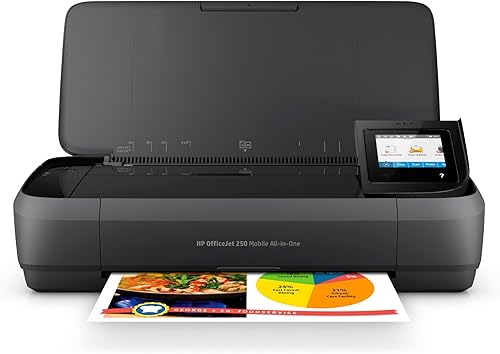 Best for mobile work with scanning
HP OfficeJet 250 Inkjet Mobile Printer
9.6/10 our score
See it on Amazon -
2
 Best for remote work from a home base
HP Envy 6155 Wireless All-in-One Color Inkjet
9.4/10 our score
See it on Amazon -
3
 Best for compact home workspaces
Canon PIXMA TS6520 Wireless Color Inkjet Printer
9.3/10 our score
See it on Amazon
- 4
 Check it
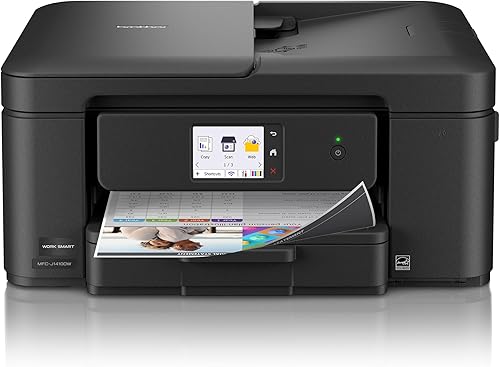
Brother Work Smart 1410 Wireless Color Inkjet
Best for a busy home office - 5
 Check it
Epson WorkForce WF-110 Wireless Color Mobile Portable
Best for lightweight print-only travel
Which portable inkjet printers for laptops fit each kind of work?
The HP OfficeJet 250 fits mobile work that includes scanning, while the Epson WF-110 is a light choice for printing alone. The other three picks suit a home office or compact work area better than frequent travel.
HP OfficeJet 250 Inkjet Mobile Printer: Best for mobile work with scanning
- Prints, scans and copies
- Battery included
- Wireless printing with or without a router
- 10-page automatic document feeder
A battery-powered all-in-one built for mobile work, with laptop printing and a 10-page automatic document feeder for multipage scans and copies.
Pros
- Battery included
- Print, scan and copy on the go
- Can print wirelessly without a router
Cons
- Manual duplex printing
- Uses HP 62 series cartridges
The HP OfficeJet 250 is a strong fit when you need to handle paperwork away from a network. It can print, scan and copy, and HP says it works without a network connection.
Its 10-page automatic document feeder handles multipage scanning and copying. The included battery supports work away from an outlet, and HP says Fast Charge can charge it within 90 minutes while the printer is turned off.
It supports letter and legal paper, plus smaller formats such as cards, photos and envelopes. Wireless setup works from a laptop or mobile device with or without a router.
Choose it if you need an all-in-one that can travel between a car, office and work site. Its 6.5 lb weight and manual duplex printing are worth considering if you want to pack light or print many two-sided pages.
HP Envy 6155 Wireless All-in-One Color Inkjet: Best for remote work from a home base
- Print, scan and copy
- Automatic two-sided printing
- 100-sheet input tray
- Dual-band Wi-Fi
A home-focused all-in-one for remote workers who print from a laptop at a regular workspace and value a larger paper tray and automatic two-sided printing.
Pros
- 100-sheet input tray
- Automatic two-sided printing
- Color touchscreen
Cons
- Weighs 11.2 lb
- Designed for home use
The HP Envy 6155 fits remote workers who print from a laptop at home and want an all-in-one with a 100-sheet input tray. It prints, scans and copies, and automatic two-sided printing can help with documents that use both sides of a sheet.
Dual-band Wi-Fi and a color touchscreen support everyday desk use. At 11.2 lb, it is less convenient to carry often than a mobile model.
This pick supports color documents and borderless photos, and its maximum media size is letter. HP says its P3 technology is designed to make printed documents and photos look vibrant.
Choose the Envy for a home base with occasional laptop printing. For a Best Portable Printer For Home Use, compare how often you'll move it with the value of its larger paper tray.
Canon PIXMA TS6520 Wireless Color Inkjet Printer: Best for compact home workspaces
- Print, scan and copy
- Automatic two-sided printing
- Dual-band Wi-Fi
- 1.42 in OLED display
A compact wireless all-in-one for laptop users who print at home, with automatic two-sided printing and support for documents and photos.
Pros
- Automatic two-sided printing
- Dual-band Wi-Fi
- Setup for a smartphone or computer
Cons
- Weighs 15.4 lb
- No automatic document feeder
The Canon PIXMA TS6520 suits a compact home workspace where laptop printing, scanning and copying matter more than carrying the printer. It supports automatic two-sided printing and dual-band Wi-Fi.
Canon describes setup for a smartphone or computer, and the printer supports laptops, PCs, smartphones and tablets. Its 1.42 in OLED display shows ink levels and printer status.
This model weighs 15.4 lb, which makes frequent packing less practical. Its maximum media size is 8.5 x 11 in, and its two-cartridge hybrid ink system is designed for sharp text and vivid color.
Choose the PIXMA if it will stay near your laptop most of the time. If you need a portable A4 inkjet printer, compare travel size, power and paper handling before choosing a home model.
Brother Work Smart 1410 Wireless Color Inkjet: Best for a busy home office
- Print, copy and scan
- Automatic two-sided printing
- 20-sheet automatic document feeder
- 150-sheet paper tray
A home-office all-in-one with a larger paper tray and automatic document feeder, suited to laptop users who need to process multipage documents at a desk.
Pros
- 20-sheet automatic document feeder
- 150-sheet paper tray
- Automatic two-sided printing
Cons
- Weighs 16.8 lb
- Larger than the mobile picks
The Brother Work Smart 1410 suits a home office that handles multipage documents. It combines printing, scanning and copying with a 20-sheet automatic document feeder and a 150-sheet paper tray.
Automatic duplex printing handles two-sided documents, and the printer offers wireless and USB connections. It also has a 2.7 in touchscreen with cloud app connections.
At 16.8 lb, this is the heaviest pick in the group. Its feeder and paper tray favor a regular work surface over a bag.
Choose it for a laptop work setup that frequently processes multipage paperwork. Students comparing a desk printer with a mobile setup can also read Best Portable Printer For Students.
Epson WorkForce WF-110 Wireless Color Mobile Portable: Best for lightweight print-only travel
- Portable print-only design
- Rechargeable battery
- Wi-Fi Direct
- USB and AC charging
A 4.6 lb mobile printer with a rechargeable battery and Wi-Fi Direct, for laptop users who need printing on the road but do not need scanning or copying.
Pros
- Lightest listed option
- Built-in rechargeable battery
- Wi-Fi Direct
Cons
- Print only
- Uses genuine Epson cartridges
The Epson WorkForce WF-110 is the lightest pick here at 4.6 lb, with a built-in rechargeable battery and Wi-Fi Direct. It prints in color from laptops and other devices without requiring a network connection.
This is a print-only model, so it won't scan or copy documents. It supports USB and AC charging, and an optional external accessory battery can extend print volume on business trips.
Its portable design suits a travel bag better than the four all-in-ones above. Check your laptop's connection options before packing it for a trip.
Choose the WF-110 if weight and battery operation matter more than document scanning. For a broader look at wireless options, compare our best portable wireless printer guide.
How did we compare laptop printers for travel and remote work?
We compared mobility, connection options and document features against the needs of someone printing from a laptop away from a fixed office. Our score weighs specs, features and buyer feedback against what you're shopping for.
The HP OfficeJet 250 ranks first because it combines a battery, wireless printing with or without a router, and print, scan and copy functions. The Epson WF-110 is lighter and has Wi-Fi Direct, but it only prints.
The Envy 6155, PIXMA TS6520 and Brother Work Smart 1410 offer useful paper handling and all-in-one functions for home work. Their weights and home-office features make them less suited to frequent travel.
For a closer look at inkjet basics, see How Does An Inkjet Printer Work? and What Is A Good Inkjet Printer?.
| Product | Best for | Functions | Battery | Paper sizes | Our score |
|---|---|---|---|---|---|
| HP OfficeJet 250 Inkjet Mobile Printer | mobile work with scanning | Print, scan and copy | Included | Up to 8.5 x 11 in | 9.6 |
| HP Envy 6155 Wireless All-in-One Color Inkjet | remote work from a home base | Print, scan and copy | 9.4 | ||
| Canon PIXMA TS6520 Wireless Color Inkjet Printer | compact home workspaces | Print, scan and copy | 9.3 | ||
| Brother Work Smart 1410 Wireless Color Inkjet | a busy home office | Print, copy, scan and fax | 9.2 | ||
| Epson WorkForce WF-110 Wireless Color Mobile Portable | lightweight print-only travel | Print only | Built-in rechargeable lithium-ion | 9.2 |
What should you check before choosing an inkjet printer for a laptop?
Check power, connection and task needs first. A travel printer must suit the way you work away from home, while a home-office printer can trade portability for a larger paper tray or automatic document feeder.
Does the printer need a battery?
A battery helps when you cannot count on an outlet. The HP OfficeJet 250 includes a battery, and the Epson WF-110 has a built-in rechargeable lithium-ion battery.
The Envy, Canon and Brother options are home-focused. If you expect to print from a car or client site, compare the mobile models' charging options with your expected print volume.
Can the laptop connect without a router?
Wi-Fi Direct or wireless printing without a router can help when you're away from a familiar network. HP says the OfficeJet 250 can print wirelessly with or without a router, and the Epson WF-110 includes Wi-Fi Direct.
The Canon and Brother offer wireless connections. Check the printer's connection instructions and your laptop's available ports before relying on a connection while traveling.
Do you need scanning or copying?
Choose an all-in-one if you need to digitize receipts, forms or signed paperwork. The HP OfficeJet 250, Envy 6155, Canon PIXMA TS6520 and Brother Work Smart 1410 all include scanning and copying.
The Epson WF-110 is print-only. It saves weight compared with these all-in-ones, but you'll need another way to scan or copy documents.
How much paper handling do you need?
An automatic document feeder helps when you scan or copy several pages, while a larger input tray means fewer reloads at a desk. The HP OfficeJet 250 has a 10-page feeder, and Brother's model has a 20-page feeder and a 150-sheet tray.
The Envy 6155 has a 100-sheet tray. The Envy, Canon and Brother offer automatic duplex printing, while the OfficeJet 250 uses manual duplex.
Is a mobile printer or a home printer better for remote work?
A mobile printer suits work that moves between locations, while a home printer suits a stable desk setup. Battery support, weight and paper capacity can help you choose.
Choose the OfficeJet 250 if you need to scan and copy away from a network. Pick the Epson WF-110 if your priority is carrying a light printer for print-only tasks.
For a home office with frequent multipage work, consider the Brother's feeder and paper tray. You can compare all-in-one color laser printers if you want a laser alternative.
The Envy or Canon may fit a smaller workload where color printing, scanning and copying matter more than travel weight.
Which portable inkjet printer is right for your laptop?
Choose the HP OfficeJet 250 if you need a battery-powered all-in-one for laptop work on the move. Pick the Epson WF-110 if you want a lighter printer and don't need scanning or copying.
For a fixed remote-work desk, the Brother offers the largest paper tray and feeder in this group. Compare color laser printers for home use if you prefer laser printing.
The Envy and Canon are home-focused alternatives with automatic two-sided printing.
Choose based on your power access, connection needs and document tasks.
Our top 3 picks at a glance
-
1
Best for mobile work with scanning
HP OfficeJet 250 Inkjet Mobile Printer
9.6/10 our score
See it on Amazon -
2
Best for remote work from a home base
HP Envy 6155 Wireless All-in-One Color Inkjet
9.4/10 our score
See it on Amazon -
3
Best for compact home workspaces
Canon PIXMA TS6520 Wireless Color Inkjet Printer
9.3/10 our score
See it on Amazon
Frequently asked questions
Can a portable inkjet printer print from a laptop without Wi-Fi?
Yes. The HP OfficeJet 250 supports wireless printing with or without a router, and the Epson WorkForce WF-110 includes Wi-Fi Direct.
Check your laptop's connection options and the printer setup steps before travel.
Which portable inkjet printer can scan documents?
The HP OfficeJet 250 is the portable pick here that prints, scans and copies. It also has a 10-page automatic document feeder for multipage documents.
The Epson WF-110 is lighter, but it is print-only, so it won't handle scanning or copying.
Is a home wireless printer portable enough for travel?
It depends on how often you'll move it and how much weight you can carry. The HP Envy 6155 weighs 11.2 lb, while the Canon PIXMA TS6520 weighs 15.4 lb; both are home-focused all-in-ones.
For regular travel, compare them with mobile models that include a battery.
What should I check before printing from a laptop on the road?
Check whether you'll have a router, whether the printer can run on battery, and if you need to scan or copy. Also confirm your laptop can use the printer's wireless or USB connection.
For multi-day trips, plan how you'll recharge the printer and replace its ink.