8 Best Printers for Infrequent Use (November 2026)
The best printers for infrequent use include the Epson EcoTank ET-2800 Wireless Color All-in-One Supertank for low-maintenance home color printing, the Canon PIXMA TR8620a for occasional home-office versatility, and the HP OfficeJet 250 Inkjet Mobile Printer for occasional printing away from home.
On this page (4 sections)
The best printer for infrequent use is the Epson EcoTank ET-2800 because its refillable ink tanks, wireless connection and print, scan and copy functions cover common home needs.
For occasional bookkeeping checks, see QuickBooks check printing printers.
That starting point matters because a printer used only now and then still has to work first time after a long gap. You should not have to fix ink, paper or connections before a simple job.
Choose a Brother laser printer for black-and-white documents, a Canon inkjet for occasional color work, or a thermal model when inkless portability matters.
Each route suits a different kind of home. Laser suits text pages and forms.
Color inkjet suits photos, charts and school work. Thermal suits short monochrome pages when you can use special paper.
A printer that sits unused for weeks should match the kind of work you do when you finally need it. Think about your normal jobs rather than the day you buy it.
If that work includes checks, see our guide to printers for printing checks.
It also helps to think about where the printer will live. A fixed desk model can stay ready for use.
A portable model is better when you need to store it away or carry it between rooms.
Color inkjets handle photos and mixed documents, laser printers suit text-heavy pages, and thermal printers avoid ink cartridges but require special paper.
That paper point is easy to miss at first. Thermal models do not take ordinary copy paper, so they do not replace a home printer for everyday documents.
Our score weighs specs, features and buyer feedback against the needs of occasional home printing.
In practice, that means we look at upkeep between jobs as well as what it can do on the day. Speed matters less than reliability when you print a small batch once in a while.
Setup is part of that picture too. Wireless printing from a laptop or phone is useful, but so is a simple cable option when your network or a device is not cooperating.
How to Choose a Printer explains the broader choices around printer type, paper handling, connections and all-in-one functions.
Use that guide to narrow your list before you compare models. Start with color needs, then paper needs, then whether you need scanning or copying.
For many homes, a color all-in-one gives the widest cover. For text-only homes, a laser printer keeps the task simple and focused.
If you travel or work away from a desk, portability may matter more than a scanner or a large tray. The right pick depends on how you actually use it.
Keep the printer clean, dry and covered where you can. Follow its care guidance and it should be ready when a job turns up.
Our picks at a glance
-
1
 Best for low-maintenance home color printing
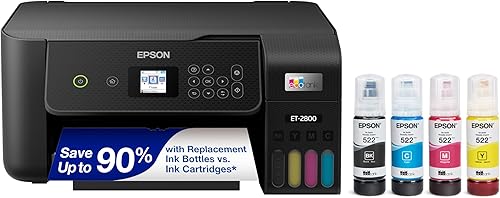
Epson EcoTank ET-2800 Wireless Color All-in-One Supertank
9.7/10 our score
See it on Amazon -
2

-
3
 Best for occasional printing away from home
HP OfficeJet 250 Inkjet Mobile Printer
9.6/10 our score
See it on Amazon
- 4
 Check it
Brother DCP-L2640DW Wireless Compact Monochrome Multi-Function Printer
Best for occasional black-and-white document batches - 5
 Check it
Brother HL-L2405W Wireless Compact Monochrome Laser Printer
Best for simple occasional documents - 6
 Check it
Canon PIXMA TS6520 Wireless Color Inkjet Printer
Best for occasional color documents and photos - 7
 Check it
Rongta Thermal Portable Printers Wireless for Travel
Best for inkless travel printing - 8
 Check it
ETIKEZ D90E Inkless Portable Thermal Printer
Best for lightweight emergency printing
Which printers are best for infrequent use?
The best printer for infrequent use is the one that limits maintenance while still matching your paper, color and scanning needs. The Epson EcoTank ET-2800 leads this group for flexible home use, while the Brother laser models are stronger for occasional black-and-white documents.
Epson EcoTank ET-2800 Wireless Color All-in-One Supertank: Best for low-maintenance home color printing
- Refillable ink tanks
- Wireless print, scan and copy
- Up to 4,500 black and 7,500 color pages per ink bottle set
- Up to 2 years of ink included
Refillable tanks make this a strong fit when long gaps between print jobs make cartridge replacement inconvenient. It also combines color printing, scanning and copying in one home printer.
Pros
- High-capacity refillable ink tanks
- Wireless print, scan and copy
- Ink bottles included
Cons
- Simplex printing
- Genuine ink is recommended
The Epson EcoTank ET-2800 is the strongest general choice for a home that prints in color but does not want frequent cartridge changes. Its refillable ink tanks hold enough ink for up to 4,500 black pages and 7,500 color pages per ink bottle set.
It combines color printing, flatbed scanning and copying in one wireless all-in-one printer. You can connect it to a home network and print, scan or copy from computers, laptops and smartphones.
The printer measures 22.8 x 10 x 14.8 in and weighs 11.4 lb. It prints up to 10 black pages per minute and 5 color pages per minute, so it fits routine home documents rather than large batches.
Up to 2 years of ink is included in the box. Epson recommends genuine ink to support print quality and performance, and non-genuine ink may cause damage that is not covered by the limited warranty.
Choose this model if you need color, scanning and copying and want high-capacity tanks. It is less suitable if you only print occasional black-and-white documents and do not need an all-in-one printer.
Canon PIXMA TR8620a: Best for occasional home-office versatility
- Wireless print, copy, scan and fax
- Automatic 2-sided printing
- 200-sheet capacity
- 15 / 10 ipm print speed
The Canon PIXMA TR8620a suits occasional home-office users who need more than basic printing. Automatic duplex printing and a 200-sheet capacity reduce routine handling.
Pros
- Four-in-one functionality
- Automatic duplex printing
- 200-sheet capacity
Cons
- Inkjet supplies still need care during long idle periods
The Canon PIXMA TR8620a is a versatile home-office choice for infrequent users who need print, copy, scan and fax functions. Its 200-sheet capacity is split between a 100-sheet cassette and a 100-sheet rear feed.
Automatic 2-sided printing helps reduce manual page handling during document jobs. The rated print speed is 15 ipm for black and 10 ipm for color, which is enough for normal household and home-office work.
This Canon measures 13.8 x 17.3 x 7.5 in and weighs 17.4 lb. Its wireless connection supports PCs and smartphones, and the printer includes an LCD touch control system.
The TR8620a also includes a Micro SD slot and supports AirPrint, Android printing and Alexa connection. Alexa can send low-ink notifications and place a smart reorder if you enroll in the optional smart reorder feature.
Pick it when an occasional home printer must also handle faxing, automatic duplexing and flexible paper loading. If you only need simple black-and-white output, a laser model is easier to match to that job.
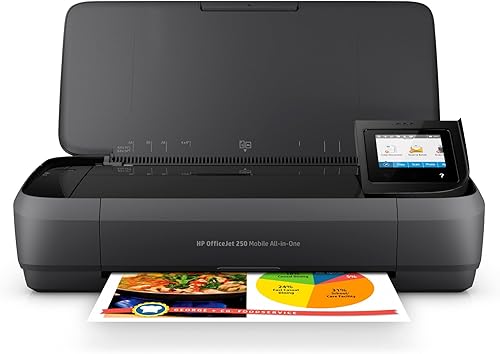
HP OfficeJet 250 Inkjet Mobile Printer: Best for occasional printing away from home
- Portable all-in-one design
- Print, scan and copy
- Battery included
- Wireless printing without a router
The HP OfficeJet 250 is suited to infrequent printing when the printer must move between home, office, car or travel bags. Its battery and wireless setup support printing without a network.
Pros
- Portable design
- Battery included
- Print, scan and copy
Cons
- Manual duplex printing
- Uses HP 62 series cartridges
The HP OfficeJet 250 is the best fit when infrequent printing happens in more than one place. It is a portable all-in-one printer that can print, scan and copy from a laptop, tablet or smartphone without connecting to a network.
Its battery is included, and HP Fast Charge can charge the printer within 90 minutes while it is turned off. You can charge it at home, in a car or in an office.
The printer measures 7.8 x 14.96 x 3.6 in and weighs 6.5 lb. It supports letter, legal, statement, executive, card, photo and envelope sizes, with a maximum media size of 8.5 x 11 in.
The HP OfficeJet 250 uses Original HP 62 series cartridges. Duplex printing is manual, so two-sided documents require you to handle and reload pages.
Choose it for travel, mobile work or a home where the printer must be stored between uses. For a fixed desk and regular color printing, the Epson or Canon all-in-one models offer a more natural fit.
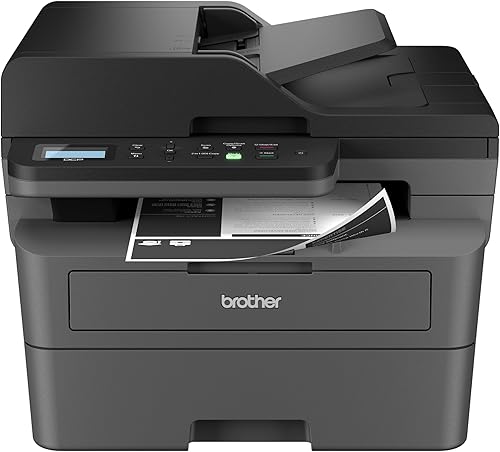
Brother DCP-L2640DW Wireless Compact Monochrome Multi-Function Printer: Best for occasional black-and-white document batches
- Monochrome laser printing
- Print, copy and scan
- Automatic duplex printing
- 50-page automatic document feeder
This Brother laser multifunction printer fits homes and small offices that print black-and-white documents in batches but may sit idle between jobs. Its automatic duplexing and document feeder reduce handling.
Pros
- Laser document printing
- Automatic duplex printing
- 50-page automatic document feeder
Cons
- Black-and-white output only
- Heavier than the compact inkjet options
The Brother DCP-L2640DW is the best laser choice here for occasional black-and-white document batches that also require scanning and copying. It combines those 3 functions with automatic duplex printing and a 50-page automatic document feeder.
Its print speed reaches 36 pages per minute, so it can handle a larger document job without the slower pace of a basic inkjet. The 250-sheet paper tray also reduces the need to reload paper during a batch.
The printer measures 15.7 x 16.1 x 12.5 in and weighs 25 lb. Connection options include dual-band wireless, Ethernet and USB, with mobile printing through the Brother Mobile Connect app.
This is a monochrome printer, so it is for black-and-white pages rather than color photos or color documents. It uses Brother Genuine TN830 or TN830XL toner.
Pick it if you want an all-in-one laser printer that can sit between jobs and then process a stack of documents quickly. Choose the HL-L2405W instead when you do not need scanning or copying.
Brother HL-L2405W Wireless Compact Monochrome Laser Printer: Best for simple occasional documents
- Monochrome laser printing
- 30 pages per minute
- 250-sheet paper tray
- Dual-band wireless and USB
The Brother HL-L2405W is a focused choice for occasional black-and-white printing. Its laser design, 250-sheet tray and wireless connection suit document users who do not need scanning or copying.
Pros
- Print-only simplicity
- 250-sheet paper tray
- Wireless and USB connections
Cons
- Manual duplex printing
- No scanner or copier
The Brother HL-L2405W suits infrequent users who need print-only black-and-white output. Its laser design, 30-page-per-minute speed and 250-sheet tray focus on clear document printing without extra all-in-one functions.
It connects to multiple devices through dual-band wireless or to one computer through USB. For operating-system compatibility, see our guide to printers for Linux.
The Brother Mobile Connect app can manage the printer from a mobile device.
The printer measures 14.2 x 14 x 7.2 in and weighs 15.1 lb. It supports media up to 8.5 x 14 in, while duplex printing is manual.
The HL-L2405W uses Brother Genuine TN830, TN830XL or TN830XL 2PK toner. It includes an AC power cord, drum unit and toner cartridges.
Choose it when your occasional jobs are letters, forms, school pages or other black-and-white documents. It is not the right choice for scanning, copying or color printing.
Canon PIXMA TS6520 Wireless Color Inkjet Printer: Best for occasional color documents and photos
- Wireless color printing, scanning and copying
- Automatic 2-sided printing
- 1.42-inch OLED display
- Prints documents and photos up to 8.5 x 11 in
The Canon PIXMA TS6520 works for occasional home printing when color output, scanning and copying matter. Its compact body and automatic duplex printing keep routine jobs simple.
Pros
- Color print, scan and copy
- Automatic duplex printing
- Dual-band Wi-Fi
Cons
- Two-cartridge ink system
- No automatic document feeder
The Canon PIXMA TS6520 is a compact color all-in-one for occasional home documents and photos. It prints, scans and copies, while automatic 2-sided printing helps reduce paper handling.
Its 2-cartridge hybrid ink system combines pigment-based black ink with dye-based color ink. The printer supports documents and photos up to 8.5 x 11 in, with or without borders.
The TS6520 measures 14.8 x 14 x 6.7 in and weighs 15.4 lb. It uses dual-band Wi-Fi and supports the Canon PRINT app, Apple AirPrint and Mopria Print Service.
A 1.42-inch monochrome OLED display shows printer status and ink levels. Rated speed reaches 14 black pages per minute and 9 color pages per minute.
Choose this Canon if you want a small printer for school pages, recipes, basic documents and occasional photos. Its two-cartridge system is less suited to buyers who want refillable tanks.
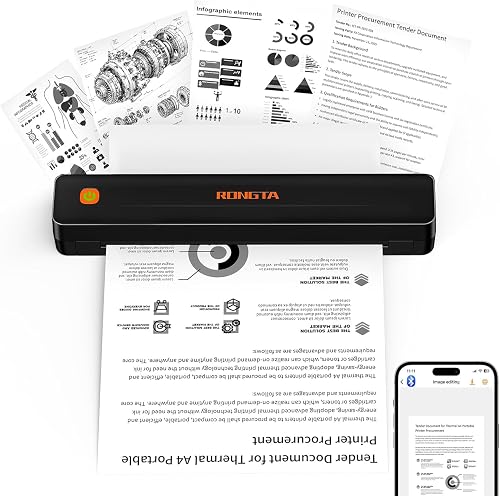
Rongta Thermal Portable Printers Wireless for Travel: Best for inkless travel printing
- Inkless thermal printing
- Bluetooth and USB connectivity
- 203 dpi resolution
- Supports 8.5 x 11 in thermal paper
The Rongta portable printer suits infrequent printing when you want to avoid ink cartridges and carry the printer between locations. It uses thermal paper and prints monochrome pages.
Pros
- No ink cartridges or ribbons
- Bluetooth and USB
- Portable 0.43 kg design
Cons
- Requires thermal paper
- Mobile pairing uses the RONGTA app
The Rongta thermal portable printer is the best fit when you want occasional pages without ink cartridges or ribbons. For other mobile monochrome options, compare portable black and white printers.
It prints monochrome pages on thermal paper and connects through Bluetooth or USB.
The F11A model supports US Letter, Legal and A4 thermal paper, with a maximum media size of 8.5 x 11 in. Its print resolution is 203 dpi, and its rated speed is 3.23 pages per minute.
It measures 10.55 x 2.28 x 1.18 in and weighs 0.43 kg. The printer connects to Android and iOS devices through the RONGTA app, while laptops can connect by USB.
Rongta says the printer does not support Chrome and does not accept ordinary paper. That limitation matters more than portability if you expect to use standard copy paper at home.
Pick it for travel documents, assignments, forms or emergency pages when thermal paper is acceptable. Choose an inkjet or laser printer for color, scanning, copying or standard paper.
ETIKEZ D90E Inkless Portable Thermal Printer: Best for lightweight emergency printing
- Inkless black-and-white thermal printing
- Bluetooth and USB
- 203 dpi resolution
- Travel case and 10 sheets of thermal paper included
The ETIKEZ D90E is a compact option for occasional black-and-white printing away from a desk. It uses thermal paper, connects by Bluetooth or USB and includes a travel case.
Pros
- Inkless printing
- Bluetooth and USB
- Travel case included
Cons
- Thermal paper only
- No color printing
The ETIKEZ D90E is a lightweight inkless printer for occasional black-and-white pages away from a desk. It connects to phones through Bluetooth and to computers through USB.
It prints on A4 and US Letter thermal paper at 203 dpi. The D90E does not accept ordinary copy paper and does not print in color.
The printer measures 10.43 x 2.32 x 1.3 in and weighs 2.08 lb. The package includes the D90E printer, USB-C cable, travel case, guide and 10 sheets of US Letter thermal paper.
Mobile printing uses the Labelnize app. Computer printing requires a driver and a USB connection, and the D90E is not compatible with Chromebooks.
Set up through the app on a phone takes a little care because pairing is done in the app rather than phone settings. On a computer, you need the driver installed first and the printer connected by USB.
The built-in paper bin keeps the design compact for a bag or briefcase. It also means you should check that you have thermal paper loaded before you travel.
This suits business travel, study notes, contracts and other short documents where a monochrome page is enough. It is not suited to photos, color files or standard home printing.
Choose it when portability and inkless printing matter more than speed or paper flexibility. The Rongta is the better match if its broader stated paper support and lighter weight fit your travel needs.
How should you choose a home printer for infrequent use?
Choose a home printer for infrequent use by starting with output type, then checking maintenance, paper and extra functions. A color inkjet covers the widest range of home tasks, while a monochrome laser printer is simpler for text-only work.
Is color printing important?
Choose a color inkjet if you print photos, colored charts, school projects or mixed documents. The Epson EcoTank ET-2800 offers refillable tanks, while the Canon PIXMA TR8620a and TS6520 use cartridge-based ink systems.
If nearly every page is black and white, a laser model can be a better match. The Brother HL-L2405W prints only, while the DCP-L2640DW adds scanning and copying.
Do you need scanning or copying?
Choose an all-in-one model if you may scan forms, copy identification documents or digitize papers. The Epson, Canon, HP and Brother DCP-L2640DW all combine printing with scanning and copying.
A print-only model takes less thought if you already have another scanner or rarely need copies. The Brother HL-L2405W, Rongta and ETIKEZ models are print-only.
Will the printer move between locations?
Choose a portable printer if you need to print in a car, office, classroom or travel setting. The HP OfficeJet 250 uses a battery, while the Rongta and ETIKEZ models use compact thermal designs.
Portable thermal printers require thermal paper and produce monochrome output. Confirm that limitation works for your documents before choosing one as a home printer.
How much paper do you keep loaded?
A larger paper tray helps when the printer stays ready for repeated jobs. The Canon PIXMA TR8620a holds 200 sheets, while the Brother DCP-L2640DW and HL-L2405W each have a 250-sheet paper tray.
That capacity cuts down on refills for forms, school pages and other batches. It also makes it easier to leave the printer set up for the next task.
A compact or portable printer may suit a low-volume home better if you store paper separately. You trade tray size for a smaller footprint and easier storage between jobs.
Keep the paper clean and dry, and use the size supported by the printer. Damp or curled paper can cause feeding trouble, especially after a long gap between jobs.
How do you maintain a printer that sits unused?
To maintain a printer that sits unused, keep it clean, protect it from dust and follow the model's care instructions. Inkjet users should pay attention to ink supply and cleaning guidance, while thermal users need the correct thermal paper.
Avoid placing a printer in a damp area or where paper can curl. Leave enough room for paper loading, scanning and cable access.
Give the printer a stable spot with space at the back for paper and room at the front for output. That space also helps you open covers, lift a scanner lid and reach ports without strain.
For an inkjet printer, use the printer's built-in maintenance tools when needed. Do not remove ink tanks or cartridges without a reason, and use the ink type recommended for the model.
A short check before a job can save trouble. Confirm the ink level, load the right paper size and make sure the printer is connected to the device you want to use.
For a laser printer, keep toner and paper installed as directed. If the first page after a long gap has a problem, follow the printer's cleaning or troubleshooting instructions before replacing supplies.
Laser care is mostly about keeping the machine clean and dry. Check the toner and drum setup only when the manual tells you to, and avoid touching parts you do not need to touch.
For a thermal printer, store thermal paper flat and use only the paper type the model supports. The Rongta and ETIKEZ models cannot use ordinary copy paper.
Keep thermal paper away from heat and damp as well, since storage can affect print quality. Use flat sheets where the model calls for them and avoid forcing paper through the printer.
For all types, use the printer now and then if the maker suggests it. A small test page can show whether it is ready before you need a full document.
Do not leave paper loaded for months in a dusty room without checking it. Clean, dry paper helps the printer feed well when you return to it.
If you store the printer away, cover it and keep cables tidy. When you bring it out, a quick check of paper, supplies and connection is a sensible start.
What is the best printer for infrequent home use?
The best home printer for infrequent use is the Epson EcoTank ET-2800 if you need color, scanning, copying and refillable ink tanks in one wireless unit. Pick the Canon PIXMA TR8620a for broader home-office functions, or see our Best HP Printer For Home Use guide if HP is your preferred brand.
That Epson pick suits homes that want one machine for everyday tasks. It can print in color, scan documents and make copies without tying you to separate devices.
The Canon PIXMA TR8620a adds fax and automatic 2-sided printing to that mix. It also has a larger paper capacity for homes that print in small batches.
Choose the Brother HL-L2405W for occasional black-and-white pages with no scanning needs. It is a print-only laser printer for users who want a simple setup.
Choose the Brother DCP-L2640DW when you also want a scanner, copier, automatic duplexing and a 50-page document feeder. That model suits anyone who needs to copy or scan a stack now and then.
The HP OfficeJet 250 is the better decision for mobile color printing. Its portable design and battery make it a fit for work away from a fixed desk.
For an inkless portable option, choose Rongta for a lighter thermal printer or ETIKEZ for a package that includes a travel case and thermal paper.
Both thermal models print monochrome pages only and need thermal paper. They work best for travel documents, forms and short notes rather than home photo or color work.
For brand-specific comparisons, read our guide to the hp envy printer meaning of envy and our Best Brother Printer For Home Use recommendations. If portability is your main concern, compare these picks with our Best Portable Printer For Home Use guide and Best Color Printer For Home Use roundup.
Before you decide, list what you print most often. Color photos and mixed documents point to inkjet.
Text-heavy pages point to laser. Short pages on the move point to thermal.
Check paper needs next. A large tray helps for batches, while a compact model is fine for single pages stored away between uses.
Also check whether you need scanning or copying. An all-in-one can save space, but a print-only model is enough if you rarely scan.
Think about care too. Laser toner, refillable ink tanks and thermal paper each ask for different habits during long idle periods.
The best choice is the one you will actually use and keep ready. Match the printer to your color, paper and location needs, and it should serve occasional jobs well.
Our top 3 picks at a glance
-
1
Best for low-maintenance home color printing
Epson EcoTank ET-2800 Wireless Color All-in-One Supertank
9.7/10 our score
See it on Amazon -
2
-
3
Best for occasional printing away from home
HP OfficeJet 250 Inkjet Mobile Printer
9.6/10 our score
See it on Amazon
Frequently asked questions
What is the best printer for infrequent use?
The best printer for infrequent use depends on what you print. Choose the Epson EcoTank ET-2800 for wireless color printing, scanning and copying with refillable tanks.
Choose the Brother HL-L2405W or DCP-L2640DW for occasional black-and-white documents, or a thermal model for portable inkless printing.
Is an inkjet or laser printer better for infrequent use?
A laser printer is often easier for occasional black-and-white documents because toner does not dry in the same way liquid ink can. An inkjet remains the better fit when you need color, photos, scanning or copying.
Store either printer in a dry, clean place and follow its care instructions.
How do you keep a home printer from drying out?
Keep an inkjet printer covered or in a clean, dry area, use it according to the manufacturer's care guidance and avoid removing cartridges or ink tanks unnecessarily. A short maintenance print can help keep an inkjet ready, but follow the printer's instructions for cleaning cycles and ink use.
Are portable thermal printers good for home use?
Portable thermal printers work well for occasional black-and-white pages when you want a compact printer without ink cartridges. The Rongta and ETIKEZ models here require thermal paper, so they are not replacements for a color home printer that handles ordinary paper, photos or scanning.