How to Choose a Printer
Choose a printer by matching its technology, functions, and capacity to what you print most. Compare inkjet and laser printing, decide whether you need scanning or copying, then check paper handling, connectivity, and ink or toner needs.
On this page (9 sections)
- What should you print most often?
- Should you choose inkjet or laser?
- Which printer functions do you need?
- How much paper capacity should you look for?
- What should you check about ink and toner?
- Which connectivity fits your setup?
- How should you choose a printer for home or travel?
- What is a simple printer buying checklist?
- How do you choose the right printer?
A good printer for your needs is one that matches what you print, how often you print, and which extra tasks you need. This buying guide for printers helps you compare inkjet and laser technology, functions, paper capacity, connectivity, and ongoing ink or toner needs.
Start with your regular jobs: school worksheets, work documents, photos, forms, or labels. If you print checks, compare printers for printing checks.
Then consider whether you need scanning, copying, faxing, or a portable device.
If an inkjet is on your shortlist, first learn how an inkjet printer works. For home options, compare our Best HP Printer For Home Use and Best Brother Printer For Home Use guides.
What should you print most often?
Choose a printer around your most common jobs, not the occasional project. Text documents, color images, photos, labels, and travel documents can call for different paper handling and print features.
| Main use | Features to prioritize |
|---|---|
| Schoolwork and everyday documents | Reliable paper feeding, clear text, and easy setup |
| Photos and color projects | Color printing and support for the photo paper sizes you use |
| Forms and home office tasks | Scanning, copying, duplex printing, and useful paper capacity |
| Travel or mobile work | Compact design and printing from your devices without depending on a home network |
| Occasional pages | Simple supply replacement and a printer that fits your low-volume routine |
Write down the paper sizes you actually use and how many pages you tend to print in a typical week or month. That makes it easier to compare models without treating a high maximum capacity as automatically better.
If you print only now and then, read our guide to the best printer for infrequent use. Long gaps between print jobs may affect which supply system is practical for you.
Should you choose inkjet or laser?
Inkjet is a common fit for color printing and mixed home tasks, while laser printers are often considered for frequent text-heavy work. Compare the model's actual features and supplies because the technology name alone cannot answer every buying question.
Inkjet printers put liquid ink onto paper and come in cartridge and refillable tank designs. They can handle documents and color images, and some models add scanning or copying.
Read what makes a good inkjet printer to narrow down the features that matter.
Laser printers use toner rather than liquid ink. They may suit buyers who print many text pages, but check whether you need color, which paper sizes are supported, and what replacement toner costs before deciding.
For either type, look at the supplies you will need after the included set runs out. A refillable system may reduce how often you replace cartridges, while a cartridge printer may be a simpler match for light use.
Compare those trade-offs with your own print volume.
How does a printer buying guide help compare inkjets?
A printer buying guide helps you compare inkjets by print purpose, ink system, functions, and paper handling. Begin with the jobs you do, then narrow the choices to models that support your devices and the sizes of paper you use.
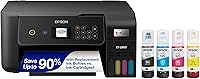
The Epson EcoTank ET-2800 is a wireless color all-in-one inkjet with refillable tanks, a flatbed scanner, and copying. Epson says one set of ink bottles can print up to 4,500 black pages and 7,500 color pages, and the box includes up to 2 years of ink.
The Canon PIXMA TR8620a combines print, copy, scan, and fax functions. It has a 200-sheet capacity split between a 100-sheet cassette and 100-sheet rear feed, plus automatic two-sided printing.
The HP OfficeJet 250 is a compact mobile all-in-one for printing, scanning, and copying on the go. HP says it can print from a laptop, tablet, or smartphone without connecting to a network.
Which printer functions do you need?
Choose only the functions you expect to use. A printer with a scanner or copier can save space if you need those tasks, while a simpler device may be enough if you only print.
- Print only: Choose this if you already have another way to scan or copy.
- Print, scan, and copy: An all-in-one can handle routine paper documents and copies.
- Fax: Consider this if an office, service, or workplace still requires faxing.
- Automatic document feeder: Helpful for scanning or copying multiple pages without placing each sheet on a flatbed.
- Automatic duplex: Useful for printing on both sides without manually turning each page.
- Mobile printing: Check app support and device compatibility if you often print from a phone or tablet.
The Canon PIXMA TR8620a offers print, copy, scan, and fax functions, plus automatic two-sided printing. The Epson EcoTank ET-2800 combines printing, flatbed scanning, and copying, while the HP OfficeJet 250 adds portability for work away from a network.
A feature matters only if it fits your routine. For example, a document feeder helps with multi-page jobs, but it may not matter if you mainly print single sheets.
How much paper capacity should you look for?
Choose enough paper capacity for your usual print runs, while accounting for how much room the printer takes up. A larger tray can reduce refills, but it does not matter much if you print only a few pages at a time.
Check these details for the models you compare:
- Paper capacity and how the tray is split
- Supported paper sizes, including any photo or envelope sizes you need
- Whether the printer supports automatic two-sided printing
- Whether paper feeds from a cassette, rear tray, or both
- The printer's dimensions and the room needed to load paper
The Canon PIXMA TR8620a's 200-sheet capacity is split between a 100-sheet cassette and a 100-sheet rear feed. That arrangement gives you two feed locations, which can help when you switch between paper types.
The Epson EcoTank ET-2800 supports paper up to 8.5 x 14 in. The HP OfficeJet 250 supports letter and legal paper, along with smaller formats such as cards and photo paper.
If you print this size often, compare printers for legal-size paper.
What should you check about ink and toner?
Compare replacement supplies and the amount you print before buying. A low purchase price can be less useful if your routine requires frequent supply changes.
Refillable ink tanks hold more ink than standard cartridges, so they can suit regular home printing. The Epson EcoTank ET-2800 uses refillable tanks and includes ink bottles; Epson gives page yield estimates of up to 4,500 black and 7,500 color pages per set.
Cartridge printers may suit buyers who print less often or want to replace supplies in smaller units. If your printing is sporadic, consider our guide to what ENVY means on an HP printer for context on one HP printer line, then compare its functions and supplies with your needs.
Before buying, check the replacement ink or toner model, whether color and black supplies are separate, and the maker's care guidance for long pauses between jobs. Avoid choosing based on included ink alone; future replacement needs matter too.
Which connectivity fits your setup?
Choose connectivity that matches the devices and location you use. Wi-Fi can make a shared home printer easier to reach, while USB can suit a printer that stays beside one computer.
Check whether your computer, phone, or tablet is compatible with the printer. If you use Linux, compare printers that work with Linux.
Consider the setup steps as well: a shared home printer may need to join your Wi-Fi network, while a mobile printer may offer a way to print without a router.
The Epson EcoTank ET-2800 connects to a home network over Wi-Fi for printing, scanning, and copying from multiple devices. The HP OfficeJet 250 is designed for mobile use and HP says it can work without a network connection.
Keep the printer within reach of its paper and supplies, and consider where it will connect to power. If you plan to print from a phone, check that the printer's app works with your device before choosing.
How should you choose a printer for home or travel?
Choose a home printer for shared tasks and a mobile printer when you need printing away from a fixed setup. Location changes which features matter most, so think about where the device will sit or travel.
For a home office, scanning, copying, Wi-Fi, and paper capacity may matter more than compact size. The Canon PIXMA TR8620a adds fax and automatic two-sided printing, while the Epson EcoTank ET-2800 offers refillable ink tanks for regular printing.
For travel or mobile work, size and network independence are more relevant. The HP OfficeJet 250 is designed as a portable all-in-one and supports printing, scanning, and copying without a network connection.
For more home options, compare our Best HP Printer For Home Use and Best Brother Printer For Home Use guides. If your print jobs are rare, use the best printer for infrequent use guide to focus on low-volume needs.
What is a simple printer buying checklist?
Use this printer buying checklist before you settle on a model. It keeps the choice tied to the tasks you actually need.
- List your regular print jobs and paper sizes.
- Decide whether you need color, photos, or mostly text.
- Choose inkjet or laser based on those jobs and supply needs.
- Mark which extra functions matter: scanning, copying, fax, or duplex.
- Compare capacity, feed types, and supported media.
- Check Wi-Fi, USB, mobile app, and device compatibility.
- Compare printer size with the space where it will sit.
- Check replacement supplies and care guidance for your print frequency.
Choose a model only after it clears the requirements that matter to you. A printer with fewer extras can be the better fit if it supports your paper, devices, and routine.
How do you choose the right printer?
Choose an inkjet with the functions and supply setup that fit your regular jobs if you need flexible color printing at home. Consider a refillable tank model for frequent printing, an all-in-one for scanning and copying, or a compact mobile model if you work away from a network.
Compare the Epson for refillable tanks and home Wi-Fi, the Canon for a 4-in-1 setup and divided 200-sheet capacity, and the HP for portable network-free printing. For the next step, see how an inkjet printer works if you're deciding between inkjet options.
Frequently asked questions
Should I choose an inkjet or laser printer?
Choose an inkjet if you need color, photos, or flexible paper sizes; choose a laser printer if your main work is frequent text documents and you value toner based printing. Compare the printer's specific media support, color needs, and supply costs before choosing, since technology alone does not tell you how well a model fits.
Do I need an all-in-one printer?
An all-in-one printer is useful if you regularly scan or copy documents and want those tasks in one device. If you only print, a print-only model may be simpler.
Consider whether you need a flatbed, automatic document feeder, fax, or mobile scanning before paying for functions you may not use.
How much printer capacity do I need?
Choose capacity based on how often you print and the longest job you expect to run. Check the paper tray size, supported paper formats, and whether duplex printing is automatic.
Infrequent users can often manage with a smaller tray, while recurring work benefits from less frequent refilling.
Is a refillable ink tank printer right for occasional printing?
A refillable ink tank printer can suit households that print regularly and want fewer cartridge changes. If you print only a few pages now and then, compare cartridge options and care guidance as well as ink capacity.
The best fit depends on your actual print pattern and the cost of replacement supplies.
What connectivity should I look for in a printer?
Choose connectivity that matches where and how you print. Wi-Fi helps multiple devices use a home printer, while USB can suit a fixed computer setup.
If you need to print away from a router, look for a model that supports direct wireless use and confirm the compatible devices.