5 Best Receipt Scanners for Small Businesses (November 2026)
The best receipt scanners for small business include the Doxie Pro for all-around office scanning, the Epson Workforce ES-55R Mobile Receipt and Document for receipt data extraction, and the IX500 Fujitsu ScanSnap Duplex Document & Receipt for wireless batch scanning.
On this page (6 sections)
- Which receipt scanner is best for a small business?
- Best receipt scanners for small business use
- How should you choose a receipt scanner for business?
- Receipt scanner or printer scanner combo for small business?
- Do photo and document scanners handle receipts?
- What is the best receipt scanner for small business?
The best receipt scanner for small business use is the Doxie Pro because it combines automatic duplex scanning, a 20-page feeder, OCR and Mac or PC software.
That mix suits a small office where receipts arrive alongside invoices, statements and reports. It can also scan photos, drawings, classwork and business cards, so one device covers more than expense records.
Choose the Epson ES-55R for receipt data extraction. It is a lightweight single-sheet model built to pull key details from receipts and send them toward accounting tools.
Choose the Fujitsu IX500 for wireless batches. Its 50-sheet capacity and Wi-Fi connection fit a shared desk where several people scan mixed paper.
Choose the Canon R40II for QuickBooks Online workflows. Its 60-sheet feeder and included plugin support larger office runs and direct expense handling.
A good small-business scanner should reduce repeated data entry without creating another pile of paper. The right choice depends on whether you scan one receipt at a time, process weekly batches, work from several locations, or send expense data into accounting software.
Daily volume matters more than the longest feature list. A mobile scanner makes sense for occasional capture, while a duplex feeder saves more time when paper arrives in stacks.
Software fit matters just as much. Searchable PDFs help you find records later, while data extraction can cut manual typing for payees, dates and amounts.
Connection should match your workspace. USB suits a fixed desk, while wireless helps when a scanner must serve more than one computer or a phone.
Setup and care should stay simple. Keep the feeder clean, sort damaged paper before a batch, and store scans in folders you will actually use.
Honest trade-offs remain. Larger feeders weigh more and stay on a desk, while portable models trade batch capacity for easier travel.
Pick the workflow you will repeat each week. That habit will matter more than adding another device later.
Our picks at a glance
-
1
-
2
 Best for receipt data extraction
Epson Workforce ES-55R Mobile Receipt and Document
9.5/10 our score
See it on Amazon -
3
 Best for wireless batch scanning
IX500 Fujitsu ScanSnap Duplex Document & Receipt
9.3/10 our score
See it on Amazon
- 4
 Check it
Epson RapidReceipt RR-70W Compact Mobile Document Scanner
Best for wireless mobile work - 5
 Check it
Canon imageFORMULA R40II Receipt Edition Office Document
Best for QuickBooks Online workflows
Which receipt scanner is best for a small business?
The Doxie Pro is the strongest all-around choice for a small office that scans receipts, invoices and other documents. It has automatic duplex scanning, a 20-page feeder, direct feed for delicate paper and software for Mac and PC.
The Epson WorkForce ES-55R is better for a single receipt or document at a time. Its receipt management software can extract and categorize key data, then export it to programs such as QuickBooks and Excel CSV.
For larger batches, the Canon R40II and Fujitsu IX500 have bigger feeders. The Canon holds 60 sheets, while the Fujitsu holds 50 and adds Wi-Fi.
We compared the listed features, scanning formats, connection options and software fit against the needs of a small business. Our score weighs specs, features and buyer feedback against what you're shopping for.
Best receipt scanners for small business use
These receipt scanner reviews for small business needs cover office-size duplex scanners and lightweight mobile models. Pick by your daily paper volume first, then check the connection and software fit.
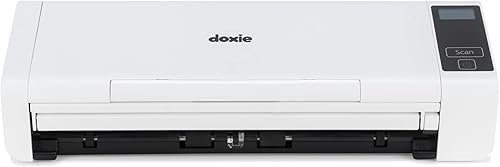
Doxie Pro: Best for all-around office scanning
- Automatic duplex scanning
- 20-page collapsible feeder
- Up to 22 pages per minute
- Mac and PC software
The Doxie Pro combines duplex scanning, a 20-page feeder and software for organizing scans on Mac and PC. It also has a direct feed slot for thick or delicate paper.
Pros
- Automatic two-sided scanning
- OCR and automatic image adjustments
- Works with Mac and PC
Cons
- Wired USB connection
- Heavier than the mobile Epson models
The Doxie Pro is the best receipt scanner for small business owners who need one device for receipts, invoices, statements, reports, business cards and photos. Its automatic duplex feature scans both sides of a page, so two-sided receipts or documents do not need a second pass.
The collapsible feeder holds 20 sheets, and the stated scan speed reaches 22 pages per minute. For a thick receipt, business card, photo or delicate sheet, use the direct feed slot instead of the feeder.
Doxie's software works with Mac and PC computers. It can import, organize and send scans to Dropbox, Evernote, OneNote and iCloud, while text recognition creates searchable PDFs.
The compact wired unit measures about 12.01 in wide, 3.94 in deep and 2.95 in high in the listed specifications. It weighs 3 lb and connects through USB.
Choose Doxie Pro when you want balanced batch capacity and document flexibility. Its wired setup is less convenient than a wireless mobile scanner, but the duplex feeder is more useful for a steady office workflow.
Epson Workforce ES-55R Mobile Receipt and Document: Best for receipt data extraction
- Receipt management software
- QuickBooks and Excel CSV export
- Under 10 oz
- Single-page scanning in as fast as 5.5 seconds
The ES-55R is a lightweight, single-sheet scanner with receipt management software for extracting and organizing expense data. It suits small businesses that scan one receipt or document at a time.
Pros
- Receipt data extraction
- No subscription required for included software
- Exports to QuickBooks and Excel CSV
Cons
- Single-sheet capacity
- USB connection rather than wireless
The Epson Workforce ES-55R Mobile Receipt and Document Scanner is the best receipt scanner for business owners who scan one item at a time and want help organizing expense data. It weighs 9.44 oz, uses USB power and fits a mobile workflow.
Its single-sheet design accepts receipts, invoices, documents, business cards and ID cards. Epson states that a single page can scan in as fast as 5.5 seconds, while automatic feeding mode accepts the next sheet as it is inserted.
The included receipt management software automatically extracts and categorizes key receipt data. It can export information to QuickBooks, Quicken, TurboTax and Excel CSV, with no subscription required for the receipt management software.
Nuance software supports searchable PDFs and lets you create, convert, edit and assemble documents. The scanner also supports extra-long pages up to 8.5 x 72 in.
Choose the ES-55R when portability and receipt data extraction matter more than batch capacity. Its one-sheet feeder is slower for a box of receipts than the Doxie, Canon or Fujitsu.
IX500 Fujitsu ScanSnap Duplex Document & Receipt: Best for wireless batch scanning
- Automatic duplex scanning
- 50-sheet capacity
- USB 3.0 and Wi-Fi
- Searchable PDF creation
The IX500 is a larger office scanner with a 50-sheet capacity, duplex scanning and wireless connectivity. It fits a business that processes mixed receipts and documents in batches.
Pros
- Largest feeder capacity here
- Wireless scanning
- Handles mixed paper, receipts and cards
Cons
- Heaviest model in this group
- 90-day limited warranty
The IX500 Fujitsu ScanSnap Duplex Document & Receipt is the best receipt scanner small business teams can choose for wireless batch work. Its 50-sheet capacity and automatic duplex scanning suit a desk where receipts and documents arrive together.
The scanner supports USB 3.0 and Wi-Fi. Wireless scanning can send documents to a PC, Mac, iOS device or Android device through the ScanSnap Connect App.
The IX500 handles mixed batches that can include paper, thick receipts, business cards and embossed plastic cards. A Carrier Sheet supports documents up to A3 or 11 x 17 in.
Its dual-sided scanning can scan both sides in one pass, and searchable PDF creation makes text easier to find later. The 8.2 lb weight makes it much less portable than the Epson mobile models.
Choose the Fujitsu when several people need wireless access or when a 50-sheet feeder fits your routine. It is a larger office machine, so plan a fixed workspace rather than a travel bag.
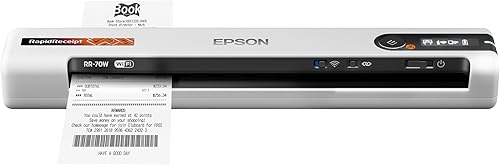
Epson RapidReceipt RR-70W Compact Mobile Document Scanner: Best for wireless mobile work
- Wireless scanning
- USB or battery power
- Up to 15 pages per minute
- Cloud scanning through Epson Smart Panel
The RR-70W combines a lightweight mobile design with wireless scanning and USB or battery power. Its software can recognize receipt and invoice types for easier digital filing.
Pros
- Wireless connection
- USB or battery power
- Supports long pages up to 8.5 x 72 in
Cons
- Lower feeder capacity than the office-size models
- Mobile workflow may not suit large daily batches
The Epson RapidReceipt RR-70W Compact Mobile Document Scanner is the best receipt scanner for small business owners who move between offices, client sites and home workspaces. It weighs 10.56 oz and supports USB or battery power.
Wireless connectivity lets the scanner work with a PC, Mac, smartphone or tablet through the Epson Smart Panel mobile app. It can send scans to OneDrive, Dropbox and Google Drive.
The RR-70W scans receipts, invoices, business cards and documents at up to 15 pages per minute in automatic feeding mode. It also supports long pages up to 8.5 x 72 in.
ScanSmart AI PRO converts scanned receipts and documents into digital data, while automatic file naming recognizes types such as receipts and invoices. The included software supports searchable and editable PDFs on Windows and Mac.
Choose this model when wireless access and low weight are central to your workflow. Its mobile format is easier to carry than the Doxie or Fujitsu, but its 15-sheet capacity is less suited to large batches.
Canon imageFORMULA R40II Receipt Edition Office Document: Best for QuickBooks Online workflows
- 60-sheet automatic feeder
- Up to 45 pages per minute
- Automatic duplex scanning
- QuickBooks Online plugin
The Canon R40II is built for larger office batches, with a 60-sheet feeder and scanning up to 45 pages per minute. Its included software supports a Scan to QuickBooks Online plugin.
Pros
- Largest feeder capacity here
- Fastest stated scan speed here
- Supports Windows 11 and macOS
Cons
- USB connection only
- Designed for CaptureOnTouch software
The Canon imageFORMULA R40II Receipt Edition Office Document Scanner is the best receipt scanner for small business workflows centered on QuickBooks Online. Its 60-sheet automatic feeder and stated speed of up to 45 pages per minute suit larger receipt batches.
The R40II scans both sides at the same time in color. It handles receipts, invoices, reports, contracts and business cards, and supports Windows 11 and macOS.
Canon includes CaptureOnTouch software and a Scan to QuickBooks Online plugin. The scanner is designed exclusively for CaptureOnTouch, and TWAIN and ISIS drivers are not supported.
Setup uses the supplied USB-C cable. That makes the R40II simple for one workstation, but it does not offer the wireless flexibility of the Fujitsu IX500 or Epson RR-70W.
Choose Canon when feeder size and QuickBooks Online access matter most. It weighs 7.1 lb, so it is better for a permanent desk than for mobile work.
How should you choose a receipt scanner for business?
Choose a receipt scanner for business by matching feeder size, scanning style, connection and software to your weekly routine. A mobile single-sheet scanner suits occasional expense capture, while a duplex office scanner saves more time during batch work.
Should you choose a duplex receipt scanner?
A duplex receipt scanner is useful when documents have information on both sides. The Doxie Pro, Fujitsu IX500 and Canon R40II scan both sides automatically, which reduces manual page turning.
If most receipts are printed on one side, duplex scanning is still useful for invoices, reports, contracts and other office documents. It gives one scanner a wider role beyond expense records.
Is wireless scanning useful for a small business?
Wireless scanning helps when you need to send documents from more than one computer or from a mobile device. The Fujitsu IX500 supports Wi-Fi, and the Epson RR-70W supports wireless scanning through Epson Smart Panel.
USB remains a practical choice for a fixed workstation. The Doxie Pro, ES-55R and Canon R40II are better suited to a planned desk setup than to a shared wireless workflow.
How much feeder capacity do you need?
A 1-sheet feeder works for occasional receipts, while 15 to 20 sheets suit short batches. The Fujitsu IX500 holds 50 sheets, and the Canon R40II holds 60 sheets for larger office runs.
Feeder capacity does not replace sorting. Remove staples, separate damaged paper and keep receipts flat before scanning.
Follow the scanner's general cleaning and paper-handling instructions to reduce feeding problems.
What software should a small business look for?
Receipt management software can reduce manual entry by extracting details such as payee, amount and date. The Epson ES-55R is the clearest fit for that workflow, while the Canon R40II includes a Scan to QuickBooks Online plugin.
If you mainly need searchable records, OCR and searchable PDF creation are useful. The Doxie Pro, Fujitsu IX500, Epson ES-55R and Epson RR-70W support document workflows that make scanned text easier to find.
For more accounting-focused options, compare these receipt scanners for QuickBooks. If Windows compatibility is your main concern, see our guide to the best receipt scanner for Windows.
Receipt scanner or printer scanner combo for small business?
A dedicated receipt scanner is usually the better fit for regular receipt batches because its feeder and software focus on documents. A printer scanner combo can make sense when you also need printing in the same small office.
A combo device takes less space when one machine must print, copy and scan. However, it may not offer the same receipt data tools, mobile format or feeder design as a dedicated scanner.
Review our best printer scanner combo for small business if printing is part of the same purchase. For broader office printing needs, our guide to what is the best printer for small business covers a different set of trade-offs.
Do photo and document scanners handle receipts?
Many document scanners handle receipts, but a photo-focused scanner may be better when your main goal is preserving photos.
Receipt work usually depends more on feeding, OCR, duplex scanning and digital filing than on photo detail. A thermal receipt can fade, curl or arrive crumpled, so feeding and straightening matter in daily use.
A dedicated receipt scanner is built around paper flow. It should accept mixed sizes, create readable images and turn text into searchable files for later retrieval.
Photo scanners follow a different priority. They focus on keeping colour, fine detail and surface quality intact for images you plan to keep and share.
The Doxie Pro accepts photos through its direct feed slot and supports scans up to 600 dpi. That path suits an original photo or delicate sheet that should not go through the feeder.
Direct feed also helps with thick or fragile paper. It gives you more control for items that could bend, tear or feed unevenly in a batch.
Resolution alone does not settle the choice. Feeding reliability, image adjustment and file handling often decide whether a receipt remains easy to read six months later.
If your priority is family photos, compare our guide to the best scanner for pictures before choosing a receipt-focused model.
Epson also offers a separate range of receipt-focused options. See our guide to the best Epson receipt scanner if you want to compare that brand's mobile and office workflows.
Mobile Epson models suit receipts captured away from a desk. Their software and single-sheet feeding focus on quick expense records rather than preserving a photo archive.
Office duplex models suit mixed batches. They handle two-sided documents, invoices and reports without a second manual pass.
Care also differs by use. Keep the scanning path clean, avoid damaged or stapled sheets and follow the paper handling guidance for each path.
The best choice depends on what you value most. Pick photo detail for images, and feeding plus searchable filing for receipts.
What is the best receipt scanner for small business?
The best receipt scanner for small business depends on the work you do most.
Choose the Doxie Pro for the broadest balance of duplex scanning, feeder capacity and Mac or PC software.
It suits a home office or small office that scans receipts, invoices, statements, reports and cards through one feeder.
Pick the Epson ES-55R for lightweight receipt capture and data extraction.
At 9.44 oz with USB power, it fits a bag or briefcase for occasional expense capture away from a desk.
Choose the Fujitsu IX500 for Wi-Fi and 50-sheet batches.
That capacity fits a shared workstation where receipts and documents arrive together and wireless access saves cable swaps.
Choose the Epson RR-70W for wireless mobile work.
At 10.56 oz with USB or battery power, it suits moves between offices, client sites and home workspaces.
Choose the Canon R40II for a 60-sheet QuickBooks Online workflow.
Its larger feeder and plugin fit a business that sends receipt data toward QuickBooks Online on a regular schedule.
A receipt scanner for small business should make records easier to find after the scan is complete.
Set a consistent folder system, use clear file names and scan receipts soon after each purchase so paper does not build up.
Use names that include the supplier, date and amount where possible. That simple habit beats searching through a folder of generic scan names later.
Keep originals until the digital copy is filed and checked. A quick glance at the image can catch a cropped edge or unreadable line while the paper is still handy.
Store files in one place rather than splitting them between a desktop, cloud folder and email. One clear system makes month-end review faster.
Clean the feeder and scanning path as directed and sort batches before you start. That routine reduces jams and keeps images consistent.
Match the device to your routine, then build the filing habit around it. The scanner only helps when the finished files are easy to find.
Our top 3 picks at a glance
-
1
-
2
Best for receipt data extraction
Epson Workforce ES-55R Mobile Receipt and Document
9.5/10 our score
See it on Amazon -
3
Best for wireless batch scanning
IX500 Fujitsu ScanSnap Duplex Document & Receipt
9.3/10 our score
See it on Amazon


