6 Best Wireless Document Scanners (November 2026)
The best wireless document scanners include the Epson Workforce ES-590W Wireless & USB High-Speed for high-volume desk scanning, the ScanSnap iX1300 Wireless or USB Double-Sided Color for small shared desks, and the Epson Workforce ES-50 Compact & Lightweight Mobile for mobile single-sheet scanning.
On this page (5 sections)
The best wireless document scanner for most busy desks is the Epson WorkForce ES-590W, with Wi-Fi, USB, fast duplex scanning and a 100-page feeder. The best choice changes with your workload: the ScanSnap iX1300 saves desk space, while the Epson ES-50 is made for USB-powered mobile scanning.
Wireless connectivity lets you place a scanner where it works best instead of keeping it beside one computer. It also helps when several people need to send scans from computers, phones or tablets.
We compared the stated connection types, feeder sizes, duplex speeds, dimensions and supported workflows. Our score weighs specs, features and buyer feedback against what you're shopping for.
If your main goal is scanning printed photos, start with our guide to the best scanner for pictures. For a shared home workspace, our list of the best document scanner for home office covers more placement and workflow choices.
Our picks at a glance
-
1
 Best for high-volume desk scanning
Epson Workforce ES-590W Wireless & USB High-Speed
9.7/10 our score
See it on Amazon -
2
 Best for small shared desks
ScanSnap iX1300 Wireless or USB Double-Sided Color
9.6/10 our score
See it on Amazon -
3
 Best for mobile single-sheet scanning
Epson Workforce ES-50 Compact & Lightweight Mobile
9.4/10 our score
See it on Amazon
- 4
 Check it
ScanSnap iX2500 Wireless or USB High-Speed Document
Best for advanced wireless workflows - 5
 Check it
Epson Workforce ES-C320W Wireless Compact Document Scanner
Best for compact duplex scanning - 6
 Check it
Canon imageFORMULA R40II Office Document Scanner
Best for simple USB office setup
The best wireless document scanners for different desks
The best wireless document scanner depends on whether you scan large batches, short stacks, mixed media or single pages. The picks below are ordered by score, with the strongest overall fit first.
Epson Workforce ES-590W Wireless & USB High-Speed: Best for high-volume desk scanning
- Wi-Fi and USB
- Up to 45 ppm duplex scanning
- 100-page Auto Document Feeder
- 4.3-inch color touchscreen
The ES-590W is the strongest fit for busy desks that need fast double-sided scanning, a large feeder and computer-free ScanWay workflows.
Pros
- 45 ppm duplex scanning
- 100-sheet feeder
- 4.3-inch color touchscreen
Cons
- Larger and heavier than the mobile picks
- Windows is the stated minimum system requirement
The Epson WorkForce ES-590W is the strongest all-around choice for a busy desk. Its Wi-Fi and USB connections give you two ways to send scans, while the 100-page Auto Document Feeder suits larger paperwork batches.
It scans both sides in one pass at up to 45 ppm. That combination matters when contracts, forms or office records arrive as double-sided pages and you want fewer manual steps.
The 4.3-inch color touchscreen supports ScanWay computer-free scanning to email accounts, cloud storage or connected USB flash drives. The Epson ScanSmart AI technology is designed to convert scans into smart, AI-ready data.
Its dimensions are 6.7 D x 11.6 W x 6.6 H in, and it weighs 8.2 lb. That is a reasonable desktop footprint for the capacity, but measure your available shelf or counter space before choosing it.
Pick the ES-590W for recurring paperwork and larger batches. It is less suited to a travel bag than the Epson ES-50, and its stated minimum system requirement is Windows.
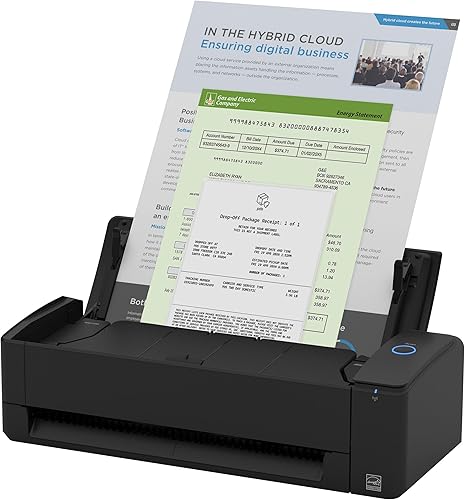
ScanSnap iX1300 Wireless or USB Double-Sided Color: Best for small shared desks
- Wi-Fi and USB
- Up to 30 ppm duplex scanning
- 20-sheet capacity
- Scans documents, photos, cards and thick items
The iX1300 fits tight work areas while supporting wireless or USB scanning to computers, mobile devices and cloud services.
Pros
- Compact 4.5 x 11.7 x 3.3 in body
- Wi-Fi and USB
- Can scan without a computer
Cons
- 20-sheet capacity is smaller than the desktop leaders
- Lower stated duplex speed than the 45 ppm models
The ScanSnap iX1300 is the best fit for a small shared desk because its body measures 4.5 D x 11.7 W x 3.3 H in. The compact shape helps you keep a wireless document scanner nearby without giving up the option to store it between jobs.
It connects through Wi-Fi or USB and scans to Mac, PC, mobile devices and cloud services. For Mac users, compare document scanners for Mac.
It can also be used without a computer, while Chromebook scanning works through the mobile app.
The iX1300 scans both sides at up to 30 ppm and has a 20-sheet capacity. It handles documents, photos, cards, thick items and plastic cards, so it offers more media flexibility than a basic single-sheet scanner.
Automatic de-skew, color optimization and blank-page removal are designed to reduce cleanup after scanning. ScanSnap Home brings document, receipt, business card and photo organization into one software workflow.
Choose this model when space and flexible connections matter most. A 20-sheet capacity means it is better for short batches than the 100-sheet desktop models.
Epson Workforce ES-50 Compact & Lightweight Mobile: Best for mobile single-sheet scanning
- USB-powered operation
- Single-sheet scanning
- Scans pages up to 8.5 x 72 in
- Nuance OCR included
The ES-50 is the lightest and simplest choice here for USB-powered scanning at a desk, in a small office or while traveling.
Pros
- 9.44 oz weight
- No external power supply required
- Scans receipts and ID cards
Cons
- USB-only connection
- Feeds one sheet at a time
The Epson WorkForce ES-50 is the best wireless document scanner alternative for mobile work, but it is not wireless. It uses USB power and a USB 2.0 connection, so it suits a laptop-based workflow where simple direct scanning matters more than Wi-Fi.
At 9.44 oz, it is the lightest pick here. The single-sheet feed accepts documents up to 8.5 x 72 in, along with receipts and ID cards.
Epson states that one page can scan in as fast as 5.5 seconds. Automatic Feeding Mode combines multiple inserted sheets into one file, but you still feed each page yourself.
Nuance OCR is included for searchable PDFs and editable Word and Excel files. Epson ScanSmart software supports scanning, reviewing, saving and sending files to online storage accounts when installed on a connected Windows PC or Mac.
Choose the ES-50 for a small bag, a temporary desk or occasional document capture. Choose a wireless document scanner with an Auto Document Feeder when you regularly scan stacks.
ScanSnap iX2500 Wireless or USB High-Speed Document: Best for advanced wireless workflows
- Wi-Fi 6 and USB-C
- 45 ppm duplex scanning
- 100-sheet feeder
- Large touchscreen
The iX2500 combines a 100-sheet feeder and 45 ppm duplex scanning with a large touchscreen, Wi-Fi 6 and USB-C.
Pros
- 45 ppm double-sided scanning
- Wi-Fi 6 and USB-C
- 100-sheet feeder
Cons
- Heavier than the compact wireless models
- More scanner than occasional users may need
The ScanSnap iX2500 is the best pick for advanced wireless workflows. It pairs Wi-Fi 6 and USB-C with a 100-sheet feeder, 45 ppm double-sided scanning and a large touchscreen.
The high-capacity feeder helps with longer batches, while the touchscreen lets you select personalized profiles. ScanSnap Cloud supports scanning directly to a favorite service without a computer.
The iX2500 can send scans to PC, Mac, mobile devices and cloud services. Its software can automatically make text searchable, optimize files, name them and sort them into folders and clouds.
A brake roller system feeds paper smoothly, while a multi-feed sensor detects pages stuck together. Skew detection is intended to help prevent paper damage and data loss during a batch.
The scanner measures 6.26 D x 11.5 W x 6.34 H in and weighs 7.7 lb. Pick it when you want a high-capacity wireless document scanner with a modern touchscreen and broad device support.
Epson Workforce ES-C320W Wireless Compact Document Scanner: Best for compact duplex scanning
- Wi-Fi and USB
- Up to 30 ppm duplex scanning
- 20-page Auto Document Feeder
- Scans cards and passports
The ES-C320W brings wireless, double-sided scanning to a compact desktop body with a 20-page feeder.
Pros
- Wireless scanning to computers and mobile devices
- 60% desk-space saving claim in vertical path position
- Scans cards and passports
Cons
- 20-page feeder is smaller than the high-volume picks
- Lower stated speed than the 45 ppm models
The Epson WorkForce ES-C320W is the best compact wireless document scanner for everyday duplex work. It connects by Wi-Fi or USB and scans to smartphones, tablets, computers and cloud storage accounts.
Its 20-page Auto Document Feeder handles short stacks, while Single-Step Technology captures both sides at up to 30 ppm. That makes it a practical middle ground between a single-sheet mobile scanner and a larger 100-page desktop unit.
The ES-C320W scans standard paper, cards and passports through its flexible scan path. Epson says the vertical path position saves 60% of desk space compared with the WorkForce ES-400 II with trays extended.
It measures 4.1 D x 11.7 W x 4.9 H in and weighs 3.9 lb. The smaller body is easier to place in a home office where a full-size feeder would take too much room.
Choose this model for wireless duplex scanning in a compact workspace. Choose the ES-590W or iX2500 if your normal batches exceed 20 sheets.
Canon imageFORMULA R40II Office Document Scanner: Best for simple USB office setup
- USB-C connection
- Up to 45 ppm duplex scanning
- 60-sheet feeder
- Canon CaptureOnTouch software included
The Canon R40II fits buyers who want fast duplex scanning and a 60-sheet feeder without a wireless connection.
Pros
- 45 ppm duplex scanning
- 60-sheet feeder
- Windows 11 and macOS support
Cons
- USB-only connection
- TWAIN and ISIS drivers are not supported
The Canon imageFORMULA R40II is the best choice for a simple USB office setup. It connects to a computer with the supplied USB-C cable and does not add wireless setup or network placement decisions.
The R40II scans both sides at up to 45 ppm and has a 60-sheet automatic feeder. Its feeding system handles receipts, business cards, reports, contracts, long documents and thick or thin documents.
Canon CaptureOnTouch scanning software is included, and the scanner supports Windows 11 and macOS. Canon states that the R40II is designed exclusively for CaptureOnTouch, with TWAIN and ISIS drivers not supported.
The compact body has a foldable paper feed tray and a monochrome LCD display. It weighs 7.1 lb, so it is a desktop office scanner rather than a lightweight mobile option.
Pick the Canon when fast duplex scanning and a medium-size feeder matter more than Wi-Fi. If you need wireless scanning to phones or cloud services, choose one of the five wireless models above.
How we compared wireless document scanners
The best wireless document scanner should match your paper volume, device mix and available desk space. A high speed number helps only when the feeder and workflow also fit your daily use.
Does the scanner need Wi-Fi or USB?
Wi-Fi is useful when the scanner sits away from your main computer or serves several devices. The Epson ES-590W, ScanSnap iX1300, ScanSnap iX2500 and Epson ES-C320W all support Wi-Fi and USB.
USB can be the better choice when one computer stays beside the scanner. The Epson ES-50 and Canon R40II use USB, so they avoid wireless setup but give you less freedom in placement.
If you want to print after scanning, a wireless printer can complete the workflow. Compare our guide to the Best Wireless Printer For Photos when photo output is part of the same desk setup.
How much feeder capacity do you need?
A 100-page feeder is best for larger batches. The Epson ES-590W and ScanSnap iX2500 both hold up to 100 sheets, while the Canon R40II holds 60 sheets.
The ScanSnap iX1300 and Epson ES-C320W each hold 20 sheets. These models are easier to fit into smaller work areas, but you may reload them more often for a large document set.
The Epson ES-50 holds one sheet. It works well for occasional forms, receipts, ID cards and long pages, but it is not the right fit for unattended batch scanning.
Is duplex scanning worth it?
Duplex scanning is worth prioritizing when your paperwork has printing on both sides. It captures the front and back in one pass, reducing the need to turn pages manually.
The ES-590W and iX2500 combine duplex scanning up to 45 ppm with 100-sheet feeders. The iX1300 and ES-C320W offer up to 30 ppm with smaller 20-sheet feeders, while the Canon R40II reaches up to 45 ppm with a 60-sheet feeder.
A mobile single-sheet scanner can still be the better choice when you scan only one page at a time. The ES-50 keeps the setup small and USB-powered.
Which brand should you choose?
Choose Epson if you want several wireless options across different workloads. The ES-590W targets high-volume desktop scanning, while the ES-C320W keeps wireless duplex scanning compact.
Choose ScanSnap if you want a wireless workflow with touchscreen or software organization features. The iX1300 is smaller, while the iX2500 adds a 100-sheet feeder, Wi-Fi 6 and USB-C.
Choose Canon if you prefer a direct USB connection and CaptureOnTouch software. For more brand-specific comparisons, see our guides to best brother document scanners, the best document scanner hp and the best epson document scanner.
How to set up a wireless document scanner
Start by placing the scanner near a power source with enough room for the paper path and output. Check the stated dimensions, then keep the feeder and tray clear before loading pages.
Give the scanner a flat and stable surface where pages can enter without bending. A tight space may force paper to curve as it feeds, which can affect a first test batch.
Install the brand's software on the computer or mobile device you plan to use. Connect through Wi-Fi when you want flexible placement, or use USB when the scanner and computer will stay together.
For Wi-Fi models, join the scanner to the same network as the device that will receive the files. Confirm that the computer, phone or cloud service appears as a valid destination before you load a large stack.
For a first batch, use a small group of pages. Check that pages feed straight, double-sided files include both sides and the destination folder or cloud service is correct.
Review the first scan for alignment, missing sides and file quality. A short test makes it easier to change settings now than after a full archive has been scanned.
Remove clips, staples and loose adhesive before scanning. Keep paper flat and in the supported path, and follow the scanner's care instructions when dust or paper debris begins to affect feeding.
Wipe the outside of the scanner with a soft and dry cloth and avoid liquid near the input slot. Keep the paper path clear between jobs, especially when you scan receipts, cards or mixed sizes.
Create clear file names and folders before scanning a large archive. A simple structure by year, client or document type makes searchable files easier to find later.
Store originals separately until you have confirmed that the digital copies are complete and readable. This simple check protects you from losing a signed page or receipt during the first week of use.
Set a regular time to scan new paperwork so batches stay small. Short and frequent sessions suit a 20-sheet feeder and keep a 100-sheet feeder from becoming a storage pile.
Test sending a scan to each destination you plan to use, including email, cloud storage or a mobile app if those options apply. Confirm that names, folders and formats look right before you rely on the workflow for important records.
Wireless document scanner trade-offs to remember
Wireless models make placement easier, but they add a network or mobile setup step. USB models are simpler for a single-computer desk, but they need a direct connection and cannot offer the same placement freedom.
Wi-Fi can help a scanner serve a computer, a phone and a cloud account from one position. That freedom depends on a stable network and on keeping each device signed in and reachable.
USB keeps the path short and predictable when the scanner stays beside one computer. The trade-off is that the scanner must remain within cable reach, which may limit shelf, counter or shared desk placement.
Large feeders reduce reloads, but the scanners with 60- or 100-sheet capacities take more desk space and weigh more. Compact 20-sheet models work well for short batches and smaller work areas.
A large feeder suits repeated office paperwork, contracts and multi-page reports. You load once and spend less time attending the scanner during a long job.
A smaller feeder suits households and small offices where most batches run to a few pages. Reloading is more frequent, but the scanner itself is easier to place and store.
Fast duplex scanning helps most when your documents have two printed sides. For receipts, occasional forms and a few pages at a time, a smaller scanner may be easier to keep ready.
Duplex scanning can also reduce your own handling because you do not need to turn each sheet over. The value rises when two-sided pages are routine rather than occasional.
Single-sheet scanning remains practical when portability matters more than batch speed. It suits a bag or a temporary desk, but it asks you to feed each page and combine multi-page files yourself.
Touchscreen and computer-free features can simplify daily use for people who scan from several places. They add convenience, yet they are most useful when you send files to email, cloud storage or a flash drive without a computer nearby.
Software organization matters as much as speed for long-term use. Searchable files, clear names and consistent folders help you find a document months later, even after the scanner itself is gone from your desk.
Which wireless document scanner should you choose?
Choose the Epson WorkForce ES-590W for the best overall mix of Wi-Fi, USB, 45 ppm duplex scanning, a 100-page feeder and a 4.3-inch touchscreen. It suits busy desks where large batches and computer-free sending are part of the daily routine.
Choose the ScanSnap iX1300 for a compact wireless document scanner that handles short batches, cards, photos and mobile workflows. Its smaller body fits a shared desk, while its 20-sheet capacity keeps expectations realistic for larger jobs.
Choose the Epson ES-50 when low weight and USB-powered single-sheet scanning matter most. At 9.44 oz, it fits a bag or a temporary desk, but it cannot match the batch speed of a feeder model.
For advanced wireless workflows, the ScanSnap iX2500 adds Wi-Fi 6, USB-C, a 100-sheet feeder and a large touchscreen. It suits people who want personalized profiles, cloud sending and stronger paper handling in one desktop unit.
For compact duplex scanning, choose the Epson ES-C320W. It keeps wireless and double-sided scanning in a smaller body with a 20-page feeder, which suits a home office with limited space.
For fast USB-only office scanning, the Canon R40II is the straightforward pick. It pairs 45 ppm duplex scanning with a 60-sheet feeder and CaptureOnTouch software, without adding wireless setup.
Use your normal batch size as the first filter. A 100-sheet feeder serves large stacks, a 20-page feeder serves short batches and a single-sheet model serves occasional pages.
Use your desk space as the second filter. The larger desktop models need room for the feeder and paper path, while the compact and mobile models are easier to store between jobs.
Use your devices as the third filter. Choose Wi-Fi when scans need to reach phones, tablets or cloud services, and choose USB when one computer will stay beside the scanner.
Keep originals until the first scans have been checked for completeness and readability. That habit protects important pages while you learn the workflow.
If your paperwork is mostly two-sided, prioritize duplex scanning. If it is mostly receipts and single forms, prioritize a small body and simple setup.
Match the scanner to the work you actually do each week. The right choice is the one whose feeder, connections and software fit your space, your devices and your usual batch size.
Our top 3 picks at a glance
-
1
Best for high-volume desk scanning
Epson Workforce ES-590W Wireless & USB High-Speed
9.7/10 our score
See it on Amazon -
2
Best for small shared desks
ScanSnap iX1300 Wireless or USB Double-Sided Color
9.6/10 our score
See it on Amazon -
3
Best for mobile single-sheet scanning
Epson Workforce ES-50 Compact & Lightweight Mobile
9.4/10 our score
See it on Amazon
Frequently asked questions
What is the best wireless document scanner for most people?
The Epson WorkForce ES-590W is the best wireless document scanner for most busy desks because it combines Wi-Fi and USB, 45 ppm double-sided scanning, a 100-page feeder and a 4.3-inch color touchscreen.
Choose the ScanSnap iX1300 when desk space matters more than feeder capacity.
Are wireless document scanners better than USB scanners?
Wireless document scanners give you more placement choices and can send scans to computers, mobile devices or cloud services without a direct USB connection. USB scanners can be simpler when one computer stays beside the scanner.
Choose Wi-Fi for shared desks or flexible placement, and USB when a direct connection is all you need.
Can a wireless document scanner scan both sides at once?
Yes. The Epson ES-590W, ScanSnap iX1300, ScanSnap iX2500 and Epson ES-C320W support double-sided scanning.
The Canon R40II also scans both sides at the same time.
The Epson ES-50 is different because it feeds one sheet at a time and is designed for mobile scanning.
What feeder capacity should a wireless document scanner have?
Choose a feeder based on your usual batch size. A 100-sheet feeder suits large paperwork jobs, while a 20-page feeder is enough for shorter batches and keeps the scanner smaller.
If you scan only a few pages at a time, a single-sheet mobile scanner can be easier to store.


