8 Best Document Scanners for Home Offices (November 2026)
The best home office document scanners include the Epson Workforce ES-400 II High-Speed Color Duplex for regular paperwork batches, the ScanSnap iX1300 Wireless or USB Double-Sided Color for compact wireless scanning, and the Brother DS-640 Compact Mobile Document Scanner for a portable one-page workflow.
On this page (3 sections)
The Epson WorkForce ES-400 II is the best document scanner for most home offices because its 50-sheet feeder and duplex scanning suit routine paperwork batches. If desk space is tight, the ScanSnap iX1300 combines a compact footprint with Wi-Fi and USB.
A home office scanner should fit the amount of paper you handle and the space available. A feeder saves time on stacks, while a compact single-sheet scanner can be easier to keep within reach for occasional receipts or forms.
For a broader view of the best scanner for pictures, see our photo scanner guide. The picks below focus on documents, receipts and office paperwork.
Our picks at a glance
-
1
 Best for regular paperwork batches
Epson Workforce ES-400 II High-Speed Color Duplex
9.7/10 our score
See it on Amazon -
2
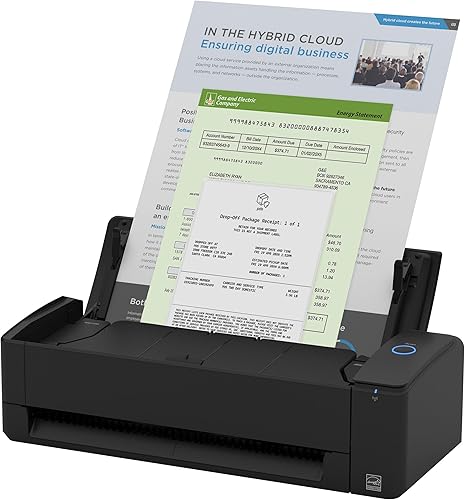 Best for compact wireless scanning
ScanSnap iX1300 Wireless or USB Double-Sided Color
9.6/10 our score
See it on Amazon -
3
 Best for a portable one-page workflow
Brother DS-640 Compact Mobile Document Scanner
9.5/10 our score
See it on Amazon
- 4
 Check it
HP Small USB Document & Photo Scanner
Best for occasional single-sided scans - 5
 Check it
Epson Workforce ES-50 Compact & Lightweight Mobile
Best for receipts and long pages - 6
 Check it
ScanSnap iX2500 Wireless or USB High-Speed Document
Best for high-volume home offices - 7
 Best for portable duplex batchesCheck it
- 8
 Check it
Canon imageFORMULA DR-C225 II Office Document Scanner
Best for upright desk placement
Which document scanners fit different home offices?
The Epson ES-400 II is the best match for routine batches, while the ScanSnap iX1300 is better suited to a compact desk that needs wireless scanning. These eight options cover different balances of footprint, feeder capacity and connection type.
Epson Workforce ES-400 II High-Speed Color Duplex: Best for regular paperwork batches
- 50-sheet auto document feeder
- Duplex scanning
- Searchable PDFs with OCR
- USB connection
A 50-sheet feeder and duplex scanning suit regular stacks of home office paperwork. OCR can create searchable PDFs and editable Word or Excel files.
Pros
- Largest feeder here
- Duplex scanning
- Searchable PDFs and editable files
Cons
- USB connection only
- Takes more desk depth than the compact picks
The Epson WorkForce ES-400 II is the most balanced pick for regular home office paperwork. Its 50-sheet automatic document feeder reduces the need to reload for a stack, and duplex scanning captures both sides in one pass.
See more scanners with automatic document feeders for comparison.
Epson says the scanner can reach 35 pages per minute for letter-sized pages at 300 dpi. That speed depends on scan mode, so consider it a maker-stated figure rather than a promise for every document or workflow.
Epson ScanSmart lets you preview scans, email files and upload them to cloud storage. OCR can create searchable PDFs and convert scans to editable Word or Excel files.
Its USB connection and dimensions of 11.6 x 11.6 x 6.9 in make it a better fit for a settled desk than a shelf you clear after each scan.
Choose the ES-400 II if you regularly digitize multipage records and want a larger feeder. Its ultrasonic double-feed detection and skew correction can help prevent missed pages during feeding.
ScanSnap iX1300 Wireless or USB Double-Sided Color: Best for compact wireless scanning
- Space-saving design
- USB and Wi-Fi
- Up to 30 ppm duplex scanning
- 20-sheet feeder
The compact footprint, Wi-Fi and duplex scanning make this a flexible fit for a crowded desk. It can send scans to computers, mobile devices and cloud services.
Pros
- Designed to save desk space
- Wireless or USB connection
- Can scan without a computer
Cons
- Smaller feeder than the Epson ES-400 II
- No touchscreen detail provided
The ScanSnap iX1300 is a strong choice when a full-size feeder scanner would crowd your work surface. Its stated dimensions are 4.5 x 11.7 x 3.3 in, and its design is intended to take up little desk space.
It scans both sides at up to 30 pages per minute and connects over USB or Wi-Fi. You can send scans to a Mac, PC, mobile device or cloud service, and the scanner can also work without a computer.
The 20-sheet feeder is smaller than the Epson's, so it fits routine but more modest stacks. ScanSnap Home brings document, receipt, business card and photo organization functions together, while automatic deskew, color optimization and blank-page removal are built in.
Pick it when wireless use and a compact footprint matter more than the largest feeder capacity. If you are comparing brands, see our guides to the best HP document scanner, the best Epson document scanner and the best Canon document scanner.
Brother DS-640 Compact Mobile Document Scanner: Best for a portable one-page workflow
- Compact mobile design
- USB powered
- Up to 16 ppm
- Windows, Mac and Linux support
This small, USB-powered scanner suits a desk that must stay clear between occasional scans. It handles one sheet at a time and supports several scan destinations.
Pros
- Compact and portable
- USB powered from a computer
- Supports Windows, Mac and Linux
Cons
- Single-sheet workflow
- No wireless connection
The Brother DS-640 is for a home office that needs a scanner that can be put away between jobs. At about 11.9 in wide and 1.45 in deep, it is a compact mobile model, and it draws power through its included micro USB cable when connected to a computer.
Its single-sheet workflow is best for a few pages at a time, not a large unattended stack. Brother states a speed of up to 16 pages per minute for color and black-and-white documents.
The iPrint&Scan desktop app offers destinations such as a computer, network, cloud services, email and OCR. The DS-640 supports Windows, Mac and Linux, which is useful if your home office setup is not limited to one operating system.
Choose it if portability and a narrow footprint matter more than wireless scanning or an automatic feeder. For more options by connection, compare a wireless document scanner with a USB-C document scanner or USB document scanner.
HP Small USB Document & Photo Scanner: Best for occasional single-sided scans
- USB connection
- Single-sided sheetfed scanning
- Up to 15 ppm
- Windows and Mac software
The HPPS100 is a slim, USB-connected option for occasional documents, receipts and cards. Its single-sided workflow fits light scanning better than frequent two-sided batches.
Pros
- Slim footprint
- Scans documents and several card types
- HP WorkScan software included
Cons
- Single-sided scanning
- Designed for occasional scanning
The HP Small USB Document & Photo Scanner suits occasional, single-sided jobs such as receipts, bills, cards and letters. Its slim 11.6 x 2 x 1.4 in body and USB connection make it easy to place beside a computer or put away after a scan.
HP specifies a speed of up to 15 pages per minute for color and black-and-white simplex scanning. HP WorkScan software for Windows and Mac includes preview, cropping, editing and saving tools.
This scanner handles a range of paper sizes and media, including photos, receipts and business cards. It is designed for light scanning, so choose a duplex feeder model if two-sided pages or larger batches are common in your home office.
Epson Workforce ES-50 Compact & Lightweight Mobile: Best for receipts and long pages
- USB powered
- Single-sheet feeding
- Scans pages up to 8.5 x 72 in
- OCR included
The ES-50 handles receipts, ID cards and long pages up to 72 inches. Its single-sheet feed and USB power suit light jobs and portable use.
Pros
- Handles extra-long pages
- USB powered
- OCR can create searchable PDFs
Cons
- Single-sheet workflow
- No wireless connection
The Epson WorkForce ES-50 is a compact option for occasional single pages, receipts and long documents. It connects to a computer over USB and does not need batteries or an external power supply.
Epson says a single page can scan in as little as 5.5 seconds. Its single-sheet feeding mode can combine pages into one file as you insert them, but you must feed each page yourself.
The ES-50 handles pages up to 8.5 x 72 in and can scan ID cards. Included OCR can create searchable PDFs and editable Word or Excel files.
Pick it if you want a small scanner for light jobs, and choose a feeder model for frequent batches.
ScanSnap iX2500 Wireless or USB High-Speed Document: Best for high-volume home offices
- 100-sheet feeder
- 45 ppm duplex scanning
- Wi-Fi and USB-C
- Touchscreen profiles
A 100-sheet feeder, fast duplex scanning and touchscreen profiles suit a home office with frequent large batches. Wi-Fi and USB-C offer flexible placement and connections.
Pros
- Largest feeder here
- 45 ppm duplex scanning
- Wi-Fi and USB-C
Cons
- Larger and heavier than compact picks
- May be more scanner than occasional jobs need
The ScanSnap iX2500 is the high-volume pick for a home office with frequent, large scanning jobs. Its 100-sheet feeder has the largest stated capacity in this group, and the scanner supports duplex scanning at up to 45 pages per minute.
The touchscreen lets you select personalized profiles, while Wi-Fi and USB-C provide connection choices. ScanSnap describes automatic optimization, naming and sorting features for documents, receipts, photos and business cards.
At 11.5 x 6.26 x 6.34 in and 7.7 lb, it needs a stable place on the desk. Its capacity and speed can be more than an occasional scanner user needs, but they suit a paper-heavy workflow.
Choose it when you want a large feeder, fast two-sided scanning and touchscreen controls in one device. For other workflow needs, see options for a document scanner for PC, a network document scanner or a document scanner with OCR.
Canon imageFORMULA R10: Best for portable duplex batches
- 20-sheet automatic feeder
- Duplex scanning up to 12 ppm
- USB powered
- Built-in software
The R10 pairs a 20-sheet feeder with duplex scanning in a portable, USB-powered design. Built-in software can help avoid a separate installation step.
Pros
- Duplex scanning
- Handles receipts and cards
- Built-in software
Cons
- USB connection only
- Slower stated speed than the higher-volume picks
The Canon imageFORMULA R10 pairs a 20-sheet feeder with duplex scanning in a portable USB-powered design. It suits a home office that handles small batches and may move the scanner between rooms.
Canon states a speed of up to 12 pages per minute for color or black-and-white duplex scanning. The scanner handles receipts, business cards, plastic or embossed cards, reports and legal documents, and its built-in software can preview, straighten and trim scans.
For delicate or irregular originals, learn what a scanner carrier sheet is.
The R10 works with Windows and Mac. Canon says it creates searchable PDFs and JPEGs, though it is not intended for photographs on photo paper.
Choose it for mixed document and card scanning, rather than photo archiving.
Canon imageFORMULA DR-C225 II Office Document Scanner: Best for upright desk placement
- Upright space-saving design
- 30-sheet automatic feeder
- Duplex scanning up to 25 ppm
- USB connection
Its upright design and top feed and eject help preserve desk space while supporting document batches. The 30-sheet feeder and duplex scanning suit regular office paperwork.
Pros
- Upright design
- 30-sheet feeder
- Duplex scanning
Cons
- USB connection only
- Taller profile than low mobile scanners
The Canon imageFORMULA DR-C225 II is a good fit when an upright scanner can make better use of a home office desk. Its top feed and top eject design keeps the paper path vertical, and a built-in cable organization system helps manage the USB connection.
A 30-sheet feeder supports batches, while duplex color scanning reaches up to 25 pages per minute according to Canon. The scanner can handle receipts, photos, business cards, plastic or embossed cards, contracts and long documents.
It supports Windows and Mac, includes a TWAIN driver and can scan to cloud services. Pick it when you want an office-style feeder in an upright design; compare the height of 8.7 in with any shelf above the scanner before placing it.
How do you choose a document scanner for a home office?
Choose a scanner by matching its feeder, scanning style and connection to your everyday paperwork. A compact body is useful, but it won't help much if you regularly feed stacks one page at a time.
Does the feeder size match your paperwork?
A larger automatic feeder suits recurring batches of forms, invoices and records. The ES-400 II holds 50 sheets, the DR-C225 II holds 30, and the iX1300 and R10 each hold 20.
If you scan just a few pages now and then, a single-sheet scanner may be easier to store. The Brother DS-640 and Epson ES-50 are compact options, but you feed pages individually.
Is duplex scanning worth it?
Duplex scanning is useful when both sides of your paperwork contain information. The ES-400 II, iX1300, iX2500, R10 and DR-C225 II scan both sides, while the HPPS100 is a simplex scanner.
For mostly one-sided receipts or forms, simplex scanning may be enough. For contracts or records with notes on the reverse, duplex scanning avoids a second pass.
How much desk space can you spare?
Measure the available width, depth and height before choosing a scanner. The iX1300 has a particularly compact stated footprint, while the DR-C225 II uses an upright form that may fit a narrow desk but needs overhead clearance.
Mobile models such as the Brother DS-640 and Epson ES-50 are easier to move or store. A larger feeder model is more convenient when it can stay connected and ready on the desk.
Do you need Wi-Fi, USB-C or a network destination?
Wi-Fi can help when the scanner needs to sit away from a computer or send work to mobile devices. The ScanSnap iX1300 and iX2500 support Wi-Fi, while USB-only models suit a fixed computer-side setup.
USB-C is a specific connection requirement, not a general synonym for USB. For email or shared-workflow needs, check the scanning software and supported destinations; the Brother DS-640 includes scan-to options such as email, network and cloud services.
Will OCR help you find old paperwork?
OCR can make scanned pages searchable, which helps when you need to locate a name or phrase in a digital archive. The Epson ES-400 II and ES-50 support searchable PDF creation, and the Brother DS-640 includes OCR software.
If you mainly need image copies of receipts, OCR may be less important. For records you expect to search or edit, compare the software's supported output and destinations before choosing.
Should you buy a scanner or a printer-scanner combo?
A standalone scanner is useful if scanning is the main job and you already have a printer. A combo can save space if you also need to print and copy, though you may want to compare separate devices for scan volume and workflow.
See our best printer scanner combo for a home office guide and the explanation of whether a scanner printer combo is worth it for a home office before choosing.
Which home office document scanner should you choose?
Pick the Epson ES-400 II if you scan regular batches and want a 50-sheet feeder with duplex and OCR features. Choose the ScanSnap iX1300 for a compact, wireless desk setup, or the Brother DS-640 for a portable one-page workflow.
If your home office has heavier daily volume, the ScanSnap iX2500 brings a 100-sheet feeder, fast duplex scanning and Wi-Fi. For a different brand or buying need, browse our guides to Brother document scanners, scanners that send to email, document scanner deals, Mac document scanners, standalone document scanners and Ricoh document scanners.
Our top 3 picks at a glance
-
1
Best for regular paperwork batches
Epson Workforce ES-400 II High-Speed Color Duplex
9.7/10 our score
See it on Amazon -
2
Best for compact wireless scanning
ScanSnap iX1300 Wireless or USB Double-Sided Color
9.6/10 our score
See it on Amazon -
3
Best for a portable one-page workflow
Brother DS-640 Compact Mobile Document Scanner
9.5/10 our score
See it on Amazon
Frequently asked questions
What is the best document scanner for a home office?
The Epson WorkForce ES-400 II is a strong fit for regular paperwork because it has a 50-sheet feeder, duplex scanning and OCR for searchable PDFs. For a smaller desk with wireless needs, consider the ScanSnap iX1300, which has a compact design and USB or Wi-Fi connections.
Do I need a document scanner with an automatic feeder?
A feeder helps when you scan several pages at once. The Epson ES-400 II holds 50 sheets, while the ScanSnap iX1300 and Canon R10 each hold 20.
For occasional single pages, a compact one-sheet model may take less room and be simpler to store.
Is duplex scanning useful for home office paperwork?
Duplex scanning captures both sides of a page in one pass, which helps with forms, contracts and other double-sided records. Several picks here offer it, including the Epson ES-400 II, ScanSnap iX1300 and Canon R10.
A simplex scanner is sufficient when your papers are one-sided.
Should I choose a wireless or USB document scanner?
Choose Wi-Fi if you want placement flexibility or to send scans to mobile devices and cloud services. USB suits a scanner that stays beside one computer.
The ScanSnap iX1300 supports both USB and Wi-Fi, while the Epson ES-400 II and Brother DS-640 use USB.