7 Best CZUR Book Scanners (November 2026)
The best CZUR book scanners include the CZUR ET24 Pro Professional Book Scanner for most book scanning, the CZUR Aura Pro Book & Document Scanner for a lighter desk setup, and the CZUR Shine Ultra Smart Portable Document Scanner for thin books and portability.
On this page (8 sections)
- How we compared these book scanners
- The best CZUR book scanners and alternatives, in order
- How do these scanners compare side by side?
- What size book do you need to scan?
- How thick is your book?
- What capture quality do you need?
- What workflow will you use every day?
- Which scanner should you buy in the end?
The best CZUR book scanner for most buyers is the CZUR ET24 Pro Professional Book Scanner, because it pairs a 24MP camera with A3 capture and curve flattening for bound pages. If you want more resolution, the ET MAX steps up to 38MP.
If you scan thin books or flat papers, the Shine Ultra is faster and more portable. Our score weighs specs, features and buyer feedback against what you are shopping for.
We compared CZUR models for bound pages, capture quality and workflow. We also added two non-CZUR overhead scanners, because some buyers may prefer a different software or format option.
The key differences are not only megapixels. They include page size, book thickness, lighting, system support and how the software handles curved pages and small items.
Our picks at a glance
-
1
 Best for most book scanning
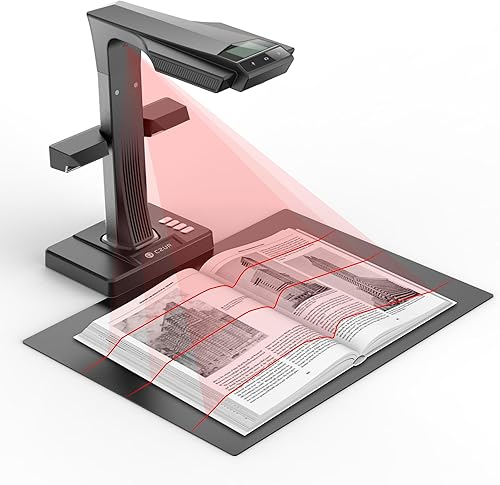
CZUR ET24 Pro Professional Book Scanner
9.5/10 our score
See it on Amazon -
2
 Best for a lighter desk setup
CZUR Aura Pro Book & Document Scanner
9.3/10 our score
See it on Amazon -
3
 Best for thin books and portability
CZUR Shine Ultra Smart Portable Document Scanner
9.3/10 our score
See it on Amazon
- 4
 Check it
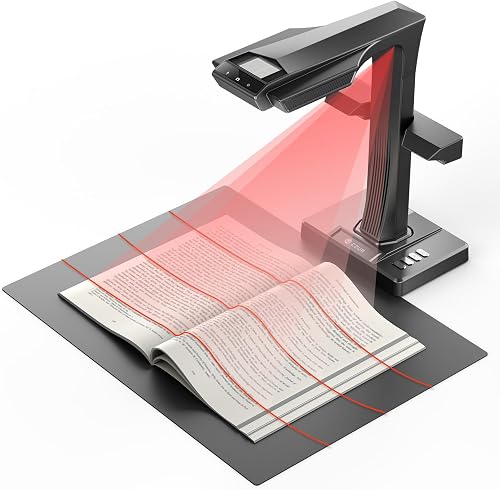
CZUR ET MAX Professional Book & Document
Best for highest resolution - 5
 Check it
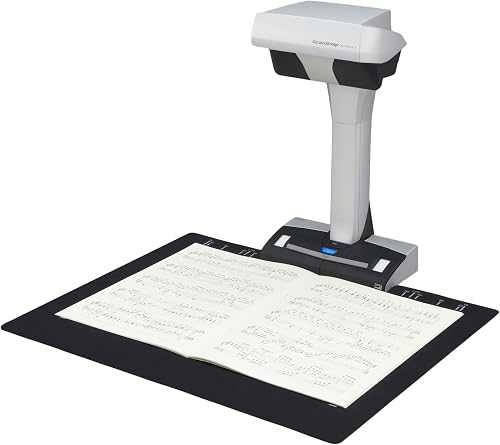
ScanSnap SV600 Overhead Book and Document Scanner
Best non-CZUR alternative - 6
 Check it
VIISAN Large Format Book & Document Scanner
Best for A2 large format - 7
 Check it
CZUR ET16 Plus Advanced Book & Document
Best for fast everyday book scans
How we compared these book scanners
We checked the specs match the job you need done. That means page size first, then resolution, speed, lighting and OCR support.
A scanner that is fast on flat paper may still struggle with a thick book that will not lie flat.
We looked at how each scanner handles a curved page. Laser lines, flattening tools and auto correction matter when you scan a book that will not lie flat.
We paid close attention to models that state a limit for thinner books only, because that limit changes the recommendation.
We checked system support too. Most models here work with Windows and macOS, and a few add Linux support for specific Ubuntu versions.
We noted where a model works only on x64 or x86 systems, or where Arabic OCR depends on the operating system.
We did not test these scanners by hand. We compared product data and buyer patterns, and we label maker claims as claims.
Speed figures, DPI figures and claims about finishing a long book in a set time depend on page size, lighting and how carefully you turn pages.
How we treated software-enhanced figures
Some models list a higher DPI after software enhancement. We treated that figure as different from native capture at the stated pixel size.
That distinction matters when you plan to crop or enlarge a page.
The best CZUR book scanners and alternatives, in order
CZUR ET24 Pro Professional Book Scanner: Best for most book scanning
- 24MP HD camera, 320 DPI
- 5696 x 4272 resolution
- A3/A4 large format capture
- Curve-flattening technology
- ABBYY OCR, 180+ languages
- HDMI support
- 2-inch preview screen
A strong all-round CZUR pick for bound books, with high resolution, A3 capture and OCR for searchable files.
Pros
- High 24MP capture for detailed pages
- A3 size handles large books and magazines
- Side lights help reduce glare on glossy pages
Cons
- Very glare-prone papers are not recommended
- Heavier than portable CZUR models
The ET24 Pro suits buyers who want one scanner for books, documents, magazines and mixed desk work. Its 24MP camera at 5696 x 4272 gives more detail than the smaller CZUR picks here.
That helps when you crop a page, zoom in on small text or keep a finer image for later editing.
It captures up to A3 size at 16.5 x 11.7 inches. That covers many large-format books and magazines, but you should still measure your widest spread before you buy.
CZUR says very glare-prone papers are not recommended, so glossy pages need care and a test scan.
Lighting is a practical plus. It has 2 side lights and a head light across 3 angles.
CZUR suggests trying the head light off and using only side lights for glossy paper. A 2-inch preview screen on the head helps you check framing as you work.
For text, it uses ABBYY OCR to convert JPG files to editable PDF, Excel and Word files. OCR covers 180 or more languages, with limits for Thai, Hebrew and Arabic by system.
HDMI support also lets it work as a document camera for live viewing.
The trade-off is size and weight. At 4.5 kg, it is less portable than the Aura Pro or Shine Ultra.
If you need a fixed desk scanner for serious book work, that trade-off is usually worth it.
CZUR Aura Pro Book & Document Scanner: Best for a lighter desk setup
- A3 and A4 capture
- 4320 x 3240 resolution
- About 2 seconds per page
- Laser lines for curve detection
- 4 color temperature lamp
- 2-inch preview screen
- Folds 90 degrees
A lighter CZUR option that folds for storage, with fast capture and lamp modes for reading and scanning.
Pros
- Lightweight at 1.5 kg
- Folds for easier storage
- Smart lamp with 4 color temperatures
Cons
- Lower resolution than the ET24 Pro
- Smaller standard sheet capacity in the specs
The Aura Pro suits buyers who want book scanning with a lighter, more flexible desk setup. It captures A3 and A4 pages and uses 3 laser lines to help map curved book pages.
That matters when the gutter of a book will not flatten on its own.
Its resolution is 4320 x 3240, which is lower than the ET24 Pro. For everyday reading copies and searchable PDFs, that is often enough.
If you plan to crop small sections or print large enlargements, the higher-resolution picks may suit you better.
Speed is about 2 seconds per page. CZUR also lists auto scan and foot pedal use, so you can keep turning pages without clicking every time.
Output includes JPG, Word, PDF and searchable PDF. The software can also correct skew when a document is placed at an angle.
Lighting sets this model apart. It has 32 LED lights plus 2 side lights and a smart lamp with 4 color temperature settings.
The lamp can work for reading as well as scanning, and sound control means no Wi-Fi or Bluetooth is needed for that control.
It folds 90 degrees and weighs 1.5 kg, so storage is easier than with the ET series. The trade-off is a smaller stated sheet capacity and lower resolution.
Choose it for flexibility, not for maximum detail.
CZUR Shine Ultra Smart Portable Document Scanner: Best for thin books and portability
- 13MP CMOS camera
- 4160 x 3120 resolution
- About 1 second per page
- A3 and A4 capture
- Flattening for thin books
- Foot pedal and auto scan
- Folds 90 degrees
A portable CZUR scanner aimed at flat papers and thinner books, with fast capture and hands-free triggers.
Pros
- Fast capture at about 1 second per page
- Portable, foldable design
- Works as a document camera for teaching
Cons
- Flattening is suited to thinner books
- Not compatible with Android or iOS
The Shine Ultra suits buyers who scan flat papers, thin books and mixed documents on the move. It captures A3 and A4 items at about 1 second per page.
That speed helps with receipts, handouts, certificates and short book sections.
Its camera is 13MP at 4160 x 3120. CZUR lists about 340 DPI at A4 and 245 DPI at A3.
For readable text and clean copies, that can work well. For fine detail on dense book pages, the ET24 Pro or ET MAX gives you more to work with.
Flattening is the key limit to know. CZUR says this model is only suitable for thinner books.
For thicker bound books, CZUR recommends the ET series instead. That one detail should drive your choice more than speed alone.
The Shine Ultra also works as a USB document camera for remote teaching and learning with Zoom and Google Meet. It has smart paging, auto cropping, combine sides and stamp mode in the software.
A foot pedal and auto scan help you keep a steady pace.
It has a 2-level height adjustable neck, folds 90 degrees and weighs 4 lbs. It works with Windows and macOS, but not Android or iOS.
Choose it for portability and flat work, not for thick books.
CZUR ET MAX Professional Book & Document: Best for highest resolution
- 38MP CMOS sensor
- 7168 x 5376 resolution, 410 DPI
- A3 capture
- Curve flattening
- OCR for Word, Excel and searchable PDF
- HDMI output
- About 1.5 seconds per page
The highest-resolution CZUR here, suited to buyers who want fine detail from bound pages and large documents.
Pros
- Highest resolution in this group
- HDMI for live projection
- Fast capture for bulk projects
Cons
- Glossy or reflective materials are not recommended
- Higher resolution may mean larger files
The ET MAX suits buyers who want the sharpest capture in this group. It has a 38MP CMOS sensor at 7168 x 5376 and 410 DPI.
That gives you more detail for cropping, zooming and keeping a clean digital copy of a page.
It captures up to A3 size at 16.5 x 11.7 inches. CZUR says glossy or highly reflective materials are not recommended.
If your books use coated paper, test your lighting and angle before you commit to a long project.
Speed is about 1.5 seconds per page with practiced operation. That is designed for bulk scanning, where a steady page-turning rhythm matters as much as the camera.
Curve flattening helps remove distortion from bound pages without unbinding the book.
OCR converts scans to editable and searchable files, including Word, Excel and searchable PDFs. It supports 180 or more languages, with the same Thai, Hebrew and Arabic limits seen on other ET models.
HDMI output supports real-time projection and live demos.
The trade-off is file size and complexity. Higher resolution can mean larger files and longer processing.
Choose the ET MAX when detail is your priority. Choose the ET24 Pro when you want a simpler balance.
ScanSnap SV600 Overhead Book and Document Scanner: Best non-CZUR alternative
- Overhead contactless scanning
- Auto book correction
- Multi-document detection
- Page turning detection
- Point Retouch for fingers
- Scans books up to 30 mm thick
A different overhead approach from ScanSnap, with book correction and multi-document detection for mixed pages.
Pros
- Contactless overhead design
- Multi-document detection crops several items at once
- Page turning detection starts scans automatically
Cons
- Lower stated resolution than CZUR picks
- Heavier at 6.6 lb
The ScanSnap SV600 suits buyers who want an overhead scanner from a different brand and workflow. It scans newspapers, magazines, documents and books without cutting or damaging them.
That contactless design helps with delicate or valuable pages.
It scans books up to 30 mm thick directly. Auto Book Correction flattens and corrects curve distortion.
Multi Document Detection can scan up to 10 documents at once, then crop and rotate them. That suits business cards, photos and newspaper clippings placed together.
Page Turning Detection starts scanning when you turn a page. Time Mode lets you set a fixed interval.
Point Retouch can remove fingers captured during scanning. Those tools suit a steady, repetitive workflow where you want the scanner to respond to your pace.
The sensor is CCD and the stated resolution is 1200. That is lower than the megapixel figures on the CZUR picks.
For some buyers, the workflow matters more than the headline number. For others, resolution will be the deciding factor.
It weighs 6.6 pounds and uses USB. The trade-off is that it sits below the CZUR picks on resolution and A3-focused book features.
Choose it if the ScanSnap workflow fits your desk and habits better.
VIISAN Large Format Book & Document Scanner: Best for A2 large format
- 26MP, 5888 x 4522 pixels
- A2 capture at 594 x 420 mm
- Software-enhanced up to 600 DPI
- Auto-flatten and fingerprint removal
- OCR to PDF, Word, Excel, Epub and Txt
- 3-level LED light control
- 90-degree foldable hinge
The only A2 pick here, suited to large journals, manuscripts, newspapers and maps that exceed A3.
Pros
- A2 capture for oversized pages
- Fingerprint removal and page splitting in software
- Adjustable height for A2 and A3
Cons
- Software supports only x64 and x86 on Windows and macOS
- Very glary papers are not recommended
The VIISAN S21 suits buyers whose pages are too large for A3 scanners. It captures up to A2 size at 594 x 420 mm.
That covers large journals, manuscripts, newspapers and maps that other picks here cannot fit.
It delivers up to 26MP at 5888 x 4522 pixels. VIISAN says software can enhance output up to 600 DPI.
Treat that as a software-enhanced figure, not the same as native capture at every size. The adjustable height for A2 and A3 helps you match the field of view to the page.
The software can flatten curved pages, erase fingers, repair damaged edges and split double pages. OCR can convert scans to PDF, Word, Excel, Epub and Txt files.
It can also scan barcodes and QR codes into Excel, according to VIISAN.
Lighting uses a 3-level LED control. VIISAN says very glary papers are not recommended, and built-in LEDs are not recommended in bright light.
That note matters for glossy magazines and coated paper. A scan pad is included in the packing list.
The main limit is compatibility. The bundled OfficeCam software supports only x64 and x86 on Windows and macOS.
It is not compatible with ARM devices such as the Surface Pro X. Choose this model for A2 size, not as a general CZUR alternative.
CZUR ET16 Plus Advanced Book & Document: Best for fast everyday book scans
- 16MP HD camera
- 4608 x 3456 resolution
- About 1.5 seconds per page
- Three laser beams
- Curve flattening
- OCR in 180+ languages
- 10 LED lights plus 2 supplemental lights
A simpler CZUR book scanner for buyers who want fast page capture without moving up to the higher-resolution models.
Pros
- Fast capture for long books
- Three laser beams help map curved pages
- Auto scan detects page changes
Cons
- Very glare papers are not recommended
- Lower resolution than ET24 Pro and ET MAX
The ET16 Plus suits buyers who want a straightforward CZUR book scanner for everyday use. It has a 16MP HD camera at 4608 x 3456.
That is enough for readable page copies, searchable text and light cropping.
Speed is about 1.5 seconds per page. CZUR says it can finish a 300-page book in about 10 minutes under its stated conditions.
Real pace will depend on your page turning, focus checks and file saving. Auto scan helps because the software detects page changes.
It uses 3 laser beams to capture the shape of curved pages. Curve Flattening then converts those pages to a flat view.
Auto scan detects page changes, and you can also use a foot pedal or software button. The software can correct skew and separate multiple small items.
Lighting includes 10 LED lights plus 2 supplemental lights. CZUR says very glare papers are not recommended.
Like the other CZUR picks, you should test a glossy page before you scan a whole book. The CIS sensor and 24-bit color depth are listed in the specs.
OCR supports 180 or more languages and can convert images to editable PDF, Excel, Word and TXT files. The trade-off is resolution.
It sits below the ET24 Pro and ET MAX, so choose it for speed and simplicity over maximum detail.
How do these scanners compare side by side?
The ET24 Pro is the balanced CZUR pick. The ET MAX wins on resolution.
The Shine Ultra wins on portable speed for flat and thin items.
| Product | Best for | Resolution | Camera | Max scan size | Our score |
|---|---|---|---|---|---|
| CZUR ET24 Pro Professional Book Scanner | most book scanning | 5696 x 4272 | 24MP | A3 (16.5 x 11.7 in) | 9.5 |
| CZUR Aura Pro Book & Document Scanner | a lighter desk setup | 4320 x 3240 | A3 and A4 | 9.3 | |
| CZUR Shine Ultra Smart Portable Document Scanner | thin books and portability | 4160 x 3120 | A3 and A4 | 9.3 | |
| CZUR ET MAX Professional Book & Document | highest resolution | 7168 x 5376 | 38MP | A3 (16.5 x 11.7 in) | 9.1 |
| ScanSnap SV600 Overhead Book and Document Scanner | non-CZUR alternative | 1200 | 8.7 | ||
| VIISAN Large Format Book & Document Scanner | A2 large format | 5888 x 4522 | 26MP | A2 (594 x 420 mm) | 8.6 |
| CZUR ET16 Plus Advanced Book & Document | fast everyday book scans | 4608 x 3456 | 16MP | 8.2 |
For thick books, look at the ET models first. The Aura Pro is lighter and folds away.
The ScanSnap SV600 uses a different overhead workflow. The VIISAN is the only A2 choice here.
Firmly separate the winners by job. ET24 Pro balances detail, A3 size and OCR.
ET16 Plus trades some detail for a simpler fast workflow. Aura Pro trades detail for a lamp and a foldable body.
Portability is a real split here. The Aura Pro is listed at 1.5 kg and the ET24 Pro at 4.5 kg.
That gap matters if you store the scanner between projects or move it for teaching.
What size book do you need to scan?
Measure your largest open spread before you buy. A scanner that fits one page may not fit two pages side by side.
Include the margin where the page curves near the binding.
A3 or smaller books
Most CZUR picks here capture up to A3. That covers many standard books, manuals and magazines.
Check the full spread, not just one page. A single page can fit while the open book cannot.
A2 pages, maps or newspapers
The VIISAN S21 is the only A2 pick here. Choose it when A3 is too small for your largest item.
Our best flatbed scanner book guide covers a different approach for loose pages.
Small items mixed with books
Some models can scan cards, photos and small documents at the same time. That helps with receipts and clippings.
If photos are the main job, see our best scanner for pictures guide.
How thick is your book?
Thick bound books
Pick an ET series model for thicker books. CZUR positions the Shine Ultra for thinner books only.
That limit is easy to miss, so check it first. The ET24 Pro, ET MAX and ET16 Plus all list curve flattening for bound pages.
Thin books and flat papers
The Shine Ultra shines here. It is fast, portable and suited to flat papers.
It also works as a document camera for teaching. The Aura Pro also suits lighter desk work where books are not very thick.
Mixed documents and loose pages
The Aura Pro and ScanSnap SV600 offer flexible workflows for mixed items. The ScanSnap can detect several documents in one scan.
The CZUR models can also separate multiple small items in software.
What capture quality do you need?
Everyday reading copies
The ET16 Plus and Aura Pro can handle everyday use. Focus on speed, lighting and OCR rather than the highest megapixel count.
A clean page and good light often matter more than extra pixels.
Cropping and zooming
The ET24 Pro and ET MAX give more detail for cropping. That helps with small text, diagrams and page edges.
Higher resolution also gives you more room to correct a page in editing.
Searchable text
OCR matters more than raw resolution for searchable files. Most CZUR picks here support OCR in 180 or more languages.
If OCR is your top need, our best book scanner with OCR guide breaks down that choice.
When lighting limits quality
Glare can undo a good camera. Several models here warn against very glary papers.
Test glossy pages with side lights only where that option exists.
What workflow will you use every day?
Foot pedal and auto scan
A foot pedal helps when you turn pages with both hands. Auto scan starts when the software detects a page change.
Practice on a short book first. A steady rhythm reduces blur and missed pages.
Lamp and reading mode
The Aura Pro doubles as a smart lamp with 4 color temperatures. That can suit a desk where you read and scan in the same spot.
The side lights work in scanning mode, while desk lamp mode uses the top light.
Live teaching or meetings
Several models here work as document cameras. The ET24 Pro and ET MAX add HDMI.
The Shine Ultra lists Zoom and Google Meet use. For classroom display, our best document scanner projector guide covers that angle.
Which scanner should you buy in the end?
The best CZUR book scanner for most people is still the ET24 Pro. It balances resolution, A3 size, OCR and lighting without forcing you into the highest-end model.
Pick the ET MAX if detail matters most. Pick the Shine Ultra for thin books and portability.
Pick the Aura Pro for a lighter, foldable desk setup.
Pick the ET16 Plus for fast everyday scanning at a lower resolution. Pick the ScanSnap SV600 for its contactless workflow.
Pick the VIISAN only when you need A2 capture.
A quick final check before you order
Confirm your operating system, your largest page size and your paper finish. Those three checks prevent most returns.
Also confirm whether you need searchable text, live projection or mainly image files.
If you want a broader shortlist beyond CZUR, read our best book and document scanner guide. For overhead options in general, see our best document scanner overhead guide.
If you plan to create your own books after scanning, our How to Print a Photo Book at Home? guide can help. For a different print project, see How to Print a Coloring Book at Home?.
Our score weighs specs, features and buyer feedback against what you are shopping for.
Our top 3 picks at a glance
-
1
Best for most book scanning
CZUR ET24 Pro Professional Book Scanner
9.5/10 our score
See it on Amazon -
2
Best for a lighter desk setup
CZUR Aura Pro Book & Document Scanner
9.3/10 our score
See it on Amazon -
3
Best for thin books and portability
CZUR Shine Ultra Smart Portable Document Scanner
9.3/10 our score
See it on Amazon
Frequently asked questions
Which CZUR scanner is best for thick bound books?
The ET24 Pro and ET MAX are the safer picks for thicker books, because CZUR positions the ET series for that use. The Shine Ultra is aimed at thinner books and flat papers.
Check page size and paper finish before you choose, since very glary papers are not recommended for several models here.
Can these scanners make searchable text files?
Yes. Most CZUR models here list OCR that can convert scans to editable PDF, Word or Excel files.
OCR support covers 180 or more languages, with some exceptions by language and system.
Thai and Hebrew are listed as not supported on several models, and Arabic support depends on the model and operating system.
Do I need a flatbed scanner instead of an overhead book scanner?
A flatbed scanner suits loose pages, photos and small items that need contact scanning. An overhead book scanner suits bound books you do not want to unbind or press flat.
Our guide to the best scanner for pictures can help if photos are your main subject.
What size can these scanners capture?
Most CZUR picks here capture up to A3, while the VIISAN S21 captures up to A2. Measure your largest book spread, including margins, before you buy.
A scanner that fits a single page may not fit a two-page spread at the height you need for clear capture.