9 Best Large Format Scanners (November 2026)
The best best large format scanners include the Epson FastFoto FF-680W High-Speed Duplex Photo for fast photo batches, the Canon Canoscan Lide 300 Scanner for compact everyday flatbed scanning, and the Epson Workforce ES-50 Compact & Lightweight Mobile for portable long documents.
On this page (10 sections)
- How we compared these large format scanners
- The best large format scanners, by type and size
- Is the best large format scanner a flatbed, overhead or sheet-fed model?
- What size large format scanner do you actually need?
- How much resolution does a large format scanner need?
- Can a large format scanner scan books and fragile originals?
- Is a printer with a scanner enough for large originals?
- What about budget wide format scanners and legal size flatbeds?
- How do you set up and care for a large format scanner?
- Our verdict on the best large format scanner
The best large format scanner for most buyers is the VIISAN VF3240 A3 Scanner if your originals are flat paper up to 12 x 17 in. The Plustek OS1180 is a strong A3 flatbed alternative with a removable lid.
If you scan books or newspapers, the VIISAN S21 captures up to A2 overhead. Measure your largest original first, then match the scanner type to the material.
Our score weighs specs, features and buyer feedback against what you are shopping for. That is why true A3 glass scanners rank above smaller photo scanners here.
If your work is mostly photos, our best scanner for pictures guide covers smaller models in more detail.
Our picks at a glance
-
1
 Best for fast photo batches
Epson FastFoto FF-680W High-Speed Duplex Photo
9.7/10 our score
See it on Amazon -
2
 Best for compact everyday flatbed scanning
Canon Canoscan Lide 300 Scanner
9.6/10 our score
See it on Amazon -
3
 Best for portable long documents
Epson Workforce ES-50 Compact & Lightweight Mobile
9.4/10 our score
See it on Amazon
- 4
 Check it
CZUR Aura Pro Book & Document Scanner
Best for A3 and A4 books overhead - 5
 Check it
CZUR Shine Ultra Smart Portable Document Scanner
Best for thin books and flat papers - 6
 Check it
VIISAN Large Format Book & Document Scanner
Best for A2 books and newspapers - 7
 Best for A3 flatbed scanning on a budgetCheck it
- 8
 Best for A3 CAD and blueprintsCheck it
- 9
 Check it
Colortrack Colortrac SmartLF 36-inch wide color scanner
Best for true 36-inch wide originals
How we compared these large format scanners
We compared maximum capture size, scanner type, resolution, color depth, connection and included software across all nine models. We also checked which models suit flat paper, books, photos or wide technical drawings.
A large format scanner is not one design. Flatbeds use a glass platen.
Overhead scanners use a camera on a stand. Sheet-fed models pull paper through a path.
We looked at stated scan area first. A model that scans 8.5 x 72 in is long, not wide.
A model that scans photos up to 8 x 10 in is not a large format scanner for drawings.
We checked resolution in context. A 2400 dpi flatbed for small photos is different from a 2400 dpi A3 flatbed.
Software also matters, since OCR, auto cropping and page flattening change daily use.
The best large format scanners, by type and size
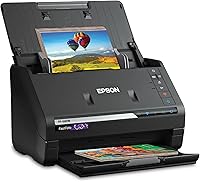
Epson FastFoto FF-680W High-Speed Duplex Photo: Best for fast photo batches
- Photos up to 8 x 10 in
- Batch scan up to 36 photos
- Duplex photo and document scanning
- 600 dpi maximum resolution
A fast sheet-fed photo scanner for batches of snapshots, postcards and panoramas. It is not a true large format flatbed for oversized art or drawings.
Pros
- High-speed photo batch scanning
- Duplex single-step scanning
- Wireless and USB connection
Cons
- Photos limited to 8 x 10 in
- Not suited for oversized flat originals
The Epson FastFoto FF-680W suits a home archive of snapshots, postcards and panoramas. Epson says it scans as fast as 1 photo per second at 300 dpi and batch-scans up to 36 photos at a time.
Its maximum photo size is 8 x 10 in, so it does not qualify as a wide large format scanner for drawings. It handles multiple photo sizes in one batch, which helps when you sort a family collection.
Duplex scanning captures the front and back of a photo in one pass. SafeTouch technology and a carrier sheet help with delicate photos.
Resolution options cover sharing at 300 dpi, archiving at 600 dpi TIFF and enlarging at 1200 dpi interpolated. OCR converts documents into readable text.
The trade-off is clear. This is the fastest photo batch tool here, but it cannot accept an 11 x 17 in original.
Choose it for volume photos, not for oversized paper.
Canon Canoscan Lide 300 Scanner: Best for compact everyday flatbed scanning
- 2400 x 2400 dpi optical resolution
- 48-bit color depth
- Auto Scan Mode
- USB connection
A slim flatbed for letter-size and smaller photos and documents. It helps long-term photo care but does not accept A3 or larger originals.
Pros
- High optical resolution for small originals
- Compact slim design
- Auto Scan Mode
Cons
- Standard flatbed size only
- Single-sheet capacity
The Canon CanoScan LiDE 300 suits everyday photo and document scanning on a small desk. It measures 14.5 x 9.9 x 1.7 in and weighs 3.6 lb, so it stores easily.
Its 2400 x 2400 dpi optical resolution suits small originals where cropping and enlargement matter. Color depth is 48 bits, which gives editing software more data to work with.
Auto Scan Mode detects what you are scanning and adjusts settings. Four EZ buttons handle copy, PDF, send and auto scan functions.
Fade correction and dust reduction help older photos. The PDF button creates editable and searchable PDFs with OCR.
USB connection keeps setup simple.
The limit is size. This is a standard flatbed, not a large format scanner for A3 work.
It appears here because many readers start with photos and need a realistic size check.
Epson Workforce ES-50 Compact & Lightweight Mobile: Best for portable long documents
- Scans documents up to 8.5 x 72 in
- Single page in 5.5 seconds
- USB powered
- OCR for searchable PDFs
A lightweight sheet-fed scanner for long receipts and documents on the go. Its width is letter width, not large format width.
Pros
- Very portable at 9.44 ounces
- Handles long documents
- No external power needed
Cons
- Only 8.5 in wide
- Single-sheet feeding
The Epson WorkForce ES-50 suits mobile office work and long document scanning. It weighs 9.44 ounces and runs from USB power, so it fits in a bag or desk drawer.
Its maximum document size is 8.5 x 72 in. That length helps with receipts, long forms and panoramic strips.
Width stays at letter size, so it does not help with wide originals.
Epson says it scans a single page in about 5.5 seconds at 300 dpi. Automatic feeding mode combines multi-page scans into one file.
Nuance OCR creates searchable PDFs and editable Word and Excel files.
Epson ScanSmart handles scan, review and save steps. A TWAIN driver lets the scanner work with other imaging software.
Compared with the flatbed models here, this scanner gives up capture width for portability. Choose it for travel and long documents, not for A3 drawings.
CZUR Aura Pro Book & Document Scanner: Best for A3 and A4 books overhead
- Captures A3 and A4 documents
- 2 seconds per page
- Curved book page flattening
- USB connection
An overhead book scanner for A3 pages without pressing books flat. It suits thin to medium books and loose documents on a desk.
Pros
- A3 capture without a flatbed lid
- Auto page flattening
- Folds for storage
Cons
- Overhead capture needs desk space
- Best for flat or book pages, not fragile art
The CZUR Aura Pro suits book scanning where pressing pages flat would damage the spine. It captures A3 and A4 pages from above and claims about 2 seconds per page.
Its curved page flattening technology uses three laser lines to correct the curve of an open book. Software can split double pages, correct skew and separate small documents placed together.
A 2-inch preview screen shows the scan area in real time. Auto scan detects page changes, and a foot pedal can trigger capture while you turn pages.
The scanner folds 90 degrees and the side light is detachable, which helps with storage. Lighting offers four color temperature settings.
The trade-off is desk space and focus. Overhead capture needs a clear desk and stable light.
It suits books and loose documents, not fragile artwork that needs contact scanning.
CZUR Shine Ultra Smart Portable Document Scanner: Best for thin books and flat papers
- Designed for A3 and A4 documents
- About 1 second per page
- 13MP CMOS camera
- OCR in 180+ languages
A portable overhead scanner for flat papers and thinner books. It also works as a document camera for remote teaching.
Pros
- Fast overhead capture
- Portable and foldable
- Smart paging and auto cropping
Cons
- Curved page flattening suits thinner books
- Not a contact flatbed for delicate art
The CZUR Shine Ultra suits flat papers, thin books and document camera work. It is designed for A3 and A4 documents and claims about 1 second per page.
Its 13MP CMOS camera gives about 340 dpi at A4 and about 245 dpi at A3. Smart paging, auto cropping and stamp mode help with repeated office scans.
Patented flattening technology handles curved pages in thinner books. For thicker books, CZUR recommends its ET series instead.
The neck has two height levels and folds 90 degrees. A foot pedal lets you trigger scans without clicking the mouse.
It also works as a document camera for Zoom and Google Meet.
Compared with a flatbed, overhead capture avoids lid pressure and fits bulky books. Compared with the Aura Pro, this model leans more toward flat paper and portable office use.
VIISAN Large Format Book & Document Scanner: Best for A2 books and newspapers
- A2 capture at 594 x 420 mm
- 26MP resolution
- Auto-flatten curved pages
- Multi-language OCR
The largest overhead capture here, sized for A2 journals, manuscripts, newspapers and maps. It is a camera-style scanner, not a glass flatbed.
Pros
- A2 capture area
- Fingerprint removal and auto-flatten
- Height adjustable for A2 and A3
Cons
- Overhead design needs a stable desk
- Software supports x64 and x86 systems only
The VIISAN S21 suits the largest overhead capture in this roundup. It scans A2 at 594 x 420 mm, which covers large journals, manuscripts, newspapers and maps.
Its 26MP camera delivers 5888 x 4522 pixels, with software-enhanced output up to 600 dpi. That detail helps when you crop a section for enlargement.
Software can flatten curved pages, remove fingers from images, repair damaged edges and split double pages. OCR converts scans into PDF, Word, Excel, EPUB and text files.
Height adjusts for A2 and A3 capture with a 90-degree foldable hinge. A built-in 3-level LED light helps in low light.
The trade-off is system compatibility and desk setup. OfficeCam supports x64 and x86 systems on Windows and macOS, not ARM devices such as Surface Pro X.
Plustek OS1180: Best for A3 flatbed scanning on a budget
- Maximum scan size 11.7 x 17 in
- 48-bit color
- LED light source
- ABBYY OCR included
A true A3 flatbed for tabloid documents, drawings and artwork on paper. The removable lid helps with bulky items.
Pros
- True A3 glass scanning area
- One-touch scan buttons
- Removable lid
Cons
- Large footprint at 23.18 in wide
- A3 color scan takes about 8 to 9 seconds
The Plustek OS1180 suits A3 flatbed scanning for libraries, schools and small offices. Its maximum scan size is 11.7 x 17 in, which covers tabloid and A3 paper.
Its 48-bit color and LED light source suit art, documents and other flat items. Plustek says A3 scanning at 300 dpi takes about 8 to 9 seconds.
No warm-up time helps with short jobs.
Four preset buttons scan to folder, email, text conversion and PDF creation. ABBYY OCR and DocAction software support file sharing and searchable output.
The removable lid helps with large and bulky items that do not close flat. The scanner measures 16.02 x 23.18 x 2.67 in, so it needs a wide desk.
Compared with the VIISAN VF3240, this model has a slightly smaller stated area but a simpler A3 flatbed design. Choose it for contact scanning of flat originals.
VIISAN VF3240 A3 Scanner: Best for A3 CAD and blueprints
- Scans up to 11.98 x 17 in
- 2400 dpi maximum
- 48-bit color
- Frameless edge-to-edge glass
A frameless A3 flatbed for CAD drawings, blueprints, legal documents and newspapers. Full A3 at 2400 dpi needs MacOS with native ICA support.
Pros
- Frameless glass for edge-to-edge scans
- High maximum resolution
- Auto-scan when lid closes
Cons
- Windows A3 resolution is 1200 dpi via ViiScan
- CIS sensor suits flat materials only
The VIISAN VF3240 suits CAD drawings, blueprints, legal documents, newspapers and painting albums on flat paper. It scans up to 11.98 x 17 in on frameless glass.
Its 2400 dpi maximum resolution needs care in daily use. Full A3 at 2400 dpi needs MacOS with native ICA support.
Windows users get 1200 dpi for A3 through ViiScan.
VIISAN claims 4-second A3 color scanning at 200 dpi. That speed suits high-volume office work.
At higher resolutions, scan time rises.
Auto-scan starts when the lid closes. Four buttons handle scan, email, print and PDF.
TWAIN, WIA, ICA and XSANE support covers many imaging apps.
The CIS sensor suits flat materials only. VIISAN does not recommend 3D objects, clothing, CDs or acrylic sleeves.
That limit matters for art buyers who need depth.
Colortrack Colortrac SmartLF 36-inch wide color scanner: Best for true 36-inch wide originals
- 36-inch wide format scanning
- 600 dpi resolution
- 24-bit color
- Ethernet and USB connection
A wide sheet-fed scanner for technical drawings and posters wider than A3. It is a specialist tool, not a general photo scanner.
Pros
- True 36-inch width
- Self-contained scan to USB or cloud
- Portable for technical documents
Cons
- Sheet-fed path, not a flatbed
- Specialist price class for most homes
The Colortrac SmartLF 36-inch suits technical drawings, posters and documents wider than A3. It is the only true 36-inch wide scanner in this roundup.
Its 600 dpi resolution and 24-bit color suit large line work and color technical documents. Scan speeds are 4.5 in per second in grayscale and 3 in per second in full color.
The paper path is centered and face-up. A self-contained system can scan to USB, internal memory, a PC or cloud storage without a PC attached.
A durable metal carrying case helps with transport. The 36-inch version weighs 15.4 lb in the detailed specs, which is heavier than the overhead scanners here.
The trade-off is specialization. This sheet-fed wide scanner does not give you a flatbed for books or fragile art.
Choose it only when originals truly exceed A3 width.
Is the best large format scanner a flatbed, overhead or sheet-fed model?
The best large format scanner depends on the original, not on the highest dpi. Flatbed suits flat paper and artwork.
Overhead suits books and newspapers. Sheet-fed suits wide or long paper that can pass through a path.
A best large format flatbed scanner comparison helps if your work is mostly flat paper. A flatbed gives even focus and contact detail across the page.
Flatbed scanners for flat originals
Flatbed models here include the Canon LiDE 300, Plustek OS1180 and VIISAN VF3240. The Plustek and VIISAN models accept A3 originals.
Flatbed scanning suits CAD drawings, blueprints and artwork on paper. The lid can close for even lighting, and glass supports fragile sheets.
Limits include desk footprint and depth, so thick books sit too far from the glass for sharp focus.
Overhead scanners for books and newspapers
Overhead models include the CZUR Aura Pro, CZUR Shine Ultra and VIISAN S21. They capture pages from above without pressing a book flat.
Overhead scanning suits newspapers, magazines, journals and manuscripts. Auto-flatten software corrects page curve and splits double pages.
Limits include lighting and desk space, and glare on glossy paper can hurt detail.
Sheet-fed scanners for wide or long paper
Sheet-fed models include the Epson FastFoto, Epson ES-50 and Colortrac SmartLF. Each pulls paper through a path instead of using a glass platen.
Sheet-fed scanning suits photo batches, long receipts and wide technical drawings. The Colortrac covers true 36-inch width.
Limits include fragile originals and thick items, and a carrier sheet helps only for some delicate photos.
What size large format scanner do you actually need?
You need the scanner size that fits your largest original with room to spare. A3 covers 11.7 x 17 in.
A2 covers 16.5 x 23.4 in. A 36-inch scanner covers wide technical drawings and posters.
Our best large format scanner for artwork guide covers art-specific needs. For office and school work, A3 is the most common step up from letter size.
A3 scanners for tabloid paper and drawings
A3 flatbeds include the Plustek OS1180 and VIISAN VF3240. A3 overhead models include the CZUR Aura Pro, CZUR Shine Ultra and VIISAN S21.
A3 suits legal documents, tabloid paper, school projects and many engineering drawings. Measure both width and length, since some drawings are A3 wide but longer than 17 in.
A2 and wider scanners for newspapers and maps
The VIISAN S21 captures A2 at 594 x 420 mm overhead. The Colortrac SmartLF scans 36 in wide through a sheet-fed path.
A2 suits large newspapers, maps, manuscripts and journals. Overhead capture avoids folding a fragile sheet to fit a flatbed.
Check desk, storage and network setup before you buy a wide model.
Long scanners are not wide scanners
The Epson ES-50 scans up to 8.5 x 72 in. That is long document scanning, not large format width.
Long scanning suits receipts, forms and banner strips. It will not accept an 11 x 17 in drawing because width stays at 8.5 in.
How much resolution does a large format scanner need?
Most buyers need 300 dpi for A3 archiving and printing. Higher resolution helps with fine lines, small text and heavy cropping.
File size rises fast at 600 dpi and above.
A best large format photo scanner search often involves photos rather than drawings. Photo scanners prioritize color accuracy, dust handling and batch speed.
300 dpi for everyday archiving
At 300 dpi, an A3 page holds enough detail for printing and screen use. CAD drawings and office documents usually scan well at this level.
Use 300 dpi for routine work to keep files manageable. Scan a small section at higher resolution if you need to enlarge fine text.
600 dpi and above for detail work
The Epson FastFoto offers 600 dpi for archiving. The Colortrac SmartLF offers 600 dpi for wide technical documents.
The VIISAN VF3240 offers up to 2400 dpi, with system limits by platform.
48-bit color depth appears on the Canon LiDE 300, Plustek OS1180 and VIISAN VF3240. Higher color depth gives editing software more range.
OCR also matters, since CZUR and VIISAN overhead models support OCR in many languages.
Can a large format scanner scan books and fragile originals?
Yes, but the scanner type must match the original. Overhead scanners suit books.
Flatbeds suit flat fragile paper. Sheet-fed models need care with delicate items.
For artwork, our best flatbed scanner for artwork guide explains contact scanning in more detail. Fragile art usually needs a flatbed or a careful overhead setup.
Books and fragile paper
The CZUR Aura Pro and Shine Ultra flatten curved pages in software. The VIISAN S21 also removes fingers and repairs damaged edges.
A flatbed supports the full sheet on glass. The Plustek removable lid helps with bulky items, while a closed lid gives even light for flat art.
Avoid sheet-fed rollers for fragile originals unless a carrier sheet is designed for that item.
Newspapers and magazines
Overhead scanners capture large newspaper pages without folding them to fit a lid. The VIISAN S21 A2 area suits full pages and maps.
Use a black mat under white-background documents if your software supports it. CZUR notes that a black mat improves automatic framing accuracy.
Is a printer with a scanner enough for large originals?
A printer with a scanner is enough only if its scan area matches your originals. Most home printers scan letter or legal size, not A3 or wider.
A dedicated large format scanner gives more capture size.
Our large format printer with scanner guide covers combined machines. Our is it worth buying a printer with a scanner guide covers the general trade-off.
When a combined machine makes sense
A large format printer with a scanner makes sense if you print and scan at the same large size. Studios and offices with poster and drawing output fit this case.
If you only need to digitize originals, a dedicated scanner puts more money into capture size and software. For posters you plan to print at home, our how to print a large poster on a home printer guide covers tiling and paper choices.
When a dedicated scanner is better
A dedicated A3 flatbed or A2 overhead scanner suits archiving without print needs. It also gives you more choice in scanner type.
Scanning size and printing size are separate decisions. Buy a combined machine only when you need both functions at large size.
What about budget wide format scanners and legal size flatbeds?
A budget wide format scanner should still meet your minimum capture size. Saving money does not help if the scanner cannot accept your originals.
Check width, length and scanner type before features.
Our best cheap wide format scanner guide covers lower-cost wide options. Legal size flatbeds sit between letter and A3, so check the exact glass size.
Legal size and budget choices
A flatbed scanner legal size model can suit 8.5 x 14 in legal paper. It will not accept A3 tabloid originals, so choose legal size only if your largest originals truly fit.
The Plustek OS1180 is the budget-leaning true A3 flatbed here. The VIISAN VF3240 adds higher maximum resolution and frameless glass.
Overhead models can cost less than wide flatbeds because they use a camera instead of a large glass platen.
How do you set up and care for a large format scanner?
Setup starts with a flat, stable surface and enough room for the lid or stand. Overhead scanners need room above the desk.
Flatbeds need room to open the lid fully.
Clean the glass or lens with a soft, dry cloth. Dust on a flatbed glass can appear as lines or spots in scans, especially at high resolution.
Set up each scanner type
Place a flatbed on a level desk and connect it by USB or Ethernet as directed. Clear the area before you close the lid on bulky items.
Place an overhead scanner on a clear desk with the capture area marked. Place a sheet-fed scanner where paper can enter and exit without bending, with clearance at both ends for long documents.
Care for glass, lenses and paper paths
Wipe flatbed glass gently and avoid harsh cleaners that can leave residue. Keep overhead lenses clean and avoid touching the lens surface.
Check sheet-fed paths for paper dust and small debris. Clean rollers only as the maker directs, and avoid forcing fragile originals through a dirty path.
Save files in a way you can find later
Use consistent file names with date, document title and page number. Book scans benefit from page numbers in the file name.
Save archive copies in TIFF or PDF, and sharing copies in JPEG or PDF as needed. The Epson FastFoto offers 300 dpi for sharing and 600 dpi TIFF for archiving.
Our verdict on the best large format scanner
Pick the VIISAN VF3240 if you need a flatbed for CAD drawings, blueprints and A3 paper. Pick the Plustek OS1180 if you want a simpler A3 flatbed with a removable lid.
Pick the VIISAN S21 if you scan A2 books, newspapers and maps overhead. Pick the CZUR Aura Pro or Shine Ultra for smaller book and document work on a desk.
Pick the Epson FastFoto for fast photo batches up to 8 x 10 in. Pick the Epson ES-50 for portable long documents.
Pick the Colortrac SmartLF only for true 36-inch wide originals.
The Canon LiDE 300 remains a compact everyday flatbed for photos and letter-size documents. It is not a large format scanner, so buy it for small originals rather than oversized work.
Measure your largest original, choose the scanner type that suits it, then compare resolution and software. That order will help you buy the best large format scanner for your actual work.
Our top 3 picks at a glance
-
1
Best for fast photo batches
Epson FastFoto FF-680W High-Speed Duplex Photo
9.7/10 our score
See it on Amazon -
2
Best for compact everyday flatbed scanning
Canon Canoscan Lide 300 Scanner
9.6/10 our score
See it on Amazon -
3
Best for portable long documents
Epson Workforce ES-50 Compact & Lightweight Mobile
9.4/10 our score
See it on Amazon
Frequently asked questions
What size counts as a large format scanner?
A large format scanner usually accepts originals larger than US Letter, often A3 at 11.7 x 17 in or wider. Some sheet-fed models scan long documents instead of wide ones, so check both width and length before you buy.
Is a flatbed or overhead scanner better for large originals?
A flatbed gives contact scanning and even focus for flat paper and artwork. An overhead scanner captures books and newspapers without pressing them flat, but needs desk space and steady lighting.
Can a large format scanner scan 3D objects?
Most flatbed models here suit flat paper only. A removable lid helps with thin bulky items, but thick objects can cause blur, shadows and uneven focus.
What resolution do I need for A3 drawings?
300 dpi is a common working resolution for A3 archiving and printing. Higher resolution helps with fine line work and cropping, but files grow fast, so balance detail with storage space.
Do I need a large format printer with a scanner?
Only if you also print posters or drawings at that size. If you only digitize originals, a dedicated scanner gives you more capture size for the money.