5 Best High Resolution Photo Scanners (November 2026)
The best high resolution photo scanners include the Epson FastFoto FF-680W High-Speed Duplex Photo for large photo collections, the Canon CanoScan LiDE 400 Slim Scanner for flatbed detail on a budget, and the ScanSnap iX2500 Photo Edition Wireless or USB for wireless photo and document batches.
On this page (9 sections)
- Best high resolution photo scanner picks for detail and enlargement
- How to compare high resolution photo scanners
- How we compared these scanners
- What dpi should a high resolution photo scanner have?
- Flatbed or sheet-fed: which high resolution scanner is safer?
- How fast should a photo scanner be for a large archive?
- What color depth and sensor type should you look for?
- How do you set up and care for a high resolution photo scanner?
- The verdict: which high resolution photo scanner should you buy?
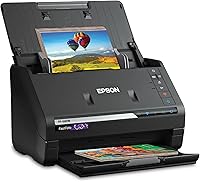
The best high resolution photo scanner for most collections is the Epson FastFoto FF-680W, because 600 dpi optical capture plus 1,200 dpi enlargement settings keep fine detail for prints you plan to enlarge or restore. It also scans about 1 photo per second at 300 dpi and batch-scans up to 36 photos, which flatbed models cannot match for volume.
High resolution does not always mean the highest dpi number in the group. A 4,800 dpi flatbed adds value when you scan one valuable print at a time.
A 600 dpi sheet-fed scanner adds more value when you need to digitize 1,000 photos quickly.
Start with our best scanner for pictures guide if you are still deciding between scanner types. Then use this guide to choose resolution and workflow.
Our picks at a glance
-
1
 Best for large photo collections
Epson FastFoto FF-680W High-Speed Duplex Photo
9.7/10 our score
See it on Amazon -
2
 Best for flatbed detail on a budget
Canon CanoScan LiDE 400 Slim Scanner
9.5/10 our score
See it on Amazon -
3
 Best for wireless photo and document batches
ScanSnap iX2500 Photo Edition Wireless or USB
9.3/10 our score
See it on Amazon
- 4
 Check it
Plustek ePhoto Z300 Photo Scanner
Best for fragile 4x6 prints - 5
 Check it
Epson Perfection V850 Pro Photo Scanner
Best for film and maximum detail
Best high resolution photo scanner picks for detail and enlargement
The FastFoto wins for volume, the Canon wins for flatbed dpi per dollar, and the V850 Pro wins for film. The ScanSnap and Plustek sit in the middle for handling needs.
Epson FastFoto FF-680W High-Speed Duplex Photo: Best for large photo collections
- 600 dpi resolution
- 1200 dpi for enlargement
- Duplex scanning
- Batch scan up to 36 photos
- Carrier sheet included
A fast sheet-fed scanner that balances high resolution capture with speed for thousands of prints, postcards and panoramas.
Pros
- High-speed batch scanning
- Duplex captures photo backs
- Includes carrier sheet
Cons
- Sheet-fed path needs care with delicate prints
- Lower flatbed dpi than Canon and Epson V850
The Epson FastFoto FF-680W suits anyone with boxes of prints, postcards and panoramas who wants one machine for photos and documents. It scans at 600 dpi optical resolution, with 300 dpi for sharing, 600 dpi TIFF for archiving and 1,200 dpi for enlarging.
That 1,200 dpi interpolated setting helps a small print make a larger copy, but the true detail ceiling is 600 dpi. For a 4 x 6 in print, 600 dpi gives enough pixels for a clean 8 x 10 in enlargement and for later restoration.
Duplex capture is the key advantage here. It records the image and any handwritten notes on the back in a single scan, so names and dates stay linked to the photo.
It batch-scans up to 36 photos up to 8 x 10 in, plus Polaroids and panoramas, with auto enhancement, color restoration, red-eye reduction, de-skew, crop and rotate.
The trade-off is handling. Prints pass through rollers, so a carrier sheet is essential for curled or torn originals.
Epson includes a carrier sheet and microfiber cloth. Choose this if speed and two-sided capture matter more than maximum dpi.
Canon CanoScan LiDE 400 Slim Scanner: Best for flatbed detail on a budget
- 4800 x 4800 dpi resolution
- 48-bit color depth
- USB Type-C power and data
- Auto scan mode
- Slim flatbed design
A slim flatbed with much higher resolution than sheet-fed models, suited to careful single-print scanning and enlargement.
Pros
- Very high flatbed resolution
- 48-bit color depth
- Compact and USB powered
Cons
- One sheet at a time
- No duplex or batch feed
The Canon CanoScan LiDE 400 suits a reader who wants high resolution without a professional price. Its 4,800 x 4,800 dpi resolution and 48-bit color depth preserve fine detail for enlargement or restoration.
That is about eight times the linear detail of 600 dpi. In practice, a small print can be enlarged more cleanly, and subtle faded color differences are easier to adjust later.
The flatbed design is gentle and precise. You place one print face down and close the lid.
There is no roller path to catch a corner, which is safer for valuable or non-flat originals.
Canon rates scanning at as fast as 8 seconds, with one USB Type-C cable for data and power. EZ Buttons and auto scan mode help save searchable PDFs for documents.
The trade-off is throughput. It holds one sheet at a time, up to 8.27 x 11.69 in or 8.50 x 11.69 in, with no duplex.
Choose this if detail per scan matters more than speed.
ScanSnap iX2500 Photo Edition Wireless or USB: Best for wireless photo and document batches
- 600 dpi resolution
- 24 bits color depth
- Automatic Document Feeder holds 100 documents or 36 photos
- Wi-Fi 6 and USB-C
- Includes 3 photo carrier sheets
A modern wireless sheet-fed scanner built for touchscreen profiles, cloud sending and large photo batches.
Pros
- Large feeder capacity
- Touchscreen profiles
- Includes 3 carrier sheets
Cons
- 600 dpi ceiling for enlargement
- Sheet-fed handling for fragile originals
The ScanSnap iX2500 Photo Edition suits users who want a wireless sheet-fed scanner with touchscreen control. It scans at 600 dpi with 24 bits color depth, covering standard enlargement and restoration.
Its feeder holds up to 100 documents or 36 photos, so mixed batches can run without constant reloading. That matches the FastFoto for photos while adding a larger document load.
Photo carrier sheets make the difference for fragile prints. The Photo Edition includes 3 sheets, so a delicate print can ride through the feeder protected from the rollers.
Automatic optimization covers rotation, cropping, color restoration and red-eye reduction. Touchscreen profiles send scans to a PC, Mac, mobile device or cloud service, with Wi-Fi 6 and USB-C.
ScanSnap claims up to 100 photos per minute, with automatic naming and sorting.
The trade-off is the 600 dpi ceiling. It cannot match the Canon or V850 Pro for very large enlargements or film.
It is a volume and convenience pick.
Plustek ePhoto Z300 Photo Scanner: Best for fragile 4x6 prints
- 600 dpi optical resolution
- CCD sensor
- Scans 4x6 photo in 2 seconds
- Supports 3x5 to 8x10 in
- Gentle roller design
A dedicated photo scanner with a gentle roller path and CCD sensor for color accuracy on small prints.
Pros
- Fast for standard print sizes
- CCD sensor for color detail
- Gentle on fragile photos
Cons
- Simplex design, no duplex
- One photo at a time
The Plustek ePhoto Z300 suits buyers whose collection is mostly standard sizes and who worry about sticky or fragile surfaces. It supports 3 x 5, 4 x 6, 5 x 7 and 8 x 10 in photos, plus letter and A4 paper, at up to 600 dpi.
Plustek says a 4 x 6 in photo scans in 2 seconds at 300 dpi and an 8 x 10 in photo in 5 seconds. That pace can digitize about 1,000 photos in an afternoon of steady feeding, without lifting a flatbed lid each time.
Its CCD sensor is a real distinction in this group. Plustek says CCD gives better color accuracy and dynamic range than CIS, with deeper focus for non-flat surfaces.
That helps preserve highlights and dark areas in old photos.
Its roller design is also photo specific and gentle compared with tight document rollers. Software auto-crops, rotates and restores faded color, with one-click upload to Facebook, X and Google Drive.
The trade-off is simplex scanning with no duplex and no batch feeder, one photo at a time. Choose this for gentle handling of standard prints.
Epson Perfection V850 Pro Photo Scanner: Best for film and maximum detail
- 6400 dpi resolution
- 4.0 Dmax tonal range
- Dual lens system
- Digital ICE
- Includes film holders
A professional flatbed for slides, film and prints where the highest resolution and tonal range matter most.
Pros
- Highest resolution here
- Dual lens for film and flat work
- Digital ICE dust and scratch correction
Cons
- Large and heavy at 20.9 pounds
- Slowest workflow for large collections
The Epson Perfection V850 Pro suits photographers, archivists and anyone scanning slides and film. It offers 6,400 dpi, a 4.0 Dmax tonal range for smooth gradations and fine shadow detail, and Digital ICE for dust and scratch correction.
Those numbers place it in a different class from the 600 dpi scanners here. Slides and film are small originals, so high dpi is needed to capture enough detail for a large print.
The dual lens system selects between two lenses for optimum results. One suits flat prints and the other suits film holders and transparencies.
Epson includes film holders for professional scans of slides and film.
The CCD sensor and LED array support that workflow. At 20.9 pounds and 12.1 x 19.8 x 6 in, it is a desktop commitment, not a portable scanner.
The trade-off is speed and size. It is a one-at-a-time flatbed for careful work, not a batch scanner for 1,000 prints.
Choose this if film or very large enlargements are the goal.
How to compare high resolution photo scanners
Compare resolution, color depth, sensor type and handling before speed. Those factors decide whether a scan holds enough detail for your intended use.
Resolution sets pixel count. A 600 dpi scan of a 4 x 6 in print makes a 2,400 x 3,600 pixel file, enough for many enlargements.
A 4,800 dpi scan makes far more pixels, but extra data only matters if the original holds that detail.
Color depth sets how smoothly tones transition. The Canon offers 48-bit color, while the FastFoto, ScanSnap and Plustek offer 24-bit.
Higher depth gives editing software more room to lift shadows without banding.
Sensor type affects focus and color. The Plustek and V850 Pro use CCD, which Plustek says offers better accuracy and deeper focus.
The FastFoto, Canon and ScanSnap use CIS, common in compact scanners.
Handling decides safety. Flatbeds use glass with no rollers.
Sheet-fed scanners need carrier sheets for delicate work. The best flatbed scanner for photos guide explains that choice in more depth.
| Product | Best for | Resolution | Color Depth | Scanner Type | Our score |
|---|---|---|---|---|---|
| Epson FastFoto FF-680W High-Speed Duplex Photo | large photo collections | 600 dpi | 24 bpp | Document, Photo | 9.7 |
| Canon CanoScan LiDE 400 Slim Scanner | flatbed detail on a budget | 4800 dpi | 48-bit | Document, Photo | 9.5 |
| ScanSnap iX2500 Photo Edition Wireless or USB | wireless photo and document batches | 600 dpi | 24 bits | Document, ID Card, Insurance Card | 9.3 |
| Plustek ePhoto Z300 Photo Scanner | fragile 4x6 prints | 600 dpi | 24-bit | Document, Photo | 9.2 |
| Epson Perfection V850 Pro Photo Scanner | film and maximum detail | 6400 dpi | Photo | 8.9 |
How we compared these scanners
We ranked models for a reader who wants high resolution for enlargement or restoration. The FastFoto ranked first because 600 dpi plus duplex and batch speed covers most family archives.
We checked dpi, color depth, sensor, sheet capacity, dimensions, weight and included items such as carrier sheets, film holders and cables. Those items change the real cost of safe scanning.
We weighed workflow, not just headline dpi. A 4,800 dpi flatbed suits one print, but a 600 dpi duplex feeder may produce a more complete archive.
Speed and quality claims are labeled by brand, and buyer patterns are noted as patterns, not guarantees.
What dpi should a high resolution photo scanner have?
600 dpi is the sweet spot for most photo prints. It preserves detail for enlargement or restoration without unmanageable file sizes for sharing.
Use 300 dpi for email or social sharing only. You lose detail you cannot recover later.
Use 1,200 dpi when a smaller original needs a larger copy, treating interpolated detail as smoothing, not new information.
Use 4,800 dpi or 6,400 dpi for flatbed work with small or valuable originals. The Canon and V850 Pro use that resolution to extract more detail from a single placement on glass.
Optical resolution versus interpolated resolution
Optical resolution comes from the sensor and is the detail truly captured. Interpolated resolution comes from software estimating pixels between sensor readings.
A 600 dpi optical scanner with 1,200 dpi interpolated output makes a larger file that may look smoother, but it does not contain twice the real detail.
Resolution for prints versus film
Prints are large originals, so 600 dpi is often enough. Slides and film are tiny, so they need 4,800 dpi or 6,400 dpi to fill a frame at enlargement size.
If film is part of your project, do not buy a 600 dpi sheet-fed scanner for it. Use the V850 Pro instead.
Flatbed or sheet-fed: which high resolution scanner is safer?
A flatbed is safer for valuable or fragile originals. The print rests on glass and nothing pulls it through rollers.
A sheet-fed scanner is faster and can capture both sides, but it needs a carrier sheet for curled, torn or sticky prints. The FastFoto includes one carrier sheet, and the ScanSnap Photo Edition includes 3.
When a flatbed wins
Choose a flatbed from our best flatbed scanner for photos list for books, thick items, film or one-of-a-kind prints. You also get higher dpi, such as 4,800 dpi on the Canon and 6,400 dpi on the V850 Pro.
If you own a printer with a flatbed, read what is a flatbed scanner on a printer first. A printer flatbed may handle occasional prints, while a dedicated scanner handles archives.
When a sheet-fed scanner wins
Choose sheet-fed when volume matters more than maximum dpi. The FastFoto batch-scans 36 photos and captures both sides.
The ScanSnap feeder holds 36 photos or 100 documents.
The Plustek Z300 sits between the styles. It is sheet-fed with a gentle roller design and scans standard sizes one by one.
It has no feeder and no duplex.
How fast should a photo scanner be for a large archive?
Speed matters when your collection holds hundreds or thousands of prints. Saving a few seconds per photo saves hours across an archive.
The FastFoto scans about 1 photo per second at 300 dpi and batch-scans 36 photos. The ScanSnap claims up to 100 photos per minute with a 36-photo feeder and touchscreen profiles.
The Plustek scans a 4 x 6 in photo in 2 seconds at 300 dpi, with you feeding each print. Flatbeds are slower by design because you place, align and close the lid each time.
Duplex scanning for photo backs
Duplex matters when notes or dates sit on the back. The FastFoto captures both sides in a single scan, so the back stays attached to the front.
The ScanSnap and Plustek do not offer duplex in the data compared. You scan the back as a separate pass or flip the print on a flatbed.
What color depth and sensor type should you look for?
48-bit color depth and a CCD sensor give more editing room. They help with faded prints, deep shadows and subtle color shifts.
The Canon offers 48-bit color with 16-bit greyscale depth for lifting dark areas. The V850 Pro offers a 4.0 Dmax tonal range for smooth gradations and fine shadow detail.
The Plustek and V850 Pro use CCD sensors. Plustek says CCD offers better color accuracy, dynamic range and deeper focus than CIS for non-flat surfaces.
The FastFoto, Canon and ScanSnap use CIS sensors. CIS keeps scanners slim, which is why the Canon is only 7.7 x 0.4 x 14.5 in and 3.6 pounds.
What is print resolution and why does it matter here?
Print resolution describes how many dots per inch a printer places on paper. It differs from scanner dpi.
Our guide what is print resolution explains how they interact when you reprint a scan.
A practical rule is to scan at two to three times the print resolution you want. For a 300 dpi print, a 600 dpi scan gives margin to crop and correct.
How do you set up and care for a high resolution photo scanner?
Clean glass or rollers, use a carrier sheet for fragile prints, and save archival files at the dpi you need. Those habits prevent most problems.
For flatbeds, wipe the glass with a dry microfiber cloth before a session. Dust on glass becomes dust in the file, though Digital ICE on the V850 Pro can correct some dust after scanning.
For sheet-fed scanners, keep the carrier sheet clean and replace it when it curls. The FastFoto includes a microfiber cloth to dust photos before scanning.
Save archive files as TIFF for maximum quality. The FastFoto offers 600 dpi TIFF for archiving, 300 dpi for sharing and 1,200 dpi for enlargement.
Name files by event and year, and keep two copies of the originals.
If a scanner is built into your printer
A printer combo can handle occasional scans, but resolution and handling are often limited. Our best printer scanner combo for photos guide compares those units against dedicated scanners.
Buy a dedicated scanner when you plan a full archive, large enlargements or film scanning.
The verdict: which high resolution photo scanner should you buy?
Buy the Epson FastFoto FF-680W for most archives, the Canon CanoScan LiDE 400 for high-resolution flatbed value, and the Epson Perfection V850 Pro for film and maximum detail.
Pick the FastFoto for 600 dpi capture, duplex scanning and batch speed. Pick the Canon for one valuable print at a time at 4,800 dpi with 48-bit color.
Pick the V850 Pro if slides and film are the main project.
Pick the ScanSnap iX2500 for wireless touchscreen profiles and a large feeder for mixed photos and documents. Pick the Plustek Z300 if prints are standard sizes and gentle handling matters more than duplex or batch feeding.
For cards or flat ephemera, compare our best flatbed scanner for sports cards guide before choosing a sheet-fed model. Start with the FastFoto for a general archive, and move to a flatbed when detail per scan matters more than speed.
Our top 3 picks at a glance
-
1
Best for large photo collections
Epson FastFoto FF-680W High-Speed Duplex Photo
9.7/10 our score
See it on Amazon -
2
Best for flatbed detail on a budget
Canon CanoScan LiDE 400 Slim Scanner
9.5/10 our score
See it on Amazon -
3
Best for wireless photo and document batches
ScanSnap iX2500 Photo Edition Wireless or USB
9.3/10 our score
See it on Amazon
Frequently asked questions
What dpi do I need for a high resolution photo scan?
Use 600 dpi for most prints you may enlarge to 8 x 10 in or restore later. Use 1,200 dpi or higher when the original is small, such as a slide or a 4 x 6 in print that needs a large enlargement.
Higher dpi only helps when the original holds that detail.
Is a flatbed or sheet-fed scanner better for photos?
A flatbed is gentler and gives higher dpi for single valuable prints and film. A sheet-fed scanner is faster for hundreds of prints and can capture both sides.
Choose flatbed for care and detail, sheet-fed for volume and convenience.
What is the difference between optical and interpolated resolution?
Optical resolution is what the sensor can truly capture. Interpolated resolution is software that fills in extra pixels between sensor points.
It can smooth an enlargement, but it does not add real detail that was not in the original.
Can I scan the back of a photo?
Yes, with a duplex sheet-fed scanner that captures both sides in one pass. Flatbed scanners scan the back when you flip the print over manually.
Simplex photo scanners scan one side only and rely on software to combine sides if needed.
How many dpi for scanning slides and film?
Slides and film are tiny originals, so they need much higher dpi than prints. A 6,400 dpi flatbed such as the Epson Perfection V850 Pro is built for that job.
A 600 dpi photo scanner will not extract enough detail for large film enlargements.