How to Choose a Large Format Printer with a Scanner
A large format printer with scanner fits your largest original, not your average page. Match print width and scanning capacity to plans, posters and technical drawings, then check speed, resolution, media handling and space.
On this page (13 sections)
- What size large format printer with scanner do you need?
- How do print width and scan width differ?
- Printer scanner or separate large format scanner?
- What scanning type fits plans, posters and drawings?
- How much resolution do you need to scan?
- What speed is enough for scanning?
- How do you scan fragile photos and artwork?
- What papers and media will it handle?
- What connectivity and software should you expect?
- How much desk and wall space do you need?
- How do you set up and care for a scanner?
- What trade offs should you accept before you buy?
- Which large format printer with scanner should you choose?
A large format printer with scanner is best chosen from your largest sheet first, then from speed and resolution. Print width and scan size are separate limits, so a machine that prints wide may not scan wide.
Measure your biggest plan, poster or drawing before you shortlist anything. Note width, length, paper type and whether you need the back side captured too.
You also need to decide if one combined device or two separate devices fit your desk. A combined unit saves space, while separate units often give clearer control over each task.
Our score weighs specs, features and buyer feedback against what you're shopping for. We compared product data and buyer patterns, and we did not test these machines hands on.
What size large format printer with scanner do you need?
Start with the largest original you will place in the machine. A 24 in limit suits many desk plans, while a 36 in limit suits full building sheets and large posters.
Do not size up for a vague future need. An oversize machine takes more desk, wall clearance and floor space for every job, even small ones.
List your three most common sizes and your one largest size. Choose for the largest size you will actually use at least a few times each year.
How to measure sheets for a large format scanner printer
Lay the sheet flat and measure width first, then length. Roll it gently to see if it curls, and note if the edges are fragile or already creased.
Check whether you need borderless output or a white margin. Many printers need a margin, so the usable image width is smaller than the sheet width.
Also measure the space behind the feed path. Long sheets need a clear run as they enter and exit, not just room for the machine body.
If your work exceeds a common limit, stitching or a specialist shop may suit better than a larger home machine. That choice saves money when large sheets are rare.
How do print width and scan width differ?
Print width and scan width are two different limits on the same machine. Print width covers the widest sheet the printer can feed, while scan width covers the widest area the scanner can capture.
A large format scanner plotter may scan wide sheets but not print them, and a wide printer may print sheets it cannot scan. Read both numbers before you assume one device does both jobs.
For plans and technical drawings, scan width matters for archiving originals. For posters, print width matters for the final wall piece.
Buy for the limit you will use most, not the larger of the two numbers in a headline. Write both limits down and compare them with your measured sheets.
Printer scanner or separate large format scanner?
A combined large format printer with scanner saves space and simplifies setup for mixed home use. It prints posters, scans documents and copies small pages from one desk footprint.
Separate devices suit heavier use because each machine is built for one task. A separate scanner can run while you print, and each can have the size and speed you need.
A combined unit can create a bottleneck when you must print and scan in the same hour. Separate units also make it easier to replace only the worn part later.
Ask if it is worth buying a printer with a scanner before you choose a combined model. For light, mixed use it often is, while for daily plotter work separate tools often win.
Pick a combined device for light mixed work at home. Skip it if you print and scan large sheets in parallel every day.
What scanning type fits plans, posters and drawings?
Flatbed scanners hold fragile or curled originals flat for clean capture. The sheet lies on glass, so you control placement and avoid bending the paper during scanning.
Sheet fed and roll fed scanners move the sheet through the machine for long or flexible media. They suit long plans and technical drawings, but curls and creases can affect feeding.
For artwork, a flatbed protects texture and edges better than a roller path. For long drawings, a roll fed path can handle sheets a flatbed cannot fit.
Our guide to the best large format flatbed scanner suits buyers who value flat placement. Our best large format photo scanner roundup suits photo archives in larger sizes.
Pick flatbed for fragile or curled originals that must lie flat. Pick a roll fed path for long sheets that exceed the glass.
How much resolution do you need to scan?
Use 300 dpi for normal sharing and 600 dpi for archiving or enlarging. That rule covers most plans, posters and documents without creating huge files.
Optical resolution is the true detail the sensor captures. Interpolated resolution is software doubling, and it does not add real detail to small text or fine lines.
Fine line drawings and small lettering benefit from 600 dpi optical capture. Photos you may enlarge later also benefit from a higher setting at the time of scanning.
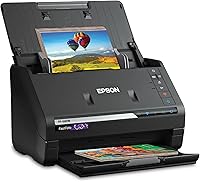
The Epson FastFoto FF-680W offers 600 dpi optical resolution, with 300 dpi for easy sharing and 600 dpi TIFF for archiving. Epson says it can scan photos up to 8 x 10 in in one batch.
Set 300 dpi for quick sharing and 600 dpi for archive copies. Do not pay for interpolated numbers as if they were true detail.
What speed is enough for scanning?
Speed matters most when you scan batches, sets of drawings or photo boxes. A slow scan turns a large archive into a long, repetitive task.
The Epson FastFoto FF-680W can scan as fast as 1 photo per second at 300 dpi, Epson says. It can batch scan up to 36 photos at a time.
Epson also rates document scanning at up to 45 pages per minute or 90 images per minute in duplex mode. That pace suits offices and homes with steady document flow.
The Canon CanoScan LiDE 400 scans in as fast as 8 seconds, Canon says, with auto scan mode that detects the type of original. The Canon CanoScan LiDE 300 scans in 10 seconds, Canon says, with four EZ buttons.
Choose speed from your weekly page count, not from a single test sheet. If you scan more than a few dozen pages a week, batch feeding saves real time.
How do you scan fragile photos and artwork?
Use a carrier sheet or flat glass for delicate originals. This keeps old photos, postcards and artwork from bending or scratching during the scan.
The Epson FastFoto FF-680W includes a carrier sheet and a microfiber cloth, Epson says. It also handles Polaroid photos, panoramas and postcards, and photos up to 8 x 10 in.
Its SafeTouch technology is designed for worry free scanning of delicate photos, Epson says. It also offers auto enhancement, color restoration, red eye reduction, de skew, crop and rotate.
For artwork, flat placement avoids roller marks on textured surfaces. Our best large format scanner for artwork guide covers sizes and placement for larger pieces.
The best scanner for pictures guide suits standard photo sizes and flatbed care. The best large format scanner roundup covers wider originals for plans and posters.
Protect the original first, then optimize the file. Dust the surface lightly and scan once at the right resolution.
What papers and media will it handle?
Check media type, thickness, length and sheet capacity before you buy. A machine that fits your width may still fail on thick card, long rolls or fragile sheets.
The Epson FastFoto FF-680W handles multiple sizes in one batch, Epson says. It scans documents up to 240 in long, which suits long records and extended drawings.
Its standard sheet capacity is 10 sheets, and it can batch scan up to 36 photos at a time, Epson says. That capacity differs by media type, so check the limit for your paper.
Flatbed models such as the Canon CanoScan LiDE 300 and LiDE 400 accept one sheet at a time. Their paper sizes cover letter and photo media, with the LiDE 400 listed for 8.27 x 11.69 in and 8.50 x 11.69 in.
Match media handling to your thinnest and longest sheet. Test with a sample sheet if the machine must feed curls, card or rolls.
What connectivity and software should you expect?
Look for USB plus Wi Fi if the machine must sit away from your computer. Wireless helps placement, while a cable often gives a steadier link during long scans.
The Epson FastFoto FF-680W includes USB and wireless connectivity, Epson says. It also supports easy Wi Fi setup with the Epson FastFoto app.
Epson ScanSmart software includes optical character recognition, Epson says, which converts scanned images into readable text. The machine also supports auto upload and backup through Dropbox and Google Drive, Epson says.
Canon flatbed models use USB, with a USB Type C cable for the LiDE 400 that carries data and power, Canon says. Both Canon models include a built in PDF button for editable and searchable PDFs, Canon says.
Choose connectivity from placement, not habit. If the scanner sits beside your computer, USB alone may keep setup simple.
How much desk and wall space do you need?
Measure the full working footprint, including feed and output paths. Wide machines need side clearance for rolls, rear clearance for long sheets and front clearance for output.
The Epson FastFoto FF-680W measures 11.7 x 11.7 x 6.9 in and weighs 8.2 lb. That compact size suits a desk, but long documents still need a clear run through the path.
The Canon CanoScan LiDE 300 measures 14.5 x 9.9 x 1.7 in and weighs 3.6 lb. The Canon CanoScan LiDE 400 measures 14.5 x 14.5 x 7.7 in in its listed dimensions and also weighs 3.6 lb.
Tape the outline on your desk and add 12 in or more behind the feed path for long sheets. Open the lid or feed tray fully before you finalize the spot.
Clear space for the sheet path, not just the body. A machine that fits on the desk can still block daily work if sheets have nowhere to travel.
How do you set up and care for a scanner?
Start with a flat surface, a clean glass or roller path and one test scan. Clean setup prevents most first week problems with skew, dust spots and feeding errors.
Place the machine on a stable desk away from direct sun and heat. Connect power and data first, then install the software before the first scan.
For flatbed models, clean the glass with a dry microfiber cloth and avoid liquid pooling at the edges. For sheet fed models, wipe the roller path gently and check for dust after photo batches.
The Epson FastFoto FF-680W includes a microfiber cloth for light dusting, Epson says. Keep carrier sheets clean and store them flat to protect delicate photos.
Run one test scan at 300 dpi and one at 600 dpi, then compare text sharpness and file size. Adjust resolution and contrast before you start a large archive.
Clean lightly and test before each batch. A dusty path creates repeat work on fragile originals.
What trade offs should you accept before you buy?
A large format printer with scanner trades some print or scan size for a smaller footprint. That trade suits mixed home use, but it may not cover full architectural sheets.
The three products here are standard size scanners, not wide plotters. They suit photos, documents and letter size work, and they show the speed and resolution trade offs to weigh.
The Epson model suits batch scanning and duplex capture. It captures both sides in a single scan, Epson says, which helps preserve notes on the back of a photo.
The Canon LiDE 300 suits simple flatbed work with auto scan mode. The Canon LiDE 400 suits higher resolution detail at 4800 x 4800 dpi, Canon says.
If your sheets exceed these sizes, look for a dedicated wide scanner or plotter instead. Our large format scanner plotter comparisons and best large format plotter scanner picks cover that wider class.
If you print posters at home, read How to Print a Large Poster on a Home Printer? before you choose print width. For a broader choice, see our large format scanner printer guides.
Pick the size you will use weekly, then accept the matching trade off. A smaller, faster scanner beats a wide machine that rarely fits your desk.
Which large format printer with scanner should you choose?
Pick the machine that fits your largest sheet, your weekly scan count and your desk space. That rule resolves most trade offs without overbuying size.
Pick the Epson FastFoto FF-680W if batch photo and document scanning is your main need. Its duplex capture, carrier sheet and 600 dpi optical resolution suit steady home archives.
Pick the Canon CanoScan LiDE 300 if you want a simple flatbed for standard documents and photos. Its auto scan mode and PDF button suit light office work.
Pick the Canon CanoScan LiDE 400 if fine detail matters on standard sizes. Its 4800 x 4800 dpi optical resolution and USB Type C cable suit detailed photo work.
For true wide plans and posters, measure your largest sheet again and compare wide models. A large format printer with scanner only helps if both print width and scan width cover that sheet.
Frequently asked questions
What print width should a large format printer with scanner have?
Choose print width from your largest output, such as 24 in or 36 in for common plan sizes, with a small margin for borders. Measure the sheet you actually use, then add room for the machine body and rear feed path.
Can one machine print and scan large format work?
Some wide machines combine printing and scanning, but many buyers pair a wide printer with a separate large format scanner for clearer control. Check both maximum print size and maximum scan size, as they are often different limits.
What resolution do I need for scanned plans and drawings?
Use at least 300 dpi for readable text and clean line work, and 600 dpi when you need to enlarge or archive fine detail. Higher optical resolution helps small lettering, while interpolated numbers add no real detail.
How do I know if scanning speed matters?
Speed matters when you process many pages, photo batches or sets of drawings each week. A scanner rated near 1 photo per second at 300 dpi suits volume work, while a flatbed suits one original at a time.