9 Best Slide Scanners for Windows 11 (November 2026)
The best slide scanners for Windows 11 include the KODAK SCANZA Film & Slide Scanner for most Windows 11 households, the KODAK Slide N Scan Film & Slide for easy one-button scanning, and the Magnasonic All-in-One 24MP Film Scanner with Large for fast standalone scanning.
On this page (9 sections)
- The best slide scanners for Windows 11, ranked by fit
- Side by side comparison of the best slide scanners for Windows 11
- How we compared these slide scanners for Windows 11
- Does a slide scanner for Windows 11 need Windows software
- Which film formats should your Windows 11 slide scanner support
- Standalone scanner or printer scanner combo for Windows 11
- Resolution, color and image quality for Windows 11 scanning
- Setup, storage and care tips for Windows 11
- Verdict: the best slide scanner for Windows 11
The best slide scanner for Windows 11 for most people is the KODAK SCANZA, because it works as a standalone unit and also connects to a Windows computer for file transfer. A slide scanner for Windows 11 does not always need Windows software at all.
Many models in this guide save straight to an SD card and use USB only to move files or show images on a screen.
If you want to understand the basic workflow first, read what is a digital slide scanner before you choose between standalone and computer models. You can also compare our best slide and film scanner guide for a broader view of film digitizing hardware.
Our picks at a glance
-
1
 Best for most Windows 11 households
KODAK SCANZA Film & Slide Scanner
9.7/10 our score
See it on Amazon -
2
-
3
 Best for fast standalone scanning
Magnasonic All-in-One 24MP Film Scanner with Large
9.5/10 our score
See it on Amazon
- 4
 Check it
ClearClick QuickConvert 2.0 Photo
Best for photos slides and negatives - 5
 Check it
TCNEWCL 35mm Negative Slide Scanner
Best for phone based 35mm scanning - 6
 Check it
BEONEGLOBAL ClearScan P7 Film Scanner
Best for a large preview screen - 7
 Check it
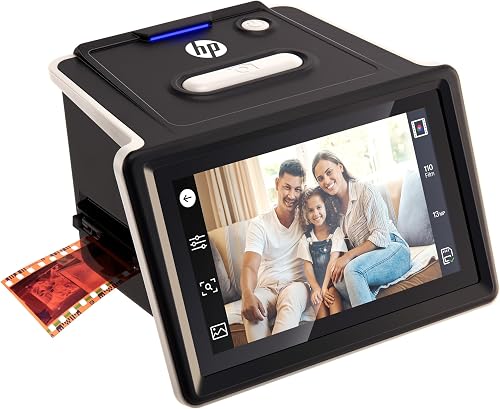
HP Film & Slide Scanner HPFS500
Best for touchscreen control - 8
 Best for high resolution computer scanningCheck it
- 9
 Best for a 7 inch touchscreenCheck it
The best slide scanners for Windows 11, ranked by fit
Our score weighs specs, features and buyer feedback against what you're shopping for. Standalone models score high here because they work well with any Windows 11 computer for storage and backup, even when they do not need a driver to scan.
KODAK SCANZA Film & Slide Scanner: Best for most Windows 11 households
- 3.5 inch TFT LCD with tilt and adjustable brightness
- 14MP sensor with optional 22MP interpolation
- 35mm, 126, 110, Super 8 and 8mm film
- HDMI and USB connections
- SD card support up to 128GB, card not included
A compact standalone scanner for mixed family film collections. It previews on its own screen and saves JPEG files to an SD card or connects to a Windows computer.
Pros
- Handles five film formats
- Built-in screen for preview and editing
- Mac and PC compatible converter
Cons
- SD card not included
- Super 8 converts to still images, not video
- Camera based design, not a flatbed scanner
The KODAK SCANZA suits households with mixed film formats and a Windows 11 computer used for storage. Its 14MP sensor with optional 22MP interpolation captures JPEG files from 35mm, 126, 110, Super 8 and 8mm negatives and slides.
The 24 bpp color depth supports everyday color and black and white negatives at that snapshot level, which is good for sharing and viewing rather than large prints.
The 3.5 inch TFT LCD has adjustable brightness and tilt, so you can preview images without moving to your computer. You can edit RGB and resolution on the device and browse a gallery from an SD card up to 128GB.
The physical footprint is compact at 4.7 by 4.7 by 5 inches and 16 ounces, so it stores in a drawer between sessions.
KODAK lists Windows 7 as the minimum system requirement, with Mac and PC compatible conversion over USB and HDMI. That makes Windows 11 use straightforward for moving files to folders and backups, even though scanning itself happens on the device.
At 250 watts listed in specs, keep it near a wall outlet for longer sessions.
The trade-off is design. This is a camera based scanner that takes a snapshot of film, not a flatbed scanner.
Super 8 converts to still images rather than video, and the SD card is not included. It suits broad family collections more than anyone who needs 126 and 110 support plus motion film.
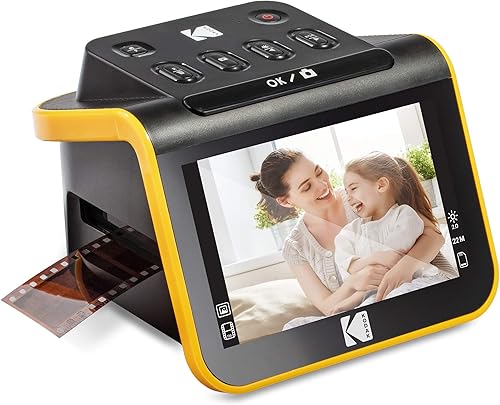
KODAK Slide N Scan Film & Slide: Best for easy one-button scanning
- 22MP digital film scanner
- 5 inch LCD with gallery mode
- 135, 110, 126mm negatives and 50mm slides
- SD or SDHC support up to 32GB, card not included
- USB and HDMI connections
A simple scanner with a large screen and easy-load inserts for continuous scanning. It suits families who want to preview and share images without complex settings.
Pros
- Large 5 inch screen
- Easy-load film inserts
- Gallery mode for sharing
Cons
- SD card not included
- Card support stops at 32GB
The KODAK Slide N Scan suits families who want simple one-button scanning. Its 22MP output and 5 inch LCD make previewing easier than on smaller screens, and gallery mode can turn it into a photo frame.
The CMOS sensor and 24 bits color depth suit color and black and white negatives for screen viewing and sharing.
It handles 135, 110 and 126mm negatives plus 50mm slides. Easy-load inserts allow continuous loading without removing and repositioning a tray for every frame.
The included cleaning brush, USB and HDMI cables help you keep the light path clean and show slideshows on a television.
KODAK lists Windows 7 as the minimum requirement and USB plus HDMI connections. On Windows 11, you would mainly use the computer connection to transfer saved images from the SD card.
Type C USB enabled computers are listed as compatible, which helps with newer Windows 11 laptops that have limited full size ports.
The main limit is storage. The scanner supports SD or SDHC cards up to 32GB and the card is not included.
At 16 ounces and about 5.27 by 5.35 by 3.74 inches, it is portable, but that lower card ceiling and lack of Super 8 or 8mm mean the SCANZA covers more film types for mixed archives.
Magnasonic All-in-One 24MP Film Scanner with Large: Best for fast standalone scanning
- 24MP JPEG output
- 5 inch LCD and HDMI output
- 35mm, 110, 126 and Super 8 film plus 135, 126 and 110 slides
- SD card support up to 128GB, card not included
- On-device brightness and RGB adjustment
A fast all-in-one scanner that saves to SD card without a computer. It lets you adjust brightness, color, flip and mirror directly on the scanner.
Pros
- Scans in less than 5 seconds each
- No computer or driver needed
- HDMI viewing on a TV or monitor
Cons
- SD card not included
- HDMI cable not included
- One image at a time workflow
The Magnasonic FS71 suits buyers who want fast standalone scanning. It converts 35mm, 110, 126 and Super 8 film plus 135, 126 and 110 slides into 24MP JPEG files in less than 5 seconds each.
That speed changes daily use because a box of family film becomes a series of short sessions rather than a single long project.
The 5 inch LCD lets you adjust brightness, RGB color correction, flip and mirror without a computer. An SD card slot supports up to 128GB, and images can also move to a PC or Mac over USB.
CCD sensor technology and 24 bits per pixel color depth are listed for this model, with seven film format options to select before scanning.
Magnasonic lists Windows 7 as the minimum system requirement. For Windows 11, that means the computer side is simple file transfer rather than required scanning software.
At 13.44 ounces and 4.44 by 5.43 by 4.91 inches, it is lighter than several rivals and easy to move between a desk and a storage shelf.
The trade-off is that the HDMI cable and SD card are not included. You also scan one image at a time, so a large archive still takes patience even at a fast per-scan speed.
It gives you broader format coverage than the KODAK Slide N Scan, but without 8mm support.
ClearClick QuickConvert 2.0 Photo: Best for photos slides and negatives
- 14MP scan with 22MP interpolation
- 4x6 photos or smaller plus 35mm slides and 35mm, 110, 126 negatives
- 5 inch instant preview LCD
- Built-in rechargeable battery
- Saves JPEG files to SD memory card
A cord-free scanner for albums and loose prints as well as film. It scans one item at a time and does not support 5x7 photos.
Pros
- Scans photos without removing them from albums
- Rechargeable battery for cord-free use
- 2 to 3 second scan time
Cons
- No autofeeder
- 5x7 photos not supported
- SD card required for saving
The ClearClick QuickConvert 2.0 suits people with photos in albums as well as film. It scans 4x6 photos or smaller, 35mm slides and 35mm, 110 and 126 negatives at 14MP, with 22MP interpolated output.
Scanning quality is listed around 3824 by 2512 pixels, which is enough for screen sharing and modest prints from small originals.
A built-in rechargeable battery and 5 inch preview screen make it useful away from a desk. ClearClick says a scan takes 2 to 3 seconds and saves as a JPEG to an SD memory card.
CIS sensor technology and 24 bpp color depth are listed, and the size button adjusts scan size for different photo sizes.
It lists Windows 7 as the minimum system requirement. On Windows 11, use the USB connection to move saved files to your computer for backup and sharing.
At 2.4 pounds and 8 by 7 by 6 inches, it is larger than the film only scanners, which reflects the paper photo path and battery inside.
The limits are clear. There is no autofeeder, 5x7 photos are not supported, and you scan one item at a time.
Choose it for flexibility with albums, not for batch paper photo scanning. Film users who do not need photo prints may find the KODAK or Magnasonic models more focused.
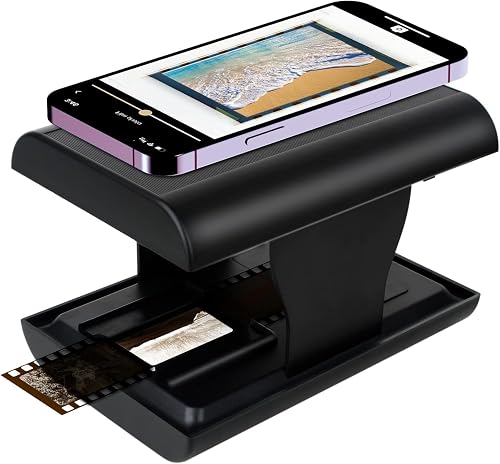
TCNEWCL 35mm Negative Slide Scanner: Best for phone based 35mm scanning
- 35mm slides and film negatives
- Foldable portable design
- Built-in LED backlight
- Uses a smartphone camera
- Free app for capture and editing
A foldable phone holder with LED backlight for 35mm film. Image quality depends on your phone camera and it is best for portability rather than archival scans.
Pros
- Foldable and easy to store
- No computer needed
- Lightweight for travel
Cons
- Limited to 35mm film
- Quality limited by phone camera
- Phone alignment affects results
The TCNEWCL scanner suits a different reader entirely. It is a foldable phone holder with LED backlight for 35mm slides and negatives, not a standalone scanner with its own sensor.
There is no built in screen, storage card or computer connection for scanning, so your phone becomes the camera and the storage device.
You insert film, switch on the LED, hold your smartphone lens over the opening and capture the image. A free app helps with capture, rotation, color and contrast adjustments.
The listed resolution is 300 to 400 dpi, and TCNEWCL notes that quality is limited to the resolution of your phone camera.
At 0.23 kg, it folds down for storage and travel. That portability is the main benefit for occasional scans or for showing a single slide to family.
It is also the simplest option to explain to parents or children who already use a phone for photos and sharing.
The trade-off is quality and format range. TCNEWCL limits use to 35mm film, and image quality depends on your phone camera and alignment.
It is a poor choice for a large archive or for formats beyond 35mm. For Windows 11, your workflow is entirely phone based and then file transfer to a computer.
BEONEGLOBAL ClearScan P7 Film Scanner: Best for a large preview screen
- 24MP output with 1/2.3 inch CMOS sensor
- 7 inch LCD screen
- 35mm, 135, 126, 110 and Super 8 film and slides
- SD card included
- Adjustable image size and one-touch operation
A large-screen standalone scanner with an SD card in the box. It is a good fit if previewing and framing images on the device matters more than computer software.
Pros
- Largest screen in this group
- SD card included
- Buttons placed below the screen
Cons
- No 8mm film listed
- Computer editing depends on transferred files
- Fewer buyer reports than the top picks
The BEONEGLOBAL ClearScan P7 suits buyers who want the largest preview screen here. Its 7 inch LCD and 24MP output make it easier to check framing and color before saving.
The 1/2.3 inch CMOS sensor and 24 bits per pixel color depth are listed for film and slide capture at that output level.
It supports 35mm, 135, 126, 110 and Super 8 film and slides. Buttons sit below the screen, which BEONE GLOBAL says makes operation more comfortable.
Adjustable image size lets you customize the frame, and one touch operation covers scanning, editing and color enhancement on the device.
An SD card is included, so you can start scanning without a separate purchase. That is a practical advantage for Windows 11 households, because you can copy files to a computer the same day without waiting for a card.
At 15.68 ounces and 4.1 by 7.1 by 6.1 inches, the larger screen shapes the footprint.
The trade-off is format range and proven buyer history. It does not list 8mm film, and it has a smaller buyer base than the KODAK models.
Check your exact film types before choosing it over them. For pure screen size, it leads this group, but resolution and formats still need to match your archive.
HP Film & Slide Scanner HPFS500: Best for touchscreen control
- 13MP CMOS sensor with 22MP interpolation
- 5 inch all-angle LCD touchscreen
- 135, 126 and 110 negatives and positive slides
- Quick-load tray
- Windows 10 or later and macOS 10.15 or later listed
An HP touchscreen scanner for standalone digitizing without a computer. Its quick-load tray helps when you have many slides to work through.
Pros
- Touchscreen preview and editing
- Quick-load tray for batch work
- Clear Windows 10 or later requirement
Cons
- No Super 8 or 8mm listed
- 13MP sensor is lower than several rivals
- SD card details need checking before purchase
The HP HPFS500 suits buyers who prefer touchscreen control. Its 5 inch all-angle LCD touchscreen lets you preview and edit scans without a computer, and a quick-load tray speeds transitions between scans.
Touch control reduces button hunting when you are working through a long strip of film.
HP lists 135, 126 and 110 negatives and positive slides. The 13MP CMOS sensor offers 22MP interpolation for digital conversions.
Color depth is listed at 24 bits, and the model is designed for standalone digitization of mixed archives without a computer at the scanning stage.
HP states Windows 10 or later and macOS 10.15 or later, which gives clear Windows 11 compatibility for file handling. This is one of the clearer Windows 11 requirements in the group.
At 13.4 ounces and 4.66 by 5.7 by 3.54 inches, it is a compact desktop unit that can sit beside a laptop.
The trade-off is resolution and format range. Its 13MP sensor is lower than the 22MP and 24MP standalone models, and Super 8 and 8mm are not listed.
Choose it for controls and tray speed, not for maximum resolution. Windows 11 users who want listed operating system support will find that clarity appealing.
Plustek OpticFilm 8200i SE: Best for high resolution computer scanning
- 7200 x 7200 dpi for 35mm negatives and mounted slides
- 48-bit input with 24 or 48-bit output
- Infrared dust and scratch detection
- SilverFast SE Plus 9 bundled
- Windows 7, 8, 10 and 11 plus Mac OS 10.7 to 14.x
The only true computer scanner in this list, built for detailed 35mm work. It needs a computer and software, but it offers far more control than standalone snapshot scanners.
Pros
- Highest stated resolution here
- 48-bit color depth
- Infrared dust and scratch removal
Cons
- 35mm only
- Needs a computer and driver setup
- Heavier desktop unit at 1.8 kg
The Plustek OpticFilm 8200i SE suits Windows 11 users who want real computer scanning. It offers 7200 x 7200 dpi and 48-bit input for 35mm negatives and mounted slides, far beyond the snapshot scanners here.
That is a different class of output for cropping, enlarging and detailed color work in software.
Plustek lists Windows 7, 8, 10 and 11 plus Mac OS 10.7 to 14.x. You download the driver from the Plustek website and use bundled Plustek QuickScan and SilverFast SE Plus 9 software.
The bundle includes two film holders and two slide holders, which helps when you alternate between strips and mounted slides.
Infrared dust and scratch detection helps clean images without manual retouching. Multi-exposure and 64-bit support give experienced users more control over exposure and color.
Dynamic range up to 3.6 is listed, along with 24 or 48 bit output depending on your workflow.
The trade-off is scope and setup. It handles 35mm only, needs a computer, and weighs 1.8 kg.
It is the right pick for quality focused 35mm work, not for mixed-format family scanning. Windows 11 buyers should budget time for driver setup and software learning.
HP Film & Slide Scanner: Best for a 7 inch touchscreen
- 13MP color CMOS sensor
- 7 inch color LCD touchscreen
- 135, 126 and 110 formats with quick-feed tray and 50mm adapter
- USB transfer and HDMI output
- On-device crop and adjustment tools
A larger touchscreen HP model for previewing and editing without extra software. It suits mixed slide collections you want to view as a slideshow.
Pros
- Large 7 inch touchscreen
- Quick-feed loading tray
- Gallery mode for display
Cons
- 13MP sensor
- No Super 8 or 8mm listed
- Heavier at 1.1 pounds
The HP Film & Slide Scanner with 7 inch touchscreen suits buyers who want a large display for previewing and editing. Its 13MP CMOS sensor and quick-feed tray handle 135, 126 and 110 formats with a 50mm adapter.
The larger screen makes cropping and color checks visible without moving files to a computer first.
You can crop and adjust scans on the 7 inch display without extra software. Gallery mode also lets you display the collection as a slideshow.
That display role can matter in a living room, where family members can review scans together before you decide which files to keep on Windows 11.
USB transfers files to a computer, and HDMI shows slideshows on a TV. For Windows 11, the computer role is storage and backup after on-device scanning.
At 1.1 pounds and 4.72 by 6.89 by 4.57 inches, it is heavier than the HPFS500, largely because of the larger display assembly.
The trade-off is sensor resolution and format range. At 13MP it trails the 22MP and 24MP models, and Super 8 and 8mm are not listed.
Choose it if screen size and touch control matter most. It is a viewing focused choice, while Magnasonic and BEONE GLOBAL offer higher listed output.
Side by side comparison of the best slide scanners for Windows 11
Use this table to compare sensor resolution, screen size, film formats and Windows use at a glance. The Plustek stands apart as the only model that requires computer software for scanning.
| Product | Best for | Sensor | Screen | Film formats | Our score |
|---|---|---|---|---|---|
| KODAK SCANZA Film & Slide Scanner | most Windows 11 households | 14MP CCD, 22MP interpolated | 3.5 inch LCD | 35mm, 126, 110, Super 8, 8mm | 9.7 |
| KODAK Slide N Scan Film & Slide | easy one-button scanning | 5 inch LCD | 135, 110, 126mm negatives and slides | 9.6 | |
| Magnasonic All-in-One 24MP Film Scanner with Large | fast standalone scanning | 5 inch LCD | 35mm/110/126/Super 8 film and 135/126/110 slides | 9.5 | |
| ClearClick QuickConvert 2.0 Photo | photos slides and negatives | 5 inch LCD | 35mm slides and 35mm, 110, 126 negatives | 9.1 | |
| TCNEWCL 35mm Negative Slide Scanner | phone based 35mm scanning | 8.9 | |||
| BEONEGLOBAL ClearScan P7 Film Scanner | a large preview screen | 7 inch LCD | 35mm/135/126/110/Super 8 | 8.7 | |
| HP Film & Slide Scanner HPFS500 | touchscreen control | 13MP CMOS, 22MP interpolated | 5 inch touchscreen LCD | 135, 126 and 110 negatives and slides | 8.4 |
| Plustek OpticFilm 8200i SE | high resolution computer scanning | 8.2 | |||
| HP Film & Slide Scanner | a 7 inch touchscreen | 13MP CMOS | 7 inch touchscreen LCD | 135, 126 and 110 | 7.9 |
How we compared these slide scanners for Windows 11
We compared specs, features and buyer feedback against the needs of a Windows 11 household. We looked at film formats first, because a scanner that does not accept your film type cannot help you.
We checked resolution and color depth next. Standalone models list 13MP to 24MP output, while the Plustek lists 7200 dpi and 48-bit input.
Those numbers describe different workflows, so we scored them in context.
We also checked screens, storage and connections. A built-in LCD helps you preview without a computer, while USB and HDMI help with transfer and TV viewing.
SD card limits matter because your computer becomes the backup location.
Our score weighs specs, features and buyer feedback against what you are shopping for. That is why standalone models rank above the Plustek for most readers, even though the Plustek has higher resolution.
What we did not count as a plus
We did not treat interpolated megapixels as equal to sensor resolution. Interpolation can enlarge a file, but it does not create detail that the sensor did not capture.
We also did not assume a Windows requirement means Windows software is required to scan. For standalone models, Windows 7 or Windows 10 listings mainly help with file transfer and backup.
Does a slide scanner for Windows 11 need Windows software
No, most models here scan without Windows software. Standalone scanners save to an SD card, and Windows 11 is used to store, back up and share those JPEG files.
The KODAK SCANZA, KODAK Slide N Scan and Magnasonic FS71 list Windows 7 as the minimum requirement. On Windows 11, you use USB mainly for file transfer.
The HP HPFS500 lists Windows 10 or later, which also covers Windows 11.
The Plustek is the exception. It needs a Windows 11 driver and scanning software, and Plustek states support for Windows 11 directly.
If you want that workflow, see our best slide scanner for PC guide for more computer based options.
When standalone scanning is enough
Standalone scanning is enough when you want quick family digitizing. You preview on the LCD, adjust brightness or color, save to SD card and move files to Windows 11 later.
That workflow also avoids driver problems. You do not need to install software before your first scan.
It is less suitable when you want fine color control or dust removal, where computer software gives more options.
Which film formats should your Windows 11 slide scanner support
Check your film before you buy anything. The wrong format list is the most common reason a scanner sits unused.
The KODAK SCANZA covers the widest range here with 35mm, 126, 110, Super 8 and 8mm. The Magnasonic FS71 covers 35mm, 110, 126 and Super 8 film plus 135, 126 and 110 slides.
The KODAK Slide N Scan covers 135, 110 and 126mm negatives and slides. The BEONEGLOBAL ClearScan P7 covers 35mm, 135, 126, 110 and Super 8.
The HP models cover 135, 126 and 110 formats, while the Plustek and TCNEWCL cover 35mm only.
What Super 8 and 8mm scanning really means
Super 8 and 8mm support on standalone scanners means still images, not video conversion. KODAK states that Super 8 converts to still images on the SCANZA.
If your goal is motion video, do not expect these scanners to produce video files. They capture individual frames as digital photos, which is useful for stills but not for film reel conversion.
Standalone scanner or printer scanner combo for Windows 11
A dedicated slide scanner is better for film than a printer scanner combo. Printer scanners are built for paper, while film scanners use inserts and holders for negatives and slides.
If you also need paper scanning, read Is It Worth Buying a Printer with a Scanner? before you decide. That guide explains when a combo saves space and when it does not.
For photo prints, our best scanner for pictures guide covers flatbed and paper photo workflows. The ClearClick QuickConvert 2.0 is the only model here that also scans 4x6 photos.
For a combo device, see Best Printer Scanner Combo For Photos.
When a combo makes sense
A printer combo makes sense when desk space is tight and you mostly scan paper. It can handle documents and prints in one device.
It makes less sense when your main job is slides and negatives. Dedicated inserts protect film and hold it flat for scanning.
For mac users, our best slide scanner for mac guide covers the Apple side.
Resolution, color and image quality for Windows 11 scanning
Resolution numbers need context. Standalone scanners list megapixel output, while the Plustek lists dpi and bit depth for computer scanning.
The Magnasonic FS71 and BEONEGLOBAL ClearScan P7 list 24MP output. The KODAK Slide N Scan lists 22MP, and the KODAK SCANZA lists 14MP with 22MP interpolation.
The HP models list 13MP sensors with interpolation on the HPFS500.
The Plustek lists 7200 dpi, 48-bit input and infrared dust removal. That combination suits detailed 35mm work and careful color adjustments in software.
How to judge quality in daily use
Preview quality on the LCD matters for everyday scanning. A larger screen, such as 5 inch or 7 inch, makes framing and color checks easier.
Magnasonic and BEONEGLOBAL offer 24MP output with on-device adjustments. For archival 35mm work, the Plustek gives you software control that standalone scanners cannot match.
Setup, storage and care tips for Windows 11
Set up your scanner near your Windows 11 computer, even if scanning is standalone. You will use the computer for backup, file naming and sharing.
Insert an SD card before your first scan on models that need one. KODAK SCANZA supports up to 128GB, KODAK Slide N Scan stops at 32GB, and Magnasonic supports up to 128GB.
Clean film holders gently with the included brush where provided.
Save original film after scanning. Digital files are easier to share, but the original negatives remain your best source for a future rescan.
Windows 11 file workflow that works
Copy JPEG files from the SD card to a dated folder on your Windows 11 computer. Keep a second copy on an external drive if the collection matters to you.
Rename files by event or year while the original film is still in hand. Use Windows 11 photo apps for basic viewing, and a photo editor for deeper edits on the copied files.
Verdict: the best slide scanner for Windows 11
The best slide scanner for Windows 11 for most households is the KODAK SCANZA, because it covers five film formats and works without drivers. Pick the KODAK Slide N Scan for a larger 5 inch screen and simple one-button use.
Pick the Magnasonic FS71 for fast 24MP standalone scanning with on-device color correction. Pick the Plustek OpticFilm 8200i SE for 7200 dpi 35mm computer scanning with dust removal.
Pick the ClearClick QuickConvert 2.0 if you also need 4x6 photo scanning. Pick the TCNEWCL only for occasional 35mm phone scans and travel.
Before you buy, confirm your film formats and SD card needs. Then choose standalone speed for family collections or computer control for detailed 35mm work.
Our top 3 picks at a glance
-
1
Best for most Windows 11 households
KODAK SCANZA Film & Slide Scanner
9.7/10 our score
See it on Amazon -
2
-
3
Best for fast standalone scanning
Magnasonic All-in-One 24MP Film Scanner with Large
9.5/10 our score
See it on Amazon