9 Best Film Scanners for Negatives and Slides (November 2026)
The best slide and film scanners for home use include the KODAK SCANZA Film & Slide Scanner for mixed film formats, the KODAK Slide N Scan Film & Slide for a wide preview, and the Magnasonic All-in-One 24MP Film Scanner with Large for on-device adjustments.
On this page (4 sections)
The best slide and film scanner for home use is the KODAK SCANZA if your archive includes several film formats, including Super 8 and 8mm. For a larger preview screen, choose the KODAK Slide N Scan, or consider Magnasonic if you want direct brightness and color adjustments on the scanner.
These devices digitize developed negatives and mounted slides into image files. They differ in supported formats, screen size, storage and how much computer involvement they need.
If you also plan to digitize prints, start with our best scanner for pictures guide. For a closer look at a common format, see our best 35mm film scanner picks.
Our picks at a glance
-
1

-
2
-
3
 Best for on-device adjustments
Magnasonic All-in-One 24MP Film Scanner with Large
9.5/10 our score
See it on Amazon
- 4
 Check it
ClearClick QuickConvert 2.0 Photo
Best for photos and film - 5
 Check it
TCNEWCL 35mm Negative Slide Scanner
Best for phone-based scanning - 6
 Check it
KODAK Slide N Scan Max Film Scanner
Best for a larger display - 7
 Check it
HP Film & Slide Scanner HPFS500
Best for a touchscreen workflow - 8
 Best for direct TV viewingCheck it
- 9
 Best for a large touch displayCheck it
How we chose film scanners for negatives and slides
We compared supported film formats, included holders, preview screens, storage and computer connections to match scanners with different home archives. Our score weighs specs, features and buyer feedback against what you're shopping for.
Format support matters most when you have several boxes of negatives and slides. A scanner that handles 35mm may not support 110, 126, Super 8 or 8mm, so check each format against your collection.
The screen and controls also shape the work. A built-in display and SD card workflow can keep basic scanning on the device, while USB or HDMI gives you ways to transfer or view files elsewhere.
| Product | Best for | Film formats | Screen | Connection | Our score |
|---|---|---|---|---|---|
| KODAK SCANZA Film & Slide Scanner | mixed film formats | 35mm, 126, 110, Super 8 and 8mm | 3.5 in TFT LCD | HDMI, USB | 9.7 |
| KODAK Slide N Scan Film & Slide | a wide preview | 135, 110 and 126 negatives; 50mm slides | 5 in LCD | 9.6 | |
| Magnasonic All-in-One 24MP Film Scanner with Large | on-device adjustments | 35mm, 110, 126 and Super 8; 135, 126 and 110 slides | 5 in LCD | 9.5 | |
| ClearClick QuickConvert 2.0 Photo | photos and film | 5 in LCD | 9.1 | ||
| TCNEWCL 35mm Negative Slide Scanner | phone-based scanning | 35mm slides and negatives | 8.9 | ||
| KODAK Slide N Scan Max Film Scanner | a larger display | 135, 110 and 126 | 7 in tiltable LCD | 8.6 | |
| HP Film & Slide Scanner HPFS500 | a touchscreen workflow | 135, 126 and 110 negatives and slides | 5 in touchscreen | 8.4 | |
| ClearClick Virtuoso 2.0 | direct TV viewing | 35mm, 110 and 126 negatives; 50mm slides | 5 in LCD | Mini HDMI | 8.0 |
| HP Film & Slide Scanner | a large touch display | 135, 126 and 110 | 7 in touchscreen | USB, HDMI | 7.9 |
Which film scanner fits your collection?
The best choice depends on the formats you own and whether you want a standalone workflow, a larger preview screen or phone-based capture. These nine picks are arranged from the highest score to the lowest.
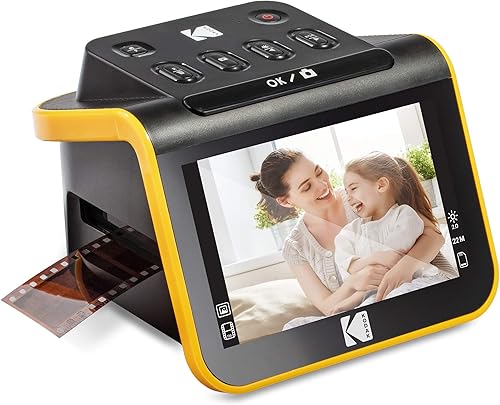
1. KODAK SCANZA Film & Slide Scanner: Best for mixed film formats
KODAK SCANZA Film & Slide Scanner: Best for mixed film formats
- 35mm, 126, 110, Super 8 and 8mm film
- 3.5 in tilt LCD
- Multiple film inserts and adapters
- Saves JPEG files to SD card
Its supplied inserts cover several common household film formats, including Super 8 and 8mm. The tilted screen and one-touch controls support a standalone scanning workflow.
Pros
- Broad film-format support
- Tilt screen with adjustable brightness
- Includes several inserts and adapters
Cons
- SD card is not included
- Super 8 converts to still images, not video
The KODAK SCANZA supports 35mm, 126, 110, Super 8 and 8mm negatives and slides. That range makes it a useful fit when a household archive spans more than one generation of cameras.
Its 3.5 in TFT LCD has adjustable brightness and a tilt feature, so you can view frames on the scanner as you work. Multiple film inserts and adapters help match the holder to the format, while one-touch buttons save JPEG files.
SCanza connects through USB and HDMI and works with Mac and PC. The SD card is sold separately, and the scanner supports cards up to 128GB.
One format detail matters: Super 8 is converted to still images, not video. The device scans developed film rather than developing raw film.
Choose it for format range and a self-contained preview. If your negatives need higher-end image control, compare this workflow with a flatbed scanner for negatives and slides.
2. KODAK Slide N Scan Film & Slide: Best for a wide preview
KODAK Slide N Scan Film & Slide: Best for a wide preview
- 135, 110 and 126 negatives
- 50mm slides
- 5 in LCD with gallery mode
- Quick-feeding tray
The 5 in screen gives you a large place to preview and edit scans. Its quick-feeding tray and included adapters suit a mixed collection of common negatives and mounted slides.
Pros
- Large screen with gallery mode
- Quick-feeding tray
- Includes film adapters and cleaning brush
Cons
- SD card is required and sold separately
- Format support does not include Super 8
The KODAK Slide N Scan has a 5 in LCD with a wide viewing angle and gallery mode. That larger preview area can make it easier to review frames and share them nearby as you scan.
It handles 135, 110 and 126 negatives, plus 50mm slides. The quick-feeding tray supports continuous loading, and the included adapters cover those film formats.
You can edit and convert images on the device, then save them to an SD or SDHC card up to 32GB. The card is required but not included, so add suitable storage to your scanning plan.
This scanner suits a household that values a large display and simple controls. For a closer explanation of the device category, see what is a digital slide scanner.
3. Magnasonic All-in-One 24MP Film Scanner with Large: Best for on-device adjustments
Magnasonic All-in-One 24MP Film Scanner with Large: Best for on-device adjustments
- 24MP JPEG files
- 5 in LCD
- On-device brightness and RGB adjustment
- SD card support up to 128GB
Brightness, RGB color, flip and mirror controls work directly on the scanner, so you can make basic adjustments without a computer. It supports several film formats and saves JPEG files to an SD card.
Pros
- On-device image adjustments
- 5 in screen and HDMI output
- Supports SD cards up to 128GB
Cons
- SD card is not included
- HDMI cable is not included
Magnasonic saves 24MP JPEG files and includes brightness, RGB color, flip and mirror adjustments on the scanner. You can preview film on its 5 in LCD and make basic corrections without installing editing software.
It supports 35mm, 110, 126 and Super 8 film, along with 135, 126 and 110 slides. The SD card slot supports cards up to 128GB, though the card is not included.
An HDMI connection can send the view to a compatible TV or monitor. The HDMI cable is also sold separately, so plan on a separate cable if you want that display option.
Magnasonic fits buyers who want to scan and make simple edits in one place. If your film is mainly 35mm, compare more options in our best 35mm film scanner guide.
4. ClearClick QuickConvert 2.0 Photo: Best for photos and film
ClearClick QuickConvert 2.0 Photo: Best for photos and film
- Scans film, slides and photos up to 4x6
- 5 in preview LCD
- Rechargeable battery
- No computer or drivers required
This model handles small prints as well as film and slides, making it useful if your archive includes both. It scans one item at a time and saves JPEG files to an SD card.
Pros
- Handles photos up to 4x6
- Rechargeable battery
- No computer or drivers required
Cons
- No autofeeder
- Does not support 5x7 photos
The ClearClick QuickConvert 2.0 handles film, slides and prints up to 4x6 in. That mix is useful if you want one device for a small print collection as well as negatives and slides.
It supports 35mm slides and 35mm, 110 and 126 negatives. Scanning happens one item at a time because this model has no autofeeder, and 5x7 photos are not supported.
For batch photo work, see our photo scanner feeder workflow.
The 5 in preview screen gives you an instant view, and a rechargeable battery allows cord-free scanning after charging. It saves JPEG files to an SD card and does not require a computer or drivers.
Pick this model when print scanning is part of the job. If slides are your only focus, a dedicated photographic slide scanner with feeder may better match a larger batch.
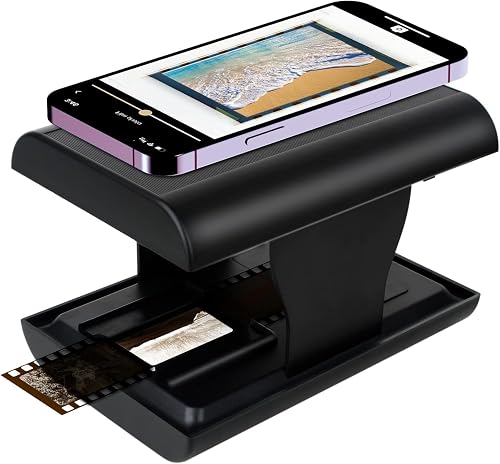
5. TCNEWCL 35mm Negative Slide Scanner: Best for phone-based scanning
TCNEWCL 35mm Negative Slide Scanner: Best for phone-based scanning
- Works with 35mm slides and negatives
- Foldable design
- Built-in LED backlight
- Uses a smartphone camera
This foldable device lights 35mm slides and negatives so you can photograph them with a smartphone. The captured image quality depends on your phone camera.
Pros
- Foldable for compact storage
- Uses a smartphone camera
- Free app supports editing and sharing
Cons
- Limited to 35mm film
- Capture quality depends on phone camera
TCNEWCL uses your smartphone camera to capture 35mm slides and negatives. Its built-in LED backlight illuminates a frame, and the foldable body stores in a small space when you finish.
The free app can capture, crop, rotate, filter, adjust color and contrast, and share images. Because the phone camera takes the picture, the capture quality depends on the camera you use.
This is a compact option for occasional scans or travel, rather than a match for mixed-format archives. It is limited to 35mm, so check whether your collection includes other formats before choosing it.
6. KODAK Slide N Scan Max Film Scanner: Best for a larger display
KODAK Slide N Scan Max Film Scanner: Best for a larger display
- 7 in tiltable LCD
- 135, 110 and 126 film formats
- Quick-feeding tray
- Saves to SD or SDHC cards up to 32GB
The tilting 7 in screen offers a larger preview area than the other picks here. Its quick-feeding tray and format adapters help with collections containing 135, 110 and 126 film.
Pros
- Largest screen in this roundup
- Quick-feeding tray
- One-touch editing features
Cons
- SD card is required and sold separately
- Does not list Super 8 support
The KODAK Slide N Scan Max offers a 7 in tilting LCD, the largest display among these picks. Its screen supports previewing, editing and showing images as a digital picture frame.
It handles 135, 110 and 126 film through a quick-feeding tray and included adapters. Images save to SD or SDHC cards up to 32GB, and the card is required but not included.
One-touch editing controls let you resize, convert and adjust images on the device. Choose the Max if a larger viewing area is a priority and your collection fits its supported formats.
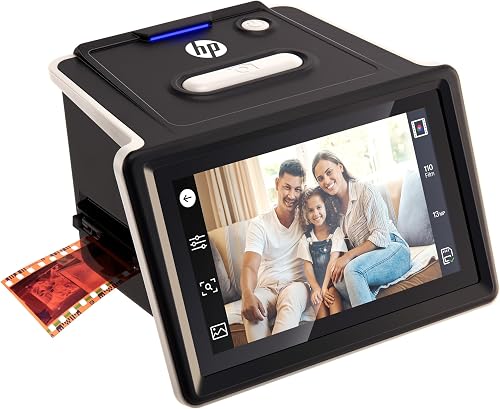
7. HP Film & Slide Scanner HPFS500: Best for a touchscreen workflow
HP Film & Slide Scanner HPFS500: Best for a touchscreen workflow
- 5 in all-angle touchscreen
- 13MP CMOS sensor with 22MP interpolation
- Standalone scanning
- Quick-load tray
The 5 in touchscreen lets you preview and edit scans on the device without a computer. A quick-load tray helps when you are working through a larger collection.
Pros
- Standalone operation
- Touchscreen controls
- Supports Windows 10 or later and macOS 10.15 or later
Cons
- Film support is limited to 135, 126 and 110 formats
- Resolution uses interpolation to reach 22MP
The HPFS500 pairs standalone scanning with a 5 in touchscreen for previewing and editing. Its quick-load tray can help you move through a batch of developed film without using a computer.
It supports 135, 126 and 110 negatives and positive slides. The sensor is 13MP with 22MP interpolation, so the higher figure comes from interpolation rather than the sensor's native resolution.
HP lists support for Windows 10 or later and macOS 10.15 or later. This model suits buyers who want touch controls and a computer-free workflow for common film formats.
8. ClearClick Virtuoso 2.0: Best for direct TV viewing
ClearClick Virtuoso 2.0: Best for direct TV viewing
- 35mm, 110 and 126 negatives
- 50mm slides
- 5 in preview screen
- Mini HDMI output
The 5 in screen shows each frame before you scan, and mini HDMI lets you view scans on a compatible TV. You can scan without a computer and save to an SD card.
Pros
- Preview screen
- Mini HDMI output
- Two-year warranty from ClearClick
Cons
- SD card is not included
- Mini HDMI cable is not included
The ClearClick Virtuoso 2.0 offers mini HDMI output to view scans on a compatible TV. Its 5 in screen previews each slide or negative before scanning.
It works with 35mm, 110 and 126 negatives and standard 50mm slides. The scanner saves to an SD card without requiring a computer, and the card is not included.
A mini HDMI cable is needed for TV viewing and is sold separately. Pick it if you want an on-device screen with the option to share scans on a larger display.
9. HP Film & Slide Scanner: Best for a large touch display
HP Film & Slide Scanner: Best for a large touch display
- 7 in color LCD touchscreen
- 13MP CMOS sensor
- Quick-feed tray with 50mm adapter
- USB and HDMI connections
A 7 in touchscreen provides a roomy preview and on-device editing tools. Its quick-feed tray and adapters cover 135, 126 and 110 formats.
Pros
- Large touchscreen
- Built-in crop and adjustment tools
- USB and HDMI connections
Cons
- Resolution is listed as 1200 dpi
- Does not list Super 8 support
This HP Film & Slide Scanner has a 7 in color touchscreen for previewing, cropping and adjusting images on the device. Its quick-feed tray and 50mm adapter support 135, 126 and 110 film formats.
USB and HDMI connections give you options for transferring scans or showing them on a compatible screen. The listed resolution is 1200 dpi, so compare that figure with your needs if resolution is a main deciding factor.
The large touchscreen is the main reason to consider this model. Choose it for the display and on-device tools, after confirming its format support fits your negatives and slides.
What should you check before buying a film negative scanner?
Check the exact film formats, holders, storage needs and scan workflow before choosing a film negative scanner. Those details determine whether your negatives and mounted slides fit and how you'll handle the saved files.
Which film formats do you need to scan?
Write down the formats in your archive before comparing models. Common household collections may include 35mm, 110 or 126 film, while some scanners also support Super 8 or 8mm.
Mounted slides need the correct holder, too. For a format-specific comparison, see our guides to a large format film scanner and a best film scanner for medium format.
Do you want an automatic feeder or one-frame loading?
Feed trays can make a long scanning session easier, but designs differ. Some models describe quick-loading or continuous-feed trays, while the ClearClick QuickConvert 2.0 scans one item at a time without an autofeeder.
Check whether a holder matches your slides and strips. Our guide to a best film scanner holder covers how holders affect fit and handling.
How will you save and view your scans?
Many dedicated film scanners save to an SD card, and several require a card that is not included. Check card type and capacity, then decide whether you want to transfer files by USB or view them through HDMI.
Operating systems matter if you plan to connect the scanner to a computer. For device-specific advice, read our guides to the best slide scanner for Mac, best slide scanner for PC and best slide scanner for Windows 11.
Is resolution the only image quality factor?
No. Resolution figures alone do not tell you how well a scanner suits your archive or what the final scans will look like.
Compare native sensor details where available, interpolation, supported formats and the editing options you need.
If high detail is your priority, compare models in our guide to the best film scanner with high resolution. For broader print and photo needs, an all-in-one printer scanner combo for home use or a printer scanner combo for a home office serves a different kind of scanning job.
Which slide and film scanner should you choose?
Choose the KODAK SCANZA if you need one scanner for several formats, including Super 8 and 8mm. Pick the KODAK Slide N Scan for its 5 in screen and continuous loading, or Magnasonic if on-device color adjustments and 24MP JPEG files fit your workflow.
For phone-based capture, TCNEWCL is a compact 35mm option. If you have a large batch, favor a model with a quick-feed tray and verify that its formats match your archive before you buy.
Our top 3 picks at a glance
-
1
-
2
-
3
Best for on-device adjustments
Magnasonic All-in-One 24MP Film Scanner with Large
9.5/10 our score
See it on Amazon
Frequently asked questions
What is the best slide and film scanner for home use?
The KODAK SCANZA is a flexible home choice if your collection includes 35mm, 126, 110, Super 8 or 8mm film. For 135 negatives and 50mm slides with a larger screen, consider the KODAK Slide N Scan.
Check supported formats before buying, since these scanners do not all handle the same film.
Can a film scanner digitize mounted slides?
Yes, several dedicated film scanners include holders for mounted slides. Check the supported slide size and format, then make sure the scanner includes a matching holder.
A film scanner is designed for developed negatives and slides.
It does not develop undeveloped film.
Do film scanners need a computer?
Some models can scan and save directly to an SD card without a computer. Others connect by USB, and some also offer HDMI for viewing on a larger screen.
Confirm what storage card is needed, because several picks require a card that is not included.
Is a flatbed or dedicated film scanner better for negatives?
A dedicated film scanner is a practical choice for making digital files from supported film strips and mounted slides. A flatbed can be a better fit if you also need to scan prints or other flat items.
Compare holders, supported formats and the scanning workflow before deciding.


