Cricut Maker vs Venture: Which Fits Your Projects? (November 2026)
Choose Cricut Maker for versatile desktop crafting and Cricut Venture for wider cutting and larger production runs. In this cricut maker vs venture comparison, project width, material thickness and workspace decide the winner.
On this page (13 sections)
- Cricut Maker vs Venture: the quick verdict
- Maker and Venture side by side
- What materials will you cut most often?
- How wide are your projects?
- Which tools do your projects need?
- How do bundles change the value?
- What workspace do you have?
- Setup and learning curve
- Care, mats and blades
- Cost over time
- Who should buy Maker?
- Who should buy Venture?
- Final verdict in the Cricut Maker vs Venture choice
Choose Cricut Maker for versatile desktop crafting and Cricut Venture for wider cutting and larger production runs. In this cricut maker vs venture comparison, your project width and material list matter more than brand loyalty.
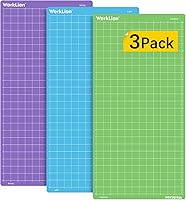
Maker gives you a 12 in cutting width in a compact desktop body. Venture is made for wider sheets and larger runs, with large mats such as the 24 x 28 in light grip mat in this guide.
Our score weighs specs, features and buyer feedback against what you are shopping for. We compared the specs, we checked tool and material lists, and we looked at what each bundle includes.

 Best for bundled tools and supplies
Cricut Maker® 5 Essential Bundle + Digital
Cricut Maker vs Venture: the quick verdict
Maker wins for mixed desktop projects; Venture wins for width and volume. If you make cards, stickers, shirts and signs from many materials, start with Maker.
If you cut wide vinyl, large paper sets or repeated production pieces, Venture saves piecing and repositioning. The 24 x 28 in mat shows the scale difference clearly.
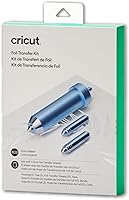
Neither machine removes the need to match tools to materials. Cricut says specialty tools are sold separately, so check which tool each job needs.
Our broader craft cutting machines guide helps you compare machine types before you narrow the choice to these two.
Why width decides so much
A wider machine lets you cut a design in one piece. That helps banners, apparel panels and vinyl signs keep lines clean and joins small.
Maker still cuts up to 12 in, which covers many home projects. For a smaller Cricut comparison, see Cricut Joy vs Joy Xtra.
The limit shows up when a sheet is wider than the machine or when you load many repeats.
Venture fits that wider work by design. Its large mat size points to paper and light cardstock projects at a bigger scale.
How to map width to everyday projects
Cards and small stickers sit well within 12 in on Maker. That keeps layering, scoring and folding in one tidy workflow.
Banners and wide apparel panels are where the choice turns. If you must split those designs, Venture avoids extra seams and repeats.
Maker and Venture side by side
Maker suits 12 in desktop work; Venture suits wider sheets and production runs. Use the table to match each point to your usual projects.
| Point | Cricut Maker | Cricut Venture |
|---|---|---|
| Best fit | Mixed desktop crafting | Wide cutting and larger runs |
| Cutting width | 12 in | Wider formats |
| Materials | 300+ materials | Wide light materials in focus |
| Tools | Cutting, drawing, foiling, scoring, engraving and more | Cutting and writing at commercial speeds |
| Printer link | Print Then Cut with most inkjet printers | Check printer pairing for your design |
| Good add on | Gel pen set for lettering | Large light grip mat for paper |
Maker data here includes a 270.25 sq in active surface area and dimensions of 7.1 x 22.1 x 6.2 in. That size fits a desk or craft table more easily than a wide format machine.
Venture accessories here include a 24 x 28 in mat. That size is a plain sign of the wider work the machine is built to hold.
What materials will you cut most often?
Choose Maker if you switch materials often; choose Venture if you cut wide light materials often. Material range is the first filter.
Maker works with 300+ materials, including leather, wood, vinyl, iron on HTV, cardstock and stickers. It also draws, foils, scores, engraves, debosses and perforates.
The Maker 5 bundle cuts thicker materials up to 3 mm and engraves materials up to 3 mm, such as metal and acrylic. Cricut says specialty tools are sold separately.
Venture shows its strength with wide light materials. Its light grip performance mat suits paper, light cardstock and vellum in a 24 x 28 in format.
If your list is mostly paper and light cardstock in wide sizes, Venture fits. If your list mixes fabric, vinyl, cardstock and thicker stock, Maker fits.
Matching grip to material weight
Light grip mats hold paper, light cardstock and vellum without tearing when you lift the sheet. That matters more on wide sheets, where a shift can waste a large piece.
Maker bundles include a light grip mat for early paper projects. Venture uses a larger performance mat with water based adhesive for the same light materials at a bigger scale.
How wide are your projects?
Choose Venture when your sheet or design is wider than 12 in; choose Maker when it fits 12 in. Measure your largest usual project, not your dream project.
Maker has 12 in cutting performance. That width covers cards, stickers, many apparel designs and home signs.
Venture is built for wider cutting and larger production runs. A 24 in wide mat gives a sense of the sheet sizes it can hold steady.
Do not buy width you will not use. A wide machine needs more table space, more storage and more material care.
For paper projects, see What Printer Works Best with Cricut Projects? when you plan Print Then Cut designs. Match printer size to your sheet size before you cut.
Test your largest design
Lay your largest design on paper first. Note its width, height and material type in inches.
If it fits within 12 in, Maker can likely cut it in one pass. If it needs a wider sheet, Venture is the safer choice.
Also note whether you need to mirror, weed or layer the design. Wide vinyl signs often need more weeding time than small stickers.
Which tools do your projects need?
Choose Maker if you want cutting plus drawing, foiling, scoring and engraving in one machine; choose Venture if cutting and writing speed lead your list. Tool range shapes daily use.
Maker works with 13 tools in the Maker 5 bundle. Cricut lists cutting, engraving, writing, drawing, foiling, scoring and debossing, with specialty tools sold separately.
Maker 4 data lists cuts, draws, foils, scores, engraves, debosses and perforates. For a generation-to-generation comparison, see Cricut Maker vs Maker 4.
That range suits mixed craft projects at home.
Venture mats are described as optimized for commercial cutting and writing speeds. That focus fits repeat work and larger sheets.
Pen use across both machines
The gel pen set in this guide works with Maker and Venture machines. It also works by hand when you want to add color after a cut.
Pens are not for textured or glossy material. Cricut advises testing or priming pens before use so ink flows ready.
How do bundles change the value?
Choose a bundle when you need tools and materials at once; choose a base machine when you already own supplies. Bundles save first trip shopping.
The Cricut Maker in this guide includes a fine point blade, materials sampler, fine point pen, light grip mat, weeder and 30 bonus images in Design Space. That set helps you start paper, vinyl and iron on projects.
The Maker 5 Essential Bundle includes supplies for up to 65 projects, plus cutting, scoring and engraving tools. It also includes 25 bonus images and 1 font.
Check the best Cricut Maker bundle when you want a box that covers tools, materials and digital content together. Compare what is in each box with what you already own.
Digital content is in the Design Space app only. Cricut says the full library and some software features need a paid Cricut Access subscription.
What workspace do you have?
Choose Maker for a desk or small craft table; choose Venture only if you have clear space for wide material. Space is a real limit, not a detail.
Maker 4 measures 22.1 in wide, 7.1 in deep and 6.2 in high. It fits a desktop much more easily than a wide format machine.
Maker 5 is described as 30% more compact than previous models, with 12 in cutting performance. It weighs 25 pounds, so plan a stable spot.
Venture needs room for wide mats and long material. Wipe a sample area with tape, then check door swings, chairs and storage.
A small room can still work if you use a fold down table or a cart. Do not block vents or storage in a way that makes loading hard.
Setup and learning curve
Maker is easier to place and learn for home use; Venture needs a plan for wide material and repeat runs. Setup time depends on your space.
Maker 4 comes with easy to follow setup instructions online. It works with the free Design Space app, which Cricut describes as easy to learn.
Design Space includes a free content library with 3,000+ images and 100+ fonts in Maker 4 data. Larger libraries need a paid subscription.
Learn how to use Cricut Maker 3 for core workflows that still help new Maker users. The steps cover design, material load, cut and weeding habits.
You can also learn how to use Cricut Maker 4 when your machine is a current Maker model. Follow the steps for your exact model first.
Care, mats and blades
Keep mats clean and store them covered; replace blades when cuts drag or tear. Care habits affect cut quality more than most buyers expect.
Maker mats hold light materials for paper and cardstock. The included light grip mat in the Maker bundle suits early projects.
Venture performance mats use long lasting water based adhesive. Cricut advises storing the mat with its frosted cover to keep dust off.
Hand wash a mat only as directed and let it dry fully. Dust, hair and paper bits reduce grip and can shift small cuts.
Blade care matters too. See best Cricut Maker replacement blades when you notice nicks, drags or torn edges.
A dull blade can ruin fine lines.
Cost over time
Choose Maker for lower first step costs; choose Venture when wide material saves time and waste. Think beyond the machine price.
Maker bundles can include pens, mats, weeders and materials. That helps you test projects before you buy extra stock.
Venture saves time on wide sheets, but large mats and wide material cost more to replace. Repeat runs can still make that trade pay.
Tools are sold separately for many specialty jobs. Budget for the tool each material needs, not just the machine.
Labels and stickers add printer and paper costs. See Can You Print Labels without a Label Maker? if stickers are a main project type.
Who should buy Maker?
Buy Maker if you want one desktop machine for mixed materials, tools and project types. It is the flexible home choice.
Maker suits card makers, apparel crafters, vinyl users and mixed media fans. It handles paper, vinyl, iron on, fabric and thicker stock with the right tool.
It also suits Print Then Cut stickers and full color designs with most inkjet printers. That link helps small shops and gift makers.
Decision help also comes from Cricut Maker vs Maker 3 if you are weighing an older Maker against a newer one. Check model names before you compare features.
Who should buy Venture?
Buy Venture if width, sheet size and repeat runs lead your project list. It is the production width choice.
Venture suits wide vinyl, large paper sets, banners and repeat designs. Its large mat format holds light materials steady at commercial speeds.
It also suits crafters who sell finished pieces and need faster runs. Fewer joins and fewer reloads can save real time.
Do not buy Venture for a small desk with no room for wide sheets. Width only helps when you can load, cut and store the material safely.
Final verdict in the Cricut Maker vs Venture choice
Pick Maker for flexible desktop crafting; pick Venture for wider cutting and larger production runs. That rule covers most buyers.
Pick Maker if your projects fit 12 in and mix many materials or tools. Pick Venture if your sheets run wide and you repeat designs for sale or events.
Check your largest material, your table space and your tool list in that order. Those three points decide which machine will get daily use.
Revisit this cricut maker vs venture choice after you list your next 10 projects. The machine that fits those 10 will fit your buying decision best.
Frequently asked questions
Is Cricut Maker or Venture better for large projects?
Venture is better for large projects when you need wider material and longer runs. Maker suits smaller desktop projects up to its 12 in cutting width.
Compare the width of your banners, signs and vinyl sheets first, then choose the machine that fits them without piecing parts together.
Can Cricut Venture cut thicker materials than Maker?
Do not choose by that claim alone. Check the exact tool and material rating for each machine and tool.
Maker data here covers cutting and engraving up to 3 mm for the Maker 5 bundle, while Venture accessories focus on wide light materials.
Match your thickest usual material to the rated tool.
Which machine fits a small craft room?
Maker fits a small craft room more easily because it is a desktop machine at 22.1 in wide. Venture needs more clear table or stand space for wide mats and material.
Measure your work surface and storage area before you buy, and keep room for material to feed through.
Do Maker and Venture use the same pens and mats?
Some accessories cross over, but many do not. The gel pen set here works with Maker and Venture, while the 24 x 28 in light grip mat here is made for Venture.
Check each accessory for the machine name before you add it to an order.
Which is better for selling finished crafts?
Venture fits larger production runs when you repeat wide designs and need faster commercial speeds. Maker fits varied one off projects and mixed materials.
Count your repeat designs, material widths and turnaround needs rather than choosing only by machine size.