8 Best Printers for Product Labels (October 2026)
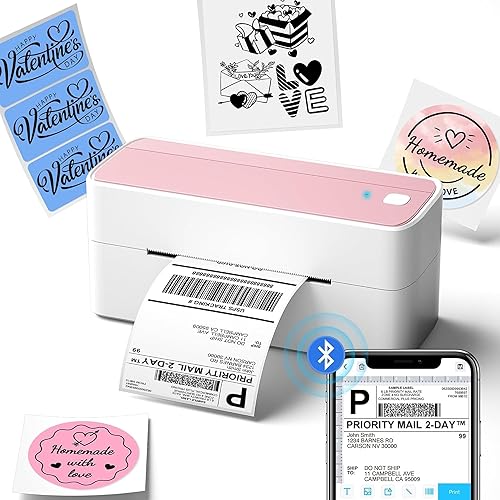
The best printers for product labels include the Phomemo Bluetooth Thermal Label Printer for phone-based label design, the NULLTONEX Thermal Shipping Label Printer 4x6 Bluetooth for standard 4 x 6 labels, and the KNAON Shipping Thermal Label Printer for template variety.
On this page (7 sections)
- Which printer features matter for product labels?
- How did we choose these printers for product labels?
- Which product label printer fits each kind of job?
- Is a thermal printer right for branded product labels?
- How should you choose label stock and prepare a design?
- Can one printer handle product labels and shipping labels?
- Which printer should you choose for product labels?
The best printer for product label printing depends on the design: choose a color inkjet for full-color branding, or a thermal label printer for black text, barcodes and simple monochrome designs. Among these picks, the Brother QL-800 can add red with compatible labels, while compact Phomemo and Bluetooth models suit narrow or varied label sizes.
A printer can only do part of the job. You also need label stock that fits its feed path and works with the package surface, plus a design sized for the label.
Our picks at a glance
-
1
 Best for phone-based label design
Phomemo Bluetooth Thermal Label Printer
9.7/10 our score
See it on Amazon -
2
 Best for standard 4 x 6 labels
NULLTONEX Thermal Shipping Label Printer 4x6 Bluetooth
9.6/10 our score
See it on Amazon -
3

- 4
 Check it
Brother QL-800 High-Speed Professional Printer
Best for black-and-red branding - 5
 Check it
MUNBYN Bluetooth Thermal Label Printer
Best for mixed label sizes - 6
 Best for small portable labelsCheck it
 - 7
 Check it
Brother QL-820NWB Professional
Best for flexible desk connections - 8
 Check it
Zebra ZD421 Thermal Shipping Label Printer
Best for established label workflows
Which printer features matter for product labels?
The best printer for product label printing starts with the look you need and the material you plan to use. Check color support, label dimensions, connectivity and the way labels feed before choosing a model.
Color is the first decision. The thermal printers here produce monochrome output, except the Brother QL models, which can print black and red with compatible media.
If your brand depends on a full-color logo or illustration, consider a color inkjet instead. For small-run custom designs, compare sticker printers for small business.
Our inkjet printer picks for printing stickers focus on that kind of output.
Label shape and size affect compatibility. A printer may support roll labels, sheets or a defined width range.
Measure the label you want, then check whether the printer accepts that format and whether your design leaves enough room for product details.
Material matters as much as the printer. Paper labels may suit dry indoor packaging, while bottles, jars or handled items can call for a different adhesive or surface.
For sewn product tags, compare fabric label printers.
Match the stock to the package and check whether the printer's ink or thermal process is compatible with it.
Choose a workflow you can repeat. Bluetooth and phone apps can make short runs convenient, while USB or Ethernet may fit a fixed workstation.
If you print several label sizes, note the time needed to change rolls or templates.
For a broader small-business comparison, see our Best Label Printer For Small Business guide. It can help you weigh product labels alongside shipping and inventory needs.
How did we choose these printers for product labels?
We compared the stated print methods, label widths, connection options and design features against the needs of product labeling. A printer ranked higher when its supported media and workflow fit a wider range of likely label jobs.
Thermal printers dominate this set, so we gave weight to the difference between monochrome output and the Brother models' black-and-red option. None of these product descriptions establish full-color printing, so buyers who need detailed color artwork should look at inkjet models and compatible label sheets.
We also considered whether each printer supports phone-based design, common computer connections or label languages that could fit an existing setup. The score weighs specs, features and buyer feedback against what you're shopping for.
| Product | Best for | Print type | Label width | Connections | Our score |
|---|---|---|---|---|---|
| Phomemo Bluetooth Thermal Label Printer | phone-based label design | Direct thermal, black and white | 1 to 4.6 in | Bluetooth and USB | 9.7 |
| NULLTONEX Thermal Shipping Label Printer 4x6 Bluetooth | standard 4 x 6 labels | Direct thermal, black and white | 1.57 to 4.3 in | Bluetooth and USB | 9.6 |
| KNAON Shipping Thermal Label Printer | template variety | Thermal, monochrome | 1.38 to 4.41 in | Bluetooth and USB | 9.4 |
| Brother QL-800 High-Speed Professional Printer | black-and-red branding | Thermal, black and red | 9.2 | ||
| MUNBYN Bluetooth Thermal Label Printer | mixed label sizes | Direct thermal, monochrome | 1.57 to 4.25 in | Bluetooth and USB | 9.0 |
| Phomemo M110 Label Printer | small portable labels | Thermal, black and white | 20 to 50 mm | 8.7 | |
| Brother QL-820NWB Professional | flexible desk connections | Thermal, black and red with compatible tape | Bluetooth, Ethernet, Wi-Fi and USB | 8.5 | |
| Zebra ZD421 Thermal Shipping Label Printer | established label workflows | Direct thermal, black and white | USB and Ethernet | 8.2 |
Which product label printer fits each kind of job?
The Phomemo Bluetooth Thermal Label Printer is the top pick here for app-based design and broad label widths, while the other models fit specific size, color or workflow needs. All eight products are thermal printers, so treat them as choices for monochrome or limited-color labels.
Phomemo Bluetooth Thermal Label Printer: Best for phone-based label design
- Bluetooth and USB printing
- Label widths from 1 to 4.6 in
- Black-and-white thermal printing
Phone app support and label widths up to 4.6 in make it a flexible choice for small monochrome labels. It prints black and white, so it won't reproduce a full-color brand design.
Pros
- Bluetooth printing through the Labelife app
- Supports text, barcodes, QR codes and templates
- USB support for several computer systems
Cons
- Black-and-white printing only
- Needs compatible thermal label paper
The Phomemo Bluetooth Thermal Label Printer supports labels from 1 to 4.6 in wide, which gives you room to work with small product stickers as well as larger package labels. Its Labelife app can create text, barcodes, QR codes and labels from templates.
You can connect by Bluetooth through the app or use USB with supported computer systems. That flexibility helps if you design on a phone but print from a desk computer for a larger batch.
The main limit is color. This model prints black and white, so a full-color logo needs another printing method.
Phomemo says compatible thermal color label paper can be purchased separately, but the printer's output remains black and white.
Choose this pick for product labels with clear text, a barcode or a simple monochrome brand mark. If your label needs a colorful illustration or several colors, compare color inkjet options before buying.
NULLTONEX Thermal Shipping Label Printer 4x6 Bluetooth: Best for standard 4 x 6 labels
- Bluetooth and USB
- Supports widths from 1.57 to 4.3 in
- Black-and-white direct thermal printing
This thermal printer supports standard 4 x 6 labels and narrower stock within its stated width range. Its monochrome output suits shipping or barcode labels more than colorful retail packaging.
Pros
- Bluetooth app and USB connection options
- App includes templates and editing tools
- Supports several common shipping platforms
Cons
- Prints black and white only
- App workflow may take setup before the first label
NULLTONEX supports standard 4 x 6 labels along with widths from 1.57 to 4.3 in. The range can cover product labels and larger shipping or barcode labels, provided the stock and design fit the job.
Its FlashLabel Pro app includes templates and editing tools, and you can connect through Bluetooth or USB. The printer is monochrome, so it is best for functional labels where readable text and codes matter more than colorful packaging.
For a small business that prints both product and parcel labels, this can reduce the need to switch printers. Before buying, verify your preferred roll or label format and make sure the app workflow fits how you prepare designs.
KNAON Shipping Thermal Label Printer: Best for template variety
- Bluetooth and USB connectivity
- Supports widths from 1.38 to 4.41 in
- FlashLabel Pro app templates
The FlashLabel Pro app offers templates, icons and fonts for simple product and barcode labels. This is a monochrome thermal option, so plan a separate color-printing method for full-color branding.
Pros
- Broad range of supported label widths
- Bluetooth and USB options
- App includes templates, icons and fonts
Cons
- Bluetooth printing uses the app
- Cannot print full-color product artwork
The KNAON printer supports label widths from 1.38 to 4.41 in and offers the FlashLabel Pro app for creating labels. The app includes templates, icons and fonts, which can help when making simple thank-you, price, barcode or product labels.
Bluetooth printing runs through the app, while USB connects to supported computers. That gives you options for a mobile workflow or a fixed workstation, though the print output is thermal and monochrome.
KNAON's broad width range is useful if your package labels vary in size. Save shipping labels as PDFs before importing them into the app, as its workflow describes, and check that your product label design exports cleanly too.
Brother QL-800 High-Speed Professional Printer: Best for black-and-red branding
- Black-and-red printing with compatible Brother labels
- USB connection
- Built-in auto-cutter
The QL-800 supports black-and-red labels with compatible Brother media, giving simple branding more contrast than a black-only thermal printer. Its USB connection and auto-cutter fit a desk-based workflow.
Pros
- Black-and-red label printing
- Built-in auto-cutter
- Works with Windows and Mac
Cons
- USB connection rather than wireless
- Uses Brother DK labels and tape
The Brother QL-800 stands out for black-and-red printing with compatible Brother media. That second color can add a simple brand accent or highlight a short piece of label text, though it won't reproduce a full-color logo.
It connects by USB to Windows and Mac systems and supports Brother DK pre-sized labels plus continuous-length tape. The built-in auto-cutter can help finish batches when you're printing multiple labels in sequence.
This model fits a desk workflow where the label format is compatible with DK media. Check the size and material options before planning a packaging design, since the printer's media range is more specific than a general-purpose inkjet's.
MUNBYN Bluetooth Thermal Label Printer: Best for mixed label sizes
- Supports widths from 1.57 to 4.25 in
- Bluetooth and USB
- Monochrome thermal labels
Its width range covers smaller product labels as well as larger shipping labels, so one printer can handle several monochrome jobs. The output is not suited to color logos or artwork.
Pros
- Wide range of label widths
- Bluetooth and USB connectivity
- Product labels and inventory tags are supported uses
Cons
- Monochrome output
- Thermal label stock is required
The MUNBYN printer supports direct thermal labels from 1.57 to 4.25 in wide. That range makes it a monochrome choice for product labels, inventory tags, barcodes and shipping labels.
Its product information includes Bluetooth and USB connections for phones, tablets and computers. It also emphasizes alignment, which can matter when labels need consistent placement across a batch.
The output is black and white, so use it for text-led designs and codes rather than color branding. If you already have label stock in mind, check its width and thermal compatibility before setting up templates.
Phomemo M110 Label Printer: Best for small portable labels
- Portable Bluetooth label maker
- Supports label widths from 20 to 50 mm
- Prints text, barcodes, icons and pictures in monochrome
The compact M110 is aimed at narrower labels such as price, jewelry and cable labels. Its app supports text and icons, but its thermal output remains black and white.
Pros
- Compact, portable format
- App has templates and batch printing
- Supports several label shapes and materials
Cons
- Maximum label width is 50 mm
- Not for full-color printing
The Phomemo M110 is a portable thermal label maker for narrower labels from 20 to 50 mm wide. Its app supports text, barcodes, icons and pictures, making it a fit for small product tags, jewelry labels or price stickers.
It connects to phones and tablets through Bluetooth and uses the Print master app. The printer handles different label shapes and materials, but its output is black and white.
Use the M110 when a compact device and small label formats matter more than large packaging labels. Measure your design area first, especially if the label needs several lines of product information.
Brother QL-820NWB Professional: Best for flexible desk connections
- Bluetooth, Ethernet, wireless and USB
- Black-and-red printing with compatible DK tape
- Monochrome LCD
The QL-820NWB offers several ways to connect and can print black and red with compatible tape. Its LCD also allows standalone use, which may help when you want to print without opening a computer each time.
Pros
- Multiple connection options
- LCD for standalone use
- Black-and-red label option
Cons
- Uses Brother DK media
- Does not print full-color labels
The Brother QL-820NWB combines Bluetooth, Ethernet, wireless networking and USB, so it can fit more than one kind of workstation. Its LCD also allows standalone use.
With compatible DK 2251 tape, it can print black and red. Like the QL-800, that is a limited-color option rather than full-color output for detailed branding.
This model suits a business that wants flexible connections and repeatable label formats. Check that the DK media sizes match your product packaging, then build the design around the available label width and tape.
Zebra ZD421 Thermal Shipping Label Printer: Best for established label workflows
- 203 DPI direct thermal printing
- USB and Ethernet connectivity
- Supports EPL and ZPL printer languages
The ZD421 supports established label formats and EPL or ZPL printer languages, which can matter when connecting to existing business systems. It prints monochrome labels and needs compatible direct thermal media.
Pros
- Supports EPL and ZPL printer languages
- USB and Ethernet connections
- Three-button interface with status icons
Cons
- Black-and-white output
- Check software and media compatibility with your workflow
The Zebra ZD421 is a direct thermal printer with 203 DPI output and USB or Ethernet connectivity. It supports EPL and ZPL printer languages, which may help if your business already uses label software built around those formats.
Its monochrome print method suits barcodes, text and simple product information. The three-button interface and status icons give you a way to check printer state at the device.
Choose it when compatibility with an established label workflow matters. Confirm that your software, label width and thermal stock work with the setup before moving a product-label process onto it.
Is a thermal printer right for branded product labels?
A thermal printer works well when your product label uses black text, a barcode or a simple monochrome design. It is a poor fit for packaging that depends on full-color logos, photos or detailed illustrations.
Thermal printing avoids ink or toner, but it still depends on compatible thermal stock. Label materials vary in adhesive and surface, so choose one suited to the product and the conditions it may face.
If your branding needs color, a color inkjet is usually the more suitable route. Read our guide to what printer is best for printing on sticker paper before choosing label sheets, and confirm that your printer can feed the size and thickness you plan to use.
For soap packaging in particular, label placement and stock should suit the container and expected handling. Our guide to custom labels for soap products walks through those choices.
How should you choose label stock and prepare a design?
Choose stock by the package surface, label dimensions and printer type, then make a test print before ordering a large batch. A design that fits the screen can still be too small or crowded when printed at its final size.
Start with the finished package. Measure the flat area available for a label and leave room for seams, curves or edges where a sticker might lift.
Next, match the stock to the printer. Thermal printers need compatible thermal labels, while inkjet models need sheets or rolls made for inkjet use.
Check whether the stock is intended for your package material and handling conditions.
Keep important text readable at the final size. Use a clear product name, essential details and a barcode only if you need one, then preview the print at actual dimensions.
For repeated production, save a master design and record the label size and printer settings. That makes it easier to reproduce a consistent look when you reorder supplies or change a package.
Can one printer handle product labels and shipping labels?
Yes, one printer can handle both jobs if the label width, media type and design needs overlap. A monochrome thermal model can make sense when your product labels use text or barcodes and your shipping labels are also black and white.
For a product label that needs color, a shipping-focused thermal printer won't replace a color inkjet. Some small businesses use one printer for parcel labels and another for branded product stickers, which keeps each device suited to its main job.
A compact option such as the best handheld inkjet printer may help with small, occasional color tasks, while a thermal model stays set up for repeat labels. Decide based on how often you print and whether changing media would interrupt your workflow.
Which printer should you choose for product labels?
Choose the Phomemo Bluetooth model if app design and a wide range of monochrome label widths matter most. Pick the Brother QL-800 if black-and-red labels and an auto-cutter suit your brand, or the Zebra if your workflow already uses EPL or ZPL.
If your label needs full-color artwork, look for a color inkjet and compatible label stock. For product labels that rely on text, barcodes or a limited color accent, choose a thermal model whose media size fits the package.
Our top 3 picks at a glance
-
1
Best for phone-based label design
Phomemo Bluetooth Thermal Label Printer
9.7/10 our score
See it on Amazon -
2
Best for standard 4 x 6 labels
NULLTONEX Thermal Shipping Label Printer 4x6 Bluetooth
9.6/10 our score
See it on Amazon -
3
Frequently asked questions
Can a thermal printer print colorful product labels?
Most thermal printers in this guide print black and white. The Brother QL-800 and QL-820NWB can print black and red with compatible media, but neither produces full-color artwork.
For a color logo, photos or multi-color packaging design, use a color inkjet with label stock made for that printer.
What printer is best for stickers and labels?
A color inkjet is a better fit for colorful stickers and product labels, while a thermal printer suits plain text, barcodes and monochrome designs. Match the label material to the printer and check that the sheet or roll size works with its feed path.
See our inkjet printer picks for stickers for color-focused options.
Can I use shipping label printers for product labels?
Yes, if your product labels can be monochrome and fit the printer's supported width. Thermal shipping printers can print text, barcodes and simple designs, but they won't reproduce full-color branding.
For daily parcel workflows, see what printer works best for printing shipping labels daily.
How do I print custom labels for handmade products?
Choose a printer and label material that match the design, product surface and expected handling. For soap, check the label stock on a dry package and confirm that its surface and adhesive suit your packaging needs.
Our guide to printing custom labels for soap products covers the workflow.