Heat Press vs Screen Printing: Which Is Better for Shirts? (November 2026)
Choose a heat press for faster one-off shirts and screen printing for repeat designs in batches. Your design count, fabric choices, cleanup space and order size should guide the decision.
On this page (8 sections)
- Heat press vs screen printing: which is faster?
- Which method suits one shirt or a small order?
- Which method is better for repeated designs?
- How do design colors affect the choice?
- Which method works with more garment types?
- How much workspace does each method need?
- What cleanup and care do they require?
- Which should you choose for shirts?
Choose a heat press for faster one-off shirts and screen printing for repeat designs in batches. Your repeat volume, color needs and workspace should shape the decision.
Heat pressing bonds a transfer to a garment with heat and pressure. Screen printing pushes ink through a prepared screen with a squeegee.
That basic difference explains most of the practical trade offs. Heat pressing starts more simply for a single design.
Screen printing takes more preparation before the first garment. It can become more efficient once the same artwork is ready to repeat.
Think about how often a design changes. A name, number or new graphic each time favors transfer work.
A matching run for a team, event or small shop favors a screen workflow. One prepared screen can support many garments.
Consider color count as well. Transfers can carry complex artwork without a new screen for each shirt.
Multicolor screen work needs alignment and a clear print order. Planning grows more important as color layers increase.
Space matters during setup and storage. A full size press needs a stable surface and room to open.
Screen printing needs a flat area for frames and garments. It also needs room for ink and cleanup.
Cleanup differs between the two methods. Heat pressing keeps wet cleanup to a minimum in most sessions.
Screen printing requires prompt cleaning of screens and tools. Water based ink makes that task simpler, but it remains part of every job.
Fabric compatibility also differs by material. Always check the transfer or ink instructions for the garment fiber.
The sections below compare setup, materials, cleanup and repeat work. They also cover product formats for home shirt makers.
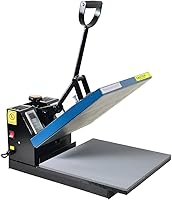
 Best for full-size shirt transfers
Fancierstudio Digital Heat Press 15 x
 Best for colorful fabric ink
Speedball Fabric Screen Printing Ink Starter Set
Heat press vs screen printing: which is faster?
A heat press usually has the faster path from finished design to finished shirt. Screen printing takes more preparation before the first shirt, especially when you need to prepare artwork and a screen.
With a heat press, you position the transfer on the garment, set the required time and temperature, apply pressure and remove the transfer according to its instructions. For model-specific steps, see the HTVRONT heat press guide.
A full-size option such as the Fancierstudio heat press machine has a 15 x 15 inch press sheet, electronic time and heat control and adjustable pressure.
Screen printing starts with a screen and ink. You align the garment, place ink on the screen, pull the squeegee across the design and then clean the tools after printing.
The first shirt takes more setup, but repeating the same artwork can make the process more efficient.
The Caydo 23 Pieces Screen Printing Starter Kit includes 3 wood frames, 2 squeegees, A4 transparency film, an ink knife, masking tape and other supplies. Its 10 x 14, 8 x 12 and 6 x 10 inch frames give you different working areas.
Which method suits one shirt or a small order?
Heat pressing is the simpler choice for one shirt, a personalized name or a design that changes often. You can work on each garment without preparing a new screen for every artwork change.
A 15 x 15 inch press sheet covers a broad area for many shirt transfers. It also gives you room to position designs consistently when the transfer size fits the garment.
For small artwork, the Calogy Mini Heat Press has a 2.87 x 4.43 inch heat plate. It has 3 temperature levels at 284°F, 320°F and 356°F, plus an LED display and a 15-minute auto power off.
The mini format can help with small areas on shirts, hats, caps, bags, masks, socks and pillows. It is less suitable when one press needs to cover a large shirt graphic.
If you are new to transfer work, read how to heat press a T-shirt before choosing a press size. Your design dimensions and the garment's flat working area matter more than the machine's overall size.
Which method is better for repeated designs?
Screen printing can be the better fit for a repeated design run once the screen and artwork are ready. The setup takes longer, but the same screen can support a series of matching prints.
The Speedball Fabric Screen Printing Ink Starter Set provides black, white, red, yellow, blue and green water-based inks. Each color is 4 fl oz, and the colors can be used as supplied or mixed for other shades.
Speedball says the inks work on cotton, polyester, blends, linen, rayon and other synthetic fabrics, as well as paper and cardboard. They are not intended for nylon, so confirm the garment fiber before planning a run.
The inks are water soluble and clean up with soap and water. They need heat setting for a more permanent result, so screen printing still has a heat step even though it does not use a heat press to apply the ink.
For transfer-based work, the best heat press for shirts and hoodies guide can help you compare full-size pressing needs before buying.
How do design colors affect the choice?
Heat pressing is flexible when each shirt needs a different design, while screen printing works well when the same color layout repeats. Your artwork and order pattern should guide the choice.
A transfer can carry a detailed design without a new screen for every shirt. This suits names, numbers and changing artwork.
Heat pressing also suits designs that vary by garment. Each item can receive its own transfer in sequence.
Screen printing works differently once artwork has been prepared. The same screen can print matching designs across many shirts.
Color count affects screen setup more than transfer setup. Each color may require its own screen and alignment step.
A simple one color design is often easier to manage. It needs fewer registration checks and less planning between passes.
A multicolor design adds stages to the workflow. The print order must be planned before the first garment is printed.
Misalignment can matter more with detailed or layered artwork. Small shifts can affect edges and color placement.
The Speedball set includes black, white, red, yellow, blue and green. Each color comes in a 4 fl oz jar.
Those six colors give beginners a flexible starting range. They can be used as supplied or mixed for other shades.
The primary colors support a wider palette through mixing. Black and white help adjust contrast and tone.
Green adds a ready made option beyond the primaries. That can help with logos and decorative designs.
Having six jars does not remove the need for planning. Screen alignment and print order still need attention.
Water based ink also affects the routine after printing. Tools need cleaning before ink dries on the screen.
Heat setting remains part of the screen printing process. The inks become permanent after proper heat setting.
Some transfer workflows begin with an inkjet printer. Our guide answers Can You Use an Inkjet Printer for Screen Printing Transfers? before you choose materials.
Use that guide to check printer compatibility early. It can save time when planning printed transfers at home.
Which method works with more garment types?
Both methods can work across several fabrics, but the exact transfer or ink must match the garment. Check the material and application instructions before producing a batch.
The Speedball ink set is designed for cotton, canvas, polyester, blends, linen, rayon and other synthetic fibers. It also works on paper and cardboard, but not nylon.
That short exclusion is worth checking before a larger run. A garment blend can change what the ink suits best.
The Calogy Mini Heat Press is described for shirts, clothing, hats, caps, bags, masks, socks and pillows. Its small plate suits compact or unusual transfer areas, not broad designs.
The Fancierstudio press is described for t-shirts, garments, bags, mouse mats, jigsaw puzzles, ID badges and ceramic tiles. For a mug-specific option, see the Cricut Mug Press review.
Its 15 x 15 inch sheet gives it a wider working area than the Calogy mini press. That size can help with larger shirt graphics.
Garment shape still matters with either machine. Seams, pockets and curved areas can make flat placement harder.
A mini press can reach smaller zones more easily. It may suit detail placement better than a broad platen.
A full size press suits transfers that need more coverage. It also helps keep a large design positioned evenly.
Screen printing depends on a flat printing area as well. The frame and garment need stable alignment during each pass.
For home transfer printing, see the top inkjet printers for printing T-shirts at home if your design process starts with printed transfers.
Match the method to the fiber first. That check should come before quantity, color planning or machine size.
How much workspace does each method need?
Heat pressing needs room for the machine, garment and transfer materials, while screen printing needs space for frames, ink, squeegees and cleanup. See the 16x24 heat press before measuring your work surface.
Measure your work surface before choosing.
The Fancierstudio press is an upward-opening model with listed dimensions of 33 x 23 x 20 inches. Its 110-volt, 1800-watt design suits a dedicated pressing area with enough room for the upper platen to open.
The Calogy press is much smaller, with a listed machine size of about 3.39 x 5.98 x 6.02 inches and a 300-watt power rating. Its insulated safety base helps with storage between craft sessions.
Screen printing needs a flat area large enough for the selected frame. The Caydo kit's largest frame is 10 x 14 inches, and its smaller frames are 8 x 12 and 6 x 10 inches.
Keep ink, garments and tools separate during setup. Screen printing becomes harder when the frame, squeegee and garment cannot stay aligned on a clean work surface.
What cleanup and care do they require?
Heat pressing usually has less wet cleanup, while screen printing needs prompt ink cleanup and careful tool storage. The method you can maintain after each project is often the better long-term choice.
For a heat press, keep the heat platen and base board free of transfer residue. Use the care method recommended for the machine and allow hot parts to cool before storage.
The Fancierstudio press has a Teflon coating on the heat platen and a silicon-gel base board. Its pressure is adjustable, so use a setting suited to the transfer and garment rather than forcing the handle.
The Calogy press has a heat-resistant base inside the package and switches off after 15 minutes of inactivity. Its one-button control changes temperature, temperature unit and power.
For screen printing, clean water-based ink from tools before it dries. Speedball describes its ink as low odor and easy to clean with soap and water, but cleanup is still part of every session.
Store wood frames flat and keep mesh away from sharp objects. Keep transparency film, tape, ink and squeegees together so the next print job does not begin with a search for missing tools.
Which should you choose for shirts?
Pick a heat press for changing designs, small orders and a shorter setup. Pick screen printing for repeated artwork, multi-shirt batches and a process built around ink and screens.
Choose the Fancierstudio Digital Heat Press 15 x if you need a 15 x 15 inch work area, electronic time and heat control, 110-volt power and adjustable pressure.
Choose the Calogy Mini Heat Press if your designs are small or placed on unusual areas. Its compact plate, 3 temperature levels and auto power off favor detail work and portable storage.
Choose the Speedball Fabric Screen Printing Ink Starter Set if you already have screens and want 6 water-based colors for suitable fabric, paper or cardboard projects.
Choose the Caydo 23 Pieces Screen Printing Starter Kit if you need 3 wood frame sizes, 2 squeegees, transparency film and basic screen-printing accessories in one set.
The best heat press vs screen printing method is the one that matches your repeat volume and available workspace. Start with a heat press for flexible home customization, or build a screen-printing setup when the same design will be printed again and again.
Frequently asked questions
Is heat press better than screen printing for shirts?
A heat press is usually better for one-off shirts, changing names or small orders because each design can be transferred separately. Screen printing is usually better for repeated designs in batches, especially when one prepared screen can print many matching garments.
What is the difference between heat press shirts and screen print shirts?
Heat press shirts use a transfer that is bonded to fabric with heat and pressure. Screen print shirts use ink pushed through a prepared screen onto the fabric, then the ink is heat set when required.
The workflow, cleanup and repeat-order costs differ.
Is heat press or silk screen easier for beginners?
Heat pressing is often easier to start because the main workflow is position, press and remove the transfer. Silk screen printing needs a screen, squeegee, ink and cleanup.
The Caydo kit supplies several basic tools, but you still need to learn screen preparation and ink control.
Can you use screen-printing ink with a heat press?
No. A heat press applies heat and pressure to a transfer or suitable material, while screen-printing ink is applied through a screen.
Speedball fabric ink is intended for screen printing or brush application, then it becomes permanent after heat setting.
Which method is better for small shirt designs?
A small heat press can be better for small shirt designs because its compact plate is easier to position. The Calogy Mini Heat Press has a 2.87 x 4.43 inch heat plate, while a full-size 15 x 15 inch press gives more coverage for broad designs.