How to Ventilate a Sublimation Heat Press Workspace
Use strong general airflow, keep the heat press away from flammable clutter, and follow the equipment manual for heat and operating limits. Ventilation helps manage odors and heat, but it does not replace safe temperatures, electrical care, or local exhaust when required.
On this page (9 sections)
- What does sublimation heat press ventilation safety require?
- How should you position a sublimation heat press?
- How do you ventilate during a transfer?
- Can a heat press oven change your ventilation needs?
- Which heat press suits a ventilated workspace?
- Is a mini press easier to ventilate?
- What should you do before heating?
- How can you tell if ventilation is not enough?
- What is the safest ventilation rule for sublimation?
Use fresh-air exchange, clear space, and careful heat control for sublimation heat press ventilation safety. Keep the press in a stable area, move odors and heat away from your breathing zone, and follow the manual for the equipment and transfer materials.
Ventilation is one part of a safe setup. It does not make an unsuitable room safe by itself, and it cannot correct damaged cords, overloaded outlets, unstable furniture, or materials that should not be heated.
What does sublimation heat press ventilation safety require?
Sublimation heat press ventilation safety requires air movement through the room and a way to prevent heat or odors from lingering. For light home use, that may mean a window, an exhaust fan, or a room air system that exchanges air instead of only recirculating it.
Keep your face out of the rising heat when opening the press. Stand to the side when practical, handle hot blanks with suitable protection, and let the work area clear before starting another transfer.
A fan can improve comfort, but it is not automatically local exhaust. Do not aim strong airflow at the platen, transfer paper, or hot blank if it could shift materials or spread dust.
For frequent production, strong odors, or materials with specific hazard information, consult the safety data for each supply and consider professional advice about local exhaust. OSHA's overview of ventilation and indoor air quality explains why general and local ventilation serve different purposes.
How should you position a sublimation heat press?
Position the press on a stable, heat-resistant surface with clear working space. Leave enough room to open the press, place the transfer, remove the blank, and set hot items down without reaching across cords or clutter.
For larger equipment, compare 16x24 swing-away heat presses.
Keep paper, fabric, packaging, solvents, and other flammable materials away from the heated area. Do not use the press beside curtains, under crowded shelves, or where a falling item could touch the platen.
Your heat press machine buying guide can help you compare press styles and working needs before choosing equipment. A larger press may need more bench space, while a compact model can still require careful clearance around its hot plate.
Check the cord before each session. Stop using equipment with damaged insulation, loose plugs, or signs of overheating, and avoid running several high-wattage appliances from one overloaded outlet.
How do you ventilate during a transfer?
Ventilate during the entire heating and cooling routine, not only after you notice an odor. Start the room fan or exhaust before heating, keep air moving while the press is closed, and continue until hot materials have cooled.
Keep the exhaust path clear. A blocked window fan, clogged filter, or closed interior door can reduce the air exchange you expected.
Do not rely on scent as a safety measurement. Some materials may have little odor, while others can smell strong even when the process is being used as intended.
Read the safety information for your sublimation ink, paper, coating, and blank. For process basics, see how to use sublimation paper with a heat press, including the need to follow the transfer material's temperature and time directions.
Can a heat press oven change your ventilation needs?
A sublimation oven can add another heated appliance and another source of room heat, so ventilation planning must cover the whole workspace. Keep the oven away from the press, protect the surrounding surface, and avoid crowding the door or air path.
The PYD Life Sublimation Oven Machine Convection Oven has a 25 L capacity, 1,600 W power, a 120 V specification in its product title, and a 0-446°F temperature range. It is designed for sublimation work with mugs, tumblers, water bottles, coffee carafes, and other drinkware.
For a dedicated mug press, see the Cricut Mug Press review.
Its stated size is 16.9 in L x 16.3 in W x 14 in H, with a 27.55 lb weight in the product information. That footprint matters when you plan a safe position, open-door clearance, and a cool place for finished blanks.
The oven includes an extra-large binder clip, shrink wrap films, a sublimation glove, sublimation tape, and a tray. Use only compatible blanks and transfer materials, and follow the supplied operating instructions for temperature and time.
For tapered or larger drinkware, compare the best heat press oven for sublimation before setting up a production corner.
Which heat press suits a ventilated workspace?
The best choice depends on the size of your transfers, the available bench space, and how much heat your room can manage. A full-size press can handle larger work, while a mini press is easier to place but has a smaller heat plate.
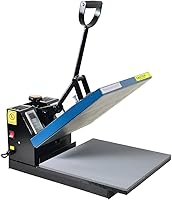
The Fancierstudio Digital Heat Press 15 x 15 has a 15-by-15-in heat press sheet, 1,800 W power, 110 V voltage, electronic time and heat control, adjustable pressure, and a Teflon-coated heat platen.
Its temperature range is 0-699°F and its time range is 0-999 seconds. The silicon-gel base board and upward-opening design are useful setup details, but the 33 in L x 23 in W x 20 in H dimensions still call for careful measurement.
The press is intended for items such as bags, mouse pads, and T-shirts. For shirt projects, compare heat press and screen printing before choosing a decoration method.
Its 1,800 W load also makes outlet planning important when other heated equipment shares the room.
Use the best heat press for sublimation when you need to compare full-size options. For metal blanks, see the best heat press for sublimation on metal.
Is a mini press easier to ventilate?
A mini press can be easier to place in a small room because its heat plate and body are compact, but it still needs a clear, heat-safe work area. Small size does not remove the need for airflow or safe handling.
The Calogy Mini Heat Press has a 2.87 x 4.43 in heat plate, 300 W power, and 3 temperature levels from 284°F to 356°F. Its one-button control changes the temperature, temperature unit, and power settings.
The press measures 4.5 x 2.9 x 5.1 in in its product title and has a White Pink finish. It is intended for small projects on shirts, clothing, hats, bags, masks, socks, and pillows.
The Calogy press heats to 284°F in about 3 minutes from an 84°F starting temperature, according to its product information. It also has a 15-minute inactivity shutoff, an insulated safety base, and a real-time LED temperature display.
For small specialty work, compare how to use Cricut EasyPress Mini with your blank size and transfer method.
What should you do before heating?
Prepare the workspace before switching on the press:
- Open or start the planned ventilation.
- Remove paper scraps, fabric, packaging, and liquids from the hot zone.
- Check the cord, plug, surface, and controls.
- Set out heat-safe space for hot blanks.
- Confirm the transfer material's temperature and time instructions.
- Keep children, pets, and unnecessary bystanders away from the work area.
Do not leave a heated press unattended unless its instructions specifically allow the operating method you use. Keep the work area dry, and never handle a hot blank with wet gloves or wet hands.
If you use a sublimation printer in the same room, keep it away from direct heat and splashes. What Is a Sublimation Printer? explains how the printer fits into the wider transfer process, while Best Inkjet Printer For Sublimation covers printer selection.
How can you tell if ventilation is not enough?
Ventilation may be inadequate when heat, smoke, strong odors, or irritation remain in the breathing zone. Stop the process, move to fresh air, and check the materials and equipment if anything seems unusual.
Do not continue just because the transfer appears to be working. Inspect the press, oven, cord, blank, paper, and settings after they cool, then follow the relevant manual or safety information before restarting.
A clean workspace also helps airflow. Remove paper scraps and dust, keep filters and vents clear when the equipment has them, and avoid stacking supplies around a fan or exhaust opening.
What is the safest ventilation rule for sublimation?
The safest rule for sublimation heat press ventilation safety is simple: control the heat source, keep air moving, and keep your breathing zone clear. Choose equipment that fits the room, leave space around every heated appliance, and follow the material instructions.
Choose the Fancierstudio for larger 15 x 15 in transfers when your bench and outlet can support it. Choose the PYD Life oven for batch drinkware work with room for a separate heated appliance, or choose the Calogy for small transfers and a compact 300 W setup.
Ventilation works best as part of the complete routine: correct settings, clear surfaces, dry electrical connections, safe handling, and enough time for hot items to cool.
Frequently asked questions
Do you need ventilation for a sublimation heat press?
Yes. Keep fresh air moving through the workspace and prevent heat and odors from collecting around the press.
Open a window or use mechanical exhaust when appropriate, but do not aim a fan directly at an open press if it could disturb paper, blanks, or hot surfaces.
Follow the equipment manual and local safety rules.
Is sublimation printing toxic indoors?
Indoor sublimation work can create heat, odors, and airborne contaminants from heated inks, coatings, blanks, or transfer materials. The exact risk depends on the materials and process.
Use suitable ventilation, avoid breathing directly over the press, read safety information for your supplies, and stop if you notice irritation or unusual fumes.
Where should a heat press be placed?
Place it on a stable, heat-resistant work surface with clear space around the equipment, away from curtains, paper stacks, solvents, and other flammable items. Keep the cord and plug dry, leave room to open the press safely, and position the work area so hot blanks do not pass over people or clutter.
Does a mask replace ventilation for sublimation?
No. A mask does not replace source control and fresh-air exchange.
Improve the workspace first by using suitable ventilation, reducing unnecessary heat exposure, and following the safety information for your inks, papers, blanks, and cleaning products.
Choose respiratory protection only with proper guidance for the specific hazard.